Fix Blocked by Page Removal Tool: The Live Test Won't Show It
To fix Blocked by page removal tool, cancel the Removals request or make it permanent before its ~6 months run out. 3 of 9 setups I tested come back.

TL;DR — Blocked by page removal tool means a person, not Google, filed a request in Search Console’s Removals tool, and the URL is hidden from results for about six months. To fix Blocked by page removal tool, cancel the request if the page should rank, or make the removal permanent with a 404, 410, login or noindex if it shouldn’t. In my 9-case test, 3 setups that look “removed” come back when the request expires.
Blocked by page removal tool is the one Search Console status that a crawler never causes. Someone on your team, or an agency, or a past owner of the site, typed the URL into Indexing → Removals → New request. Google honored it, and now the URL is hidden even though nothing on the page has changed.
That makes it the easiest status to fix and the easiest one to misdiagnose. The page returns 200, URL Inspection’s live test says it’s fine, and the page still isn’t in Google.
What Does Blocked by Page Removal Tool Mean?
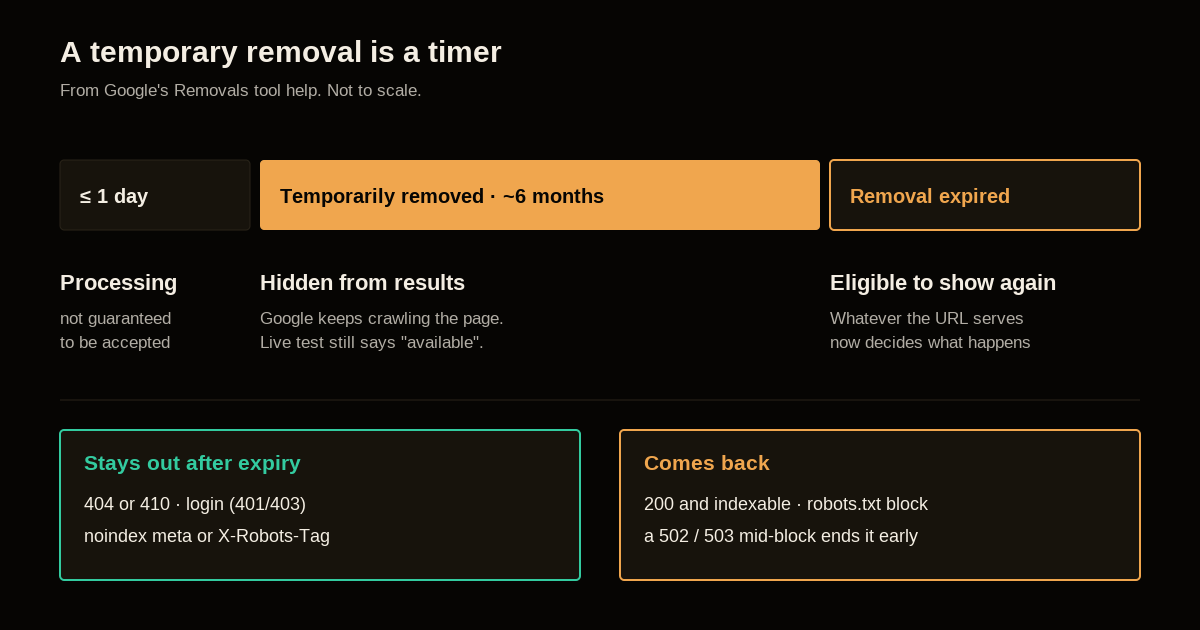
It means an active temporary removal covers the URL. Google’s Removals tool help is explicit about what that does and doesn’t do: “Blocking a URL does not prevent Google from crawling your page, only from showing it in Search results.” Google keeps fetching the page. It just won’t show it.
Two other things from the same help page matter for diagnosis:
- “A successful request lasts only about six months.” The block is a timer, not a setting.
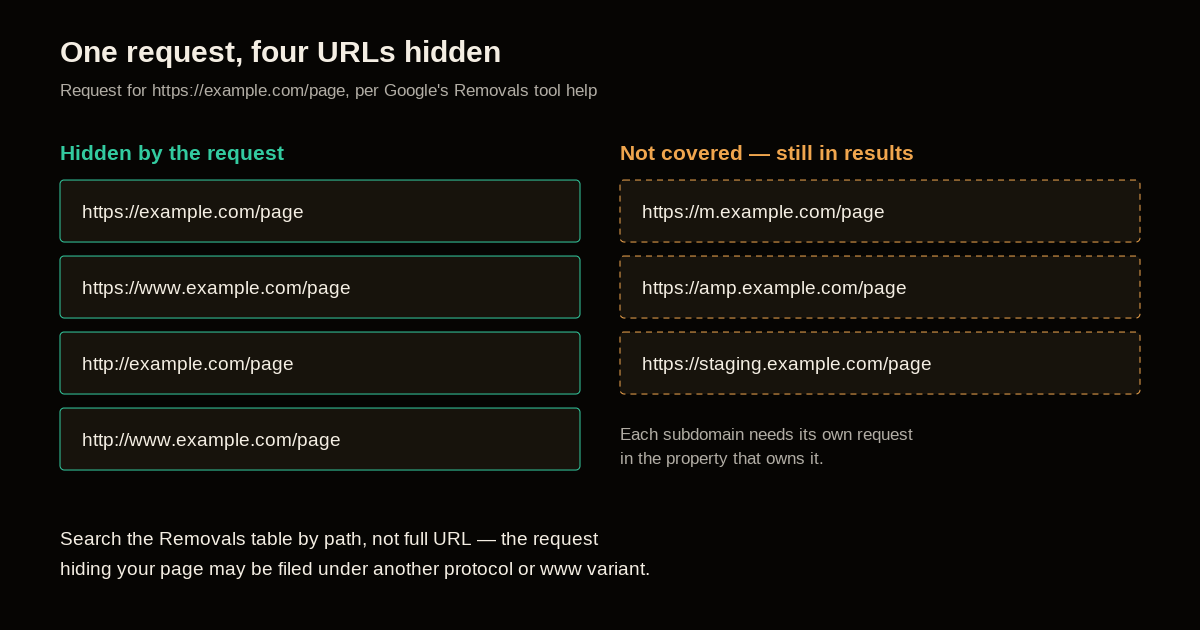
- Variants are matched together. “All variations of http and https, www and non-www match.” So a request for one version hides all four.
Here’s how it compares with the statuses it gets confused with:
| Status | Who caused it | Does Google crawl it? | How long it lasts | Fix |
|---|---|---|---|---|
| Blocked by page removal tool | A person with Search Console access | Yes | About 6 months, then expires | Cancel the request, or make removal permanent |
| Excluded by ‘noindex’ tag | Your HTML or headers | Yes | Until you remove the noindex | Remove the tag, then recrawl |
| Blocked by robots.txt | A robots.txt rule | No | Until you change the rule | Fix the matching line |
| Not found (404) | Your server | Yes | Until the URL returns 200 | Restore or redirect the URL |
The first row is the only one where the page itself is not the problem. That’s why every on-page check comes back clean.
Should You Fix Blocked by Page Removal Tool at All?
Only if the URL is one you want in Google. Removals exist for urgent cases: a leaked document, a staging page that got indexed, personal data published by mistake. If that’s why the request was filed, the status is doing its job.
The trouble is that the request is temporary. If the page is still live and indexable on the day it expires, it comes back. So both answers need action:
- The page should rank → cancel the request.
- The page should stay out → change the page so it stays out after the removal expires.
Leaving it alone is the one wrong answer, because in about six months it fixes itself in the direction you probably didn’t want.
How to Fix Blocked by Page Removal Tool in 5 Steps
Open the Removals report. In Search Console go to Indexing → Removals and open the Temporary removals tab. Every request filed in the property is listed with its URL, type, date and status. The status you’re looking for is Temporarily removed.
Find the request that covers your URL. It may not be an exact match. A request using Remove all URLs with this prefix hides every URL that starts with that path, “both www and non-www”, so a request for
https://example.com/bloghides the whole blog. A prefix of the homepage hides the whole site. Sort by date and look for short URLs first.Decide: keep or cancel. Check who filed it and why before you undo it. If it was hiding something sensitive, cancelling it puts that page back in results.
To cancel: open the menu next to the request and choose Cancel request. The history shows Request canceled. Google’s help says a new request takes “up to a day to process”, so give the change a day to show. If the page fell out of the index while hidden, use URL Inspection → Request indexing to bring it back sooner.
To keep it out: make the removal permanent before it expires. Return 404 or 410, put the page behind authentication, or serve
noindex. Then run the checker script below against the URL to confirm what Google will see when the timer runs out.
Why Does URL Inspection Say the Page Is Available?
Because the live test doesn’t look at removals. Google’s URL Inspection help says the live test “doesn’t take into account manual actions, content removals, quality and security issues, or temporarily blocked URLs.” In its list of issues the live test can’t detect, it names this exact status, Blocked by page removal tool, with the note “Check this in the Temporary Removals page instead.”
So this combination is normal:
- Live test: URL is available to Google
- Indexed view: the page isn’t showing
- Page indexing report: Blocked by page removal tool
All three are correct. The live test answers “can Googlebot fetch and index this HTML?”, and the answer is yes. The removal sits on top of that, at the search results layer, where the live test never looks.
This is the most common way the status gets missed. A developer checks the page, sees 200 and no noindex, runs the live test, gets a green result, and closes the ticket. The real cause is a row in a report nobody on the engineering side opens.
Which URLs Does One Removal Request Hide?
More than people expect, and less than they sometimes need. Google matches protocol and www together, but treats every other subdomain as a different site:
Two practical results of this:
- A removal you can’t find may be filed under a different variant. If someone filed it as
http://www.example.com/page, it still hideshttps://example.com/page. Search the Removals table by path, not full URL. - Removing a page from one subdomain doesn’t remove its copies. If an
m.oramp.version is indexed, or astaging.copy leaked, each needs its own request in the property that owns it. Google’s help says to submit a separate request for each URL that might point to the same page.
Will the Page Come Back When the Removal Expires?
It depends entirely on what the URL serves on the day Google recrawls it. To check that ahead of time, I wrote a small Node script that fetches the URL and its robots.txt the way a crawler would and tells you which outcome to expect.
// removal-check.mjs — what happens to each URL when its Search Console removal expires?
// Usage: node removal-check.mjs <url> [url...]   (Node 20+, no deps)
const UA = 'Mozilla/5.0 (compatible; removal-check/1.0)';

function rulesFor(txt, agent = 'googlebot') {
  const groups = []; let cur = null, lastWasUA = false;
  for (const raw of txt.replace(/^/, '').split(/\r?\n/)) {
    const line = raw.replace(/#.*/, '').trim(); if (!line.includes(':')) continue;
    const [k, ...v] = line.split(':'); const key = k.trim().toLowerCase(), val = v.join(':').trim();
    if (key === 'user-agent') {
      if (!lastWasUA) groups.push(cur = { agents: [], rules: [] });
      cur.agents.push(val.toLowerCase()); lastWasUA = true;
    } else if (cur && (key === 'allow' || key === 'disallow')) {
      if (val) cur.rules.push({ allow: key === 'allow', path: val }); lastWasUA = false;
    } else lastWasUA = false;
  }
  const mine = groups.filter(g => g.agents.includes(agent));
  return (mine.length ? mine : groups.filter(g => g.agents.includes('*'))).flatMap(g => g.rules);
}
function blocked(rules, path) {
  let best = null;
  for (const r of rules) {
    const re = new RegExp('^' + r.path.replace(/[.+?^{}()|[]\]/g, '\$&').replace(/*/g, '.*').replace(/\?$$/, '$'));
    if (re.test(path) && (!best || r.path.length > best.path.length || (r.path.length === best.path.length && r.allow))) best = r;
  }
  return best && !best.allow ? best.path : null;
}

async function check(url) {
  const u = new URL(url);
  let rules = [];
  try { const r = await fetch(`${u.origin}/robots.txt`, { headers: { 'user-agent': UA } }); if (r.ok) rules = rulesFor(await r.text()); } catch {}
  const rule = blocked(rules, u.pathname + u.search);
  const res = await fetch(url, { redirect: 'manual', headers: { 'user-agent': UA } });
  const xrt = (res.headers.get('x-robots-tag') || '').toLowerCase();
  const html = res.headers.get('content-type')?.includes('html') ? await res.text() : '';
  const meta = /<meta[^>]+name=["']?(robots|googlebot)["']?[^>]*content=["'][^"']*noindex/i.test(html);
  const s = res.status;
  let verdict;
  if (rule) verdict = `AT RISK — robots.txt "Disallow: ${rule}" hides the page, and any noindex, from Google`;
  else if (s === 404 || s === 410) verdict = `PERMANENT — ${s}, Google drops it on recrawl`;
  else if (s === 401 || s === 403) verdict = `PERMANENT — ${s}, behind access control`;
  else if (s >= 300 && s < 400) verdict = `CHECK TARGET — redirects to ${res.headers.get('location')}`;
  else if (s >= 500) verdict = `UNSTABLE — ${s}; Google may end the block early and re-index when it recovers`;
  else if (xrt.includes('noindex') || meta) verdict = `PERMANENT — noindex via ${xrt.includes('noindex') ? 'X-Robots-Tag' : 'meta robots'}`;
  else verdict = 'REAPPEARS — 200 and indexable; comes back when the removal expires';
  return { url, status: s, verdict };
}

for (const url of process.argv.slice(2)) {
  try { const r = await check(url); console.log(`${String(r.status).padEnd(4)} ${r.url}\n     ${r.verdict}`); }
  catch (e) { console.log(`ERR  ${url}\n     ${e.message}`); }
}
I ran it against a local test server set up with the nine ways I’ve seen teams “remove” a page. Here’s what each one does once the temporary removal is gone:
| Setup on the URL | Script verdict | After the removal expires |
|---|---|---|
| 200, no directives | REAPPEARS | Back in results |
200 + <meta name="robots" content="noindex"> | PERMANENT | Stays out |
200 + X-Robots-Tag: noindex | PERMANENT | Stays out |
| 404 | PERMANENT | Stays out |
| 410 | PERMANENT | Stays out |
| 401 (login required) | PERMANENT | Stays out |
200 + noindex, but path is Disallowed in robots.txt | AT RISK | Google can’t read the noindex; the URL can be indexed from links |
| 301 to another page | CHECK TARGET | Depends on the target |
| 503 | UNSTABLE | Block can end early; back when the server recovers |
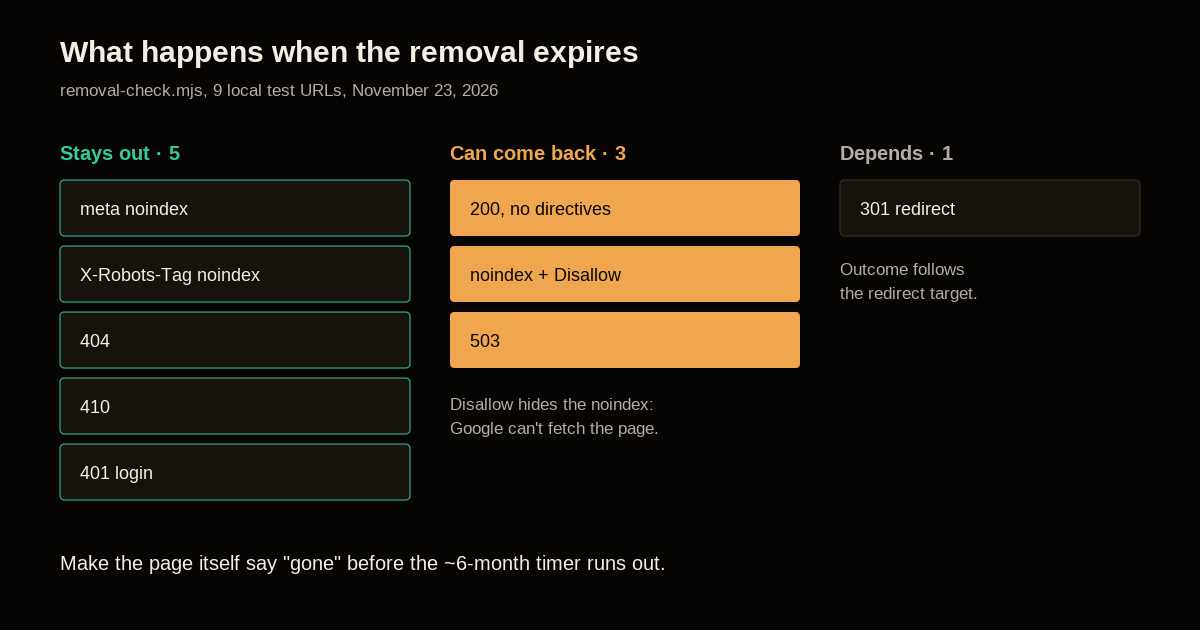
Three of the nine come back, and two of those look like they shouldn’t:
- The robots.txt combination. Adding
Disallowon top ofnoindexfeels like extra protection, but it removes the protection. Google won’t fetch the page, so it never sees thenoindex, and the URL can surface as Indexed, though blocked by robots.txt. Google’s Removals help says it directly: don’t use robots.txt to make a removal permanent. - The 503. Google’s help says that if the URL returns a 404 or 502/503, “it will assume that the page is gone, and your block request will expire.” A page that’s down during the removal and back up afterward is treated as “a new page that can appear in Google Search results.”
There’s one more trap in Google’s instructions. If you filed the removal before you changed the page, Google may have recrawled the old version during the block. Google says to “unblock and then reblock the page” in that case, so the next crawl picks up the 404 or noindex.
When Is a Temporary Removal the Right Tool?
When you need a URL out of results today and the permanent fix takes longer than that. A credentials page that got indexed, a customer’s name in a public URL, a staging site that leaked. The removal buys up to six months while you change the page.
It’s the wrong tool for anything routine. Removing old blog posts, retired product pages or thin content should go through a 404, 410 or noindex from the start. Those take effect on the next crawl and don’t expire. If the page you hid is instead one you want back but Google isn’t indexing it after you cancel, that’s a different problem, covered in Crawled, currently not indexed. For the other statuses in this Search Console series, see the AI search hub.
FAQ
What does Blocked by page removal tool mean in Search Console?
It means someone with access to your Search Console property submitted a request in the Removals tool, and Google is hiding that URL from search results. Google didn’t decide this on its own. The block is temporary and lasts about six months, after which the page can show up again.
How do I remove the Blocked by page removal tool status?
Open Indexing, then Removals, find the request in the Temporary removals table, open the menu next to it and choose Cancel request. The URL becomes eligible to show in results again. If the page has dropped out of the index while it was hidden, request indexing in URL Inspection to speed up its return.
Why does URL Inspection say the URL is available to Google when it’s blocked?
The live test doesn’t check temporary removals. Google’s URL Inspection help says the live test does not take into account content removals or temporarily blocked URLs, and tells you to check the Removals page for this status instead. A green live test and a hidden page can both be true at the same time.
How long does a Google temporary removal last?
Google’s Removals help says a successful request lasts only about six months. After that the status changes to Removal expired and the URL is eligible to appear in search again. The block also ends early if Google finds the URL returning a 404 or a 502 or 503 error.
How do I make a URL removal permanent?
Change the page itself before the removal expires. Return a 404 or 410, put the page behind a login, or serve a noindex meta tag or X-Robots-Tag header. Do not use robots.txt for this, because a blocked page can’t show Google its noindex and its URL can still be indexed from links.
Does a removal request cover www and http versions of a URL?
Yes. Google says all variations of http and https, www and non-www match the same request. Other subdomains such as m. or amp. do not match, so a mobile or AMP copy of the page needs its own request in the property that owns that subdomain.
Sources
- Google Search Console Help, Removals and SafeSearch reports tool: “lasts only about six months”, “does not prevent Google from crawling”, http/https and www matching, prefix removals, early expiry on 404 or 502/503, “unblock and then reblock”, cancelling a request, and not using robots.txt for permanent removal
- Google Search Console Help, URL Inspection tool: the live test “doesn’t take into account manual actions, content removals, quality and security issues, or temporarily blocked URLs”, and Blocked by page removal tool listed as an issue the live test can’t check
- Google Search Console Help, Page indexing report: the other non-indexed statuses compared above
- First-party measurement, November 23, 2026:
removal-check.mjs(above) run with Node 22.23 against a local test server serving nine URL setups. Five verdicts were PERMANENT, three could come back after expiry (plain 200,noindexbehind a robots.txtDisallow, 503), and one depended on a redirect target.
Frequently asked questions
Google Search · Preferred sources
Prefer this site on Google
If you already read this writing, add umesh-malik.com as a Preferred Source. Google can then highlight it with a preferred badge in Top Stories, AI Overviews, and AI Mode — for you, not as a site-wide ranking boost.
Related Articles

Web Engineering
How to Fix Crawled Currently Not Indexed: 15 of 156 Posts Audited
How to fix crawled currently not indexed: split stuck pages by age first. 7 of 15 here were just queued; the old ones had gone 87 days without a crawl.

Web Engineering
Fix Offers, Review, or aggregateRating Error: 5 Hidden Causes
The offers, review, or aggregateRating error means a Product node has none of the three. 9 test variants passed the schema.org validator; 5 still failed.

Web Engineering
Fix Unparsable Structured Data: 16 Ways It Breaks, 1 Fix
Unparsable structured data means Google hit a JSON syntax error and dropped the block. I broke JSON-LD 16 ways; one serializer change fixed every one.
Keep reading
Get new posts on AI, Claude Code & LLMs
New deep-dives on AI engineering, Claude Code, and developer tooling — follow along however you prefer.
About the Author

Software engineer writing about AI, Claude Code, LLMs, OpenAI, Anthropic, and developer tooling. 5+ years building production systems at Expedia Group, Tekion, and BYJU'S.