Fix Not Found (404) in Search Console: Fix Only the 404s You Cause
Fix Not found (404) in Search Console by fixing only the 404s you cause: sitemap entries and your own links. A free checker finds them. Why the rest can stay.

TL;DR — To fix Not found (404) in Search Console, sort each URL into one of four buckets: the page moved (301 it), it was deleted on purpose (leave the 404), it never existed (ignore it), or your own sitemap or links still point at it (fix that link). Google says to fix “only 404 errors that you link to yourself or list in a sitemap,” and a 404 by itself does not hurt the rest of your site.
Not found (404) is the Search Console status for a URL where Googlebot asked for a page and your server answered HTTP 404. It’s the one status in the Page indexing report where the right fix is often to do nothing.
What Does Not Found (404) Mean in Search Console?
It means Google requested the URL and got a 404. Google’s Page indexing report help puts it plainly: “This page returned a 404 error when requested.” The same entry adds the line most people skip: “404 responses are not necessarily a problem, if the page has been removed without any replacement.”
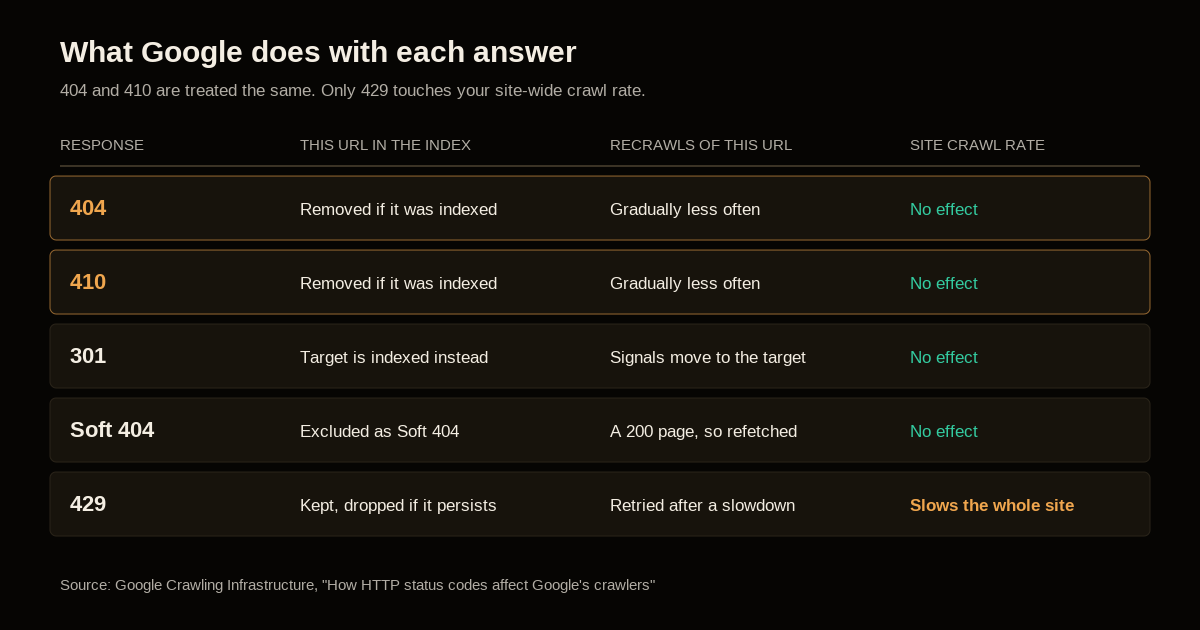
Google’s HTTP status code documentation spells out what a 404 actually does:
- “Google doesn’t use the content from URLs that return 4xx status codes.”
- “URLs that are already indexed and return a 4xx status code are removed from the index.”
- “The 4xx status codes, except 429, have no effect on crawl rate.”
- “The crawling frequency gradually decreases,” and “newly encountered 404 pages aren’t processed.”
So a 404 is a clean signal. Google drops the URL, checks back less often, and moves on. The report row is a log of that, not an alarm.
The confusion comes from four nearby labels that look alike but mean different things:
| Search Console label | What the server answered | Is the URL indexed? | What to do |
|---|---|---|---|
| Not found (404) | HTTP 404 (or 410) | No, and removed if it was | Fix only if the page should exist or you link to it |
| Soft 404 | HTTP 200 with a “not found” or empty page | No | Return a real 404, or a relevant page |
| Blocked due to other 4xx issue | Another 4xx, like 400 or 451 | No | Debug the URL with URL Inspection |
| Blocked due to access forbidden (403) | HTTP 403 | No | Let verified Googlebot through the firewall |
If your rows are in the second line, the soft 404 guide covers that fix. If they’re 403s from a CDN, allowing Googlebot through Cloudflare is the one you want.
Do 404 Errors Hurt SEO?
No, not on their own. Google answered this directly in its 2011 post Do 404s hurt my site?: “404 errors are a perfectly normal part of the web,” and “the fact that some URLs on your site no longer exist or return 404 errors does not affect how your site’s other URLs” perform in search.
The current docs agree. A 404 doesn’t change crawl rate, and Google stops processing new 404 URLs. There’s no site-wide penalty, no trust score that drops, no count of 404s that tips you over a line.
A 404 costs you something in only three cases:
- A page you want indexed returns 404. That’s a real outage, usually a broken deploy or a deleted file.
- Your own links send people and Googlebot to it. Visitors hit a dead end and Google keeps finding the link again.
- Other sites link to a URL that moved. Without a 301, the value of that link lands on nothing.
Everything else, like scrapers, typos in someone’s forum post and probes for /wp-login.php on a site that never ran WordPress, can stay a 404 forever.
Which 404s Should You Fix?
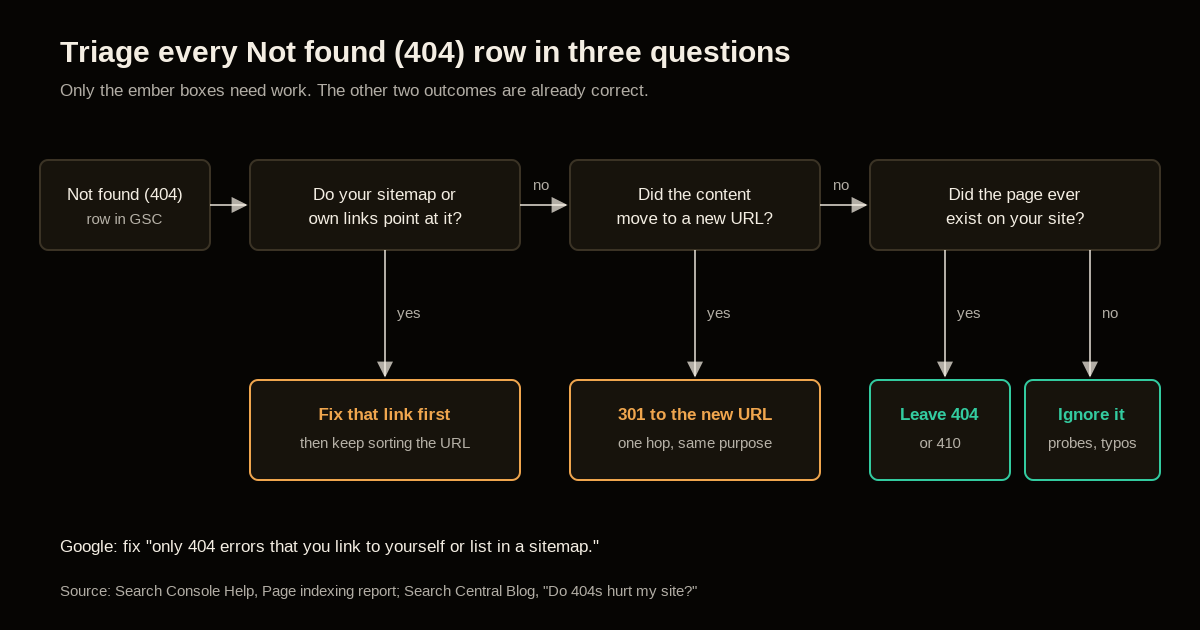
Fix the ones you cause. Google’s troubleshooting note in the Page indexing help says: “In general, we recommend fixing only 404 errors that you link to yourself or list in a sitemap.” The 2011 post says the same about the long tail: for URLs that never existed on your site, “you can safely ignore them.”
Every row in the report fits one of four buckets:
| Bucket | How to recognize it | Fix |
|---|---|---|
| Moved | The content lives at a new URL, after a slug change, migration or restructure | 301 the old URL to the new one |
| Deleted on purpose | The page is gone and nothing replaces it | Leave the 404 (or return 410) |
| Never existed | Probes, scraped junk, malformed URLs from other sites | Ignore it |
| Self-inflicted | It’s in your sitemap, or your own pages link to it | Fix the sitemap entry or link, then decide moved vs deleted |
The fourth bucket is the one to work on first. It’s the only bucket where the fix is fully in your hands and where the cause will keep coming back if you skip it.
How to Fix Not Found (404) in Search Console in 6 Steps
Export the rows. In Search Console, open Indexing → Pages, click Not found (404) under Why pages aren’t indexed, and export the examples. Sort by Last crawled so recent rows come first.
Find your self-inflicted 404s. Crawl your sitemap and check every internal link and image on every page. The script below does exactly this. Anything it flags is a 404 you’re causing.
Trace where Google found the rest. Open a few remaining rows in the URL Inspection tool and read the Discovery section, which can show the sitemap and a referring page. If the referrer is another site, the URL is in the moved or never-existed bucket.
301 the moved pages. Redirect each old URL straight to the page that replaced it, in one hop. Don’t send it to the homepage or a category page that doesn’t serve the same purpose, since Google may treat that as a soft 404. The redirect error guide shows how to keep that chain to one hop.
Leave real deletions alone. If the page is gone for good, a 404 is the correct answer. Remove it from the sitemap and from your internal links, and stop there.
Validate only what you fixed. Click Validate fix only if you changed something for the rows in the report. Google says validation “typically takes up to about two weeks.” Rows in the deleted and never-existed buckets will fade on their own as Google crawls them “less and less often.”
Here’s the checker for step 2. It’s dependency-free Node 20+. It reads one or more sitemaps, fetches each page as Googlebot, collects every same-origin <a>, <img> and <link> target, and reports the sitemap entries and internal targets that don’t answer 200:
// find-own-404s.mjs — find the 404s you cause yourself: sitemap entries and
// internal links/images that don't answer 200. Node 20+, no dependencies.
// usage: node find-own-404s.mjs https://example.com/sitemap.xml [more sitemaps]
const UA = 'Mozilla/5.0 (compatible; Googlebot/2.1; +http://www.google.com/bot.html)';
const CONCURRENCY = 6;
const get = (url, method = 'GET') => fetch(url, { method, redirect: 'manual',
headers: { 'user-agent': UA }, signal: AbortSignal.timeout(15_000) });
async function pool(items, fn) {
const out = new Array(items.length);
let i = 0;
await Promise.all(Array.from({ length: CONCURRENCY }, async () => {
while (i < items.length) { const n = i++; out[n] = await fn(items[n]).catch((e) => ({ error: String(e) })); }
}));
return out;
}
const sitemaps = process.argv.slice(2);
const origin = new URL(sitemaps[0]).origin;
const pages = new Set();
for (const sm of sitemaps) {
const xml = await (await get(sm)).text();
for (const m of xml.matchAll(/<loc>([^<]+)</loc>/g)) pages.add(m[1].trim());
}
const links = new Map(); // target URL -> Set of pages linking to it
const sitemapStatus = {};
await pool([...pages], async (page) => {
const res = await get(page);
sitemapStatus[page] = res.status;
if (res.status !== 200) return;
const html = await res.text();
for (const m of html.matchAll(/<(?:a|img|link)[^>]*?s(?:href|src)="([^"#]+)/g)) {
let u; try { u = new URL(m[1].replace(/&/g, '&'), page); } catch { continue; }
if (u.origin !== origin) continue;
if (!links.has(u.href)) links.set(u.href, new Set());
links.get(u.href).add(page);
}
});
const targets = [...links.keys()];
const statuses = await pool(targets, async (t) => (await get(t, 'HEAD')).status);
const broken = targets
.map((t, n) => ({ target: t, status: statuses[n]?.error ? 'error' : statuses[n] }))
.filter((r) => r.status === 404 || r.status === 410 || r.status === 'error')
.map((r) => ({ ...r, linkedFrom: [...links.get(r.target)].slice(0, 3) }));
console.log(JSON.stringify({
sitemapUrls: pages.size,
sitemapNon200: Object.entries(sitemapStatus).filter(([, s]) => s !== 200),
internalTargets: targets.length,
broken,
}, null, 2));I tested it against a small local server with five planted problems: a sitemap entry that 404s, a sitemap entry that 301s, a typo’d internal link, a missing image and a link to a 410 page. It caught all of them and named the page each broken link came from. It uses HEAD for the link targets to keep the run light, so an endpoint that only accepts POST will show up as 405, not as broken.
What Did Checking 1,886 Internal Links on This Site Find?
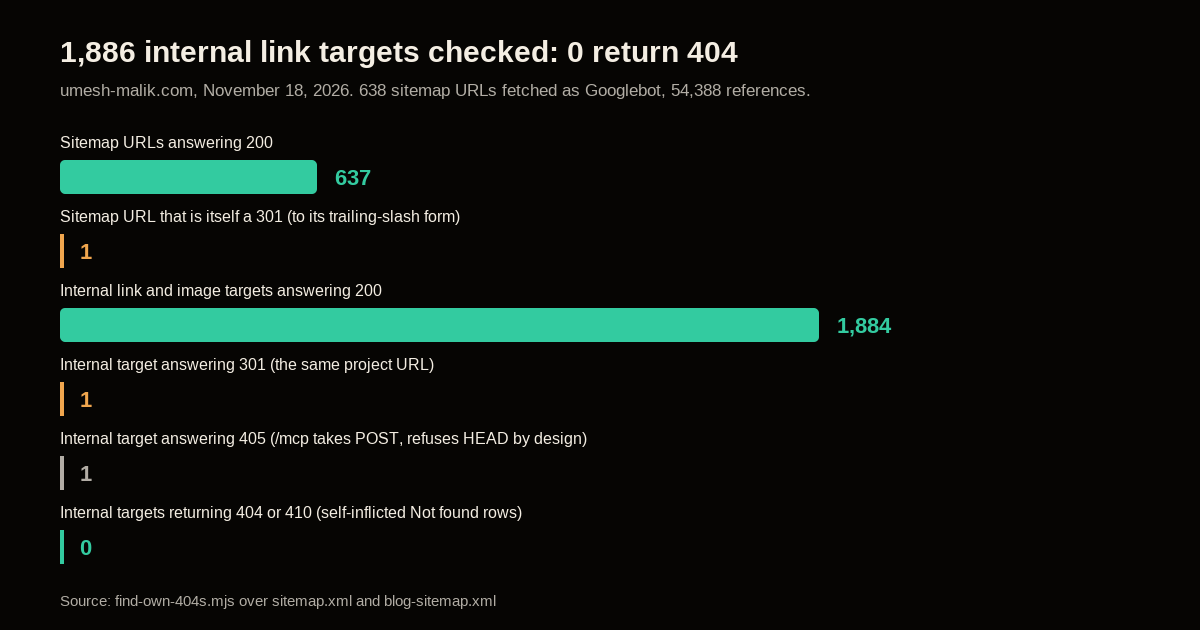
Zero self-inflicted 404s. On November 18, 2026 I ran the checker against umesh-malik.com’s two sitemaps:
- 638 sitemap URLs fetched as Googlebot. 637 answered 200. One,
/projects/edu-rag-saas, answered 301 to its trailing-slash form. - 54,388 internal link and image references on those pages, pointing at 1,886 unique targets.
- Of those targets, 1,884 answered 200, one answered 301 (the same project URL) and one answered 405 (
/mcp, an MCP endpoint that takesPOST, so aHEADrequest is refused by design). - Zero targets returned 404 or 410.
Two habits keep that number at zero, and both are copyable:
- Moved URLs get a rule, not a hope. The site’s Cloudflare
_redirectsfile holds 65 permanent 301 rules, most of them retired blog-category URLs pointing at the category that replaced them. When the taxonomy changed, the old URLs moved bucket instead of turning into 404s. - Unknown URLs get a real 404. A request for
/blog/this-does-not-existreturns HTTP 404 with a recovery page, not a 200 copy of the homepage. That’s the difference between a clean Not found row and a soft 404.
So any Not found (404) rows this site gets come from outside: old links elsewhere, probes and typos. Those are the rows Google says you can ignore.
When Should You Use 410 Instead of 404?
When it’s free. Google’s status code docs give 404 and 410 the same treatment: “All 4xx errors, except 429, are treated the same,” and the 410 row repeats the 404 wording. The 2011 post said the same: “Currently Google treats 410 (Gone) the same as 404 (Not found).”
A 410 is still a nice, explicit answer for other crawlers and for your future self reading logs. If your framework lets you mark a deleted route as gone in one line, do it. If it needs a custom Worker or server code on a static site, skip it. You’d add a moving part to get the result a 404 already gives you.
What not to use:
- 429 for a deleted page. Google treats 429 as an overloaded server and slows crawling of the whole site. That’s a 5xx-style problem, not a not-found.
- 401 or 403 to hide a page. Google’s docs say “Don’t use 401 and 403 status codes for limiting the crawl rate,” and a 403 lands in its own report bucket.
- A redirect to the homepage. It turns a clean 404 into a possible soft 404, and the Page with redirect row it creates is noise.
The sitemap side of this is covered in finding orphan pages, which runs the reverse comparison: pages that exist but nothing links to. If the rows are 401s rather than 404s, your links are pointing at a login wall instead of a missing page; fixing Blocked due to unauthorized request (401) covers that leak. If a deleted page is still hidden by a temporary removal, the 404 is what makes that removal permanent; fixing Blocked by page removal tool explains the six-month timer. The AI search hub collects the rest of this technical SEO series.
FAQ
What does Not found (404) mean in Google Search Console?
It means Googlebot requested the URL and your server answered with HTTP 404. Google does not index a 404 URL, and if the URL was indexed before, Google removes it. The status is a report of what Google found, not a penalty.
Do 404 errors hurt my SEO?
Not on their own. Google says 404s are a normal part of the web and that URLs which no longer exist do not affect how the rest of your site performs in search. They matter only when a page you want indexed returns 404, or when your own links and sitemap keep sending Googlebot to dead URLs.
Should I return 404 or 410 for a deleted page?
Either works for Google. Its HTTP status code documentation gives 404 and 410 the same treatment: the URL is removed from the index if it was indexed, and crawl frequency gradually decreases. Use 410 if your stack makes it easy and you want to be explicit, but don’t build a migration around it.
Should I redirect all 404 pages to the homepage?
No. Redirect a 404 only when the content moved to a page that serves the same purpose. Sending every dead URL to the homepage can be reported as a soft 404, which is harder to diagnose than the honest 404 you started with.
How do I find where Google found a 404 URL?
Open the URL in the URL Inspection tool and read the Discovery section, which can list the sitemap and a referring page. For links on your own site, crawl your sitemap and check every internal link’s status, which is what the script in this post does. Links from other sites show up only as the 404 URL itself.
How long does it take for 404s to leave Search Console?
Google says Googlebot will probably keep trying a 404 URL for some time, crawling it less and less often. If you fixed a URL and clicked Validate fix, Google says validation typically takes up to about two weeks. Rows for pages that are meant to be gone can stay in the report without harming anything.
Sources
- Google Search Console Help, Page indexing report
- Google Crawling Infrastructure, How HTTP status codes affect Google’s crawlers
- Google Search Central Blog, Do 404s hurt my site? (Susan Moskwa, May 2, 2011)
- First-party measurement:
find-own-404s.mjsrun on November 18, 2026 against a local Node test server with planted problems (404 and 301 sitemap entries, a typo’d link, a missing image, a 410 link; all caught), and against umesh-malik.com’ssitemap.xmlandblog-sitemap.xml(638 sitemap URLs, 54,388 internal references, 1,886 unique targets, zero 404 or 410 targets)
Frequently asked questions
Google Search · Preferred sources
Prefer this site on Google
If you already read this writing, add umesh-malik.com as a Preferred Source. Google can then highlight it with a preferred badge in Top Stories, AI Overviews, and AI Mode — for you, not as a site-wide ranking boost.
Related Articles

Web Engineering
Fix Blocked Due to Access Forbidden (403): Your Firewall Did It
Fix Blocked due to access forbidden (403) by finding the firewall rule that took Googlebot for a bad bot. Verify by IP range, not a reverse DNS regex or UA.

Web Engineering
Fix Blocked Due to Other 4xx Issue: It's Usually 400, 414 or 431
Fix Blocked due to other 4xx issue by finding the real code: usually 400, 405, 414 or 431. Five servers tested show which URL shapes trigger each, and the fix.

Web Engineering
Fix Blocked Due to Unauthorized Request (401): Find the Leaked Link
Fix Blocked due to unauthorized request (401) by finding the public link that leaked a login-walled URL to Googlebot. Then remove the link, or drop the wall.
Keep reading
Get new posts on AI, Claude Code & LLMs
New deep-dives on AI engineering, Claude Code, and developer tooling — follow along however you prefer.
About the Author

Software engineer writing about AI, Claude Code, LLMs, OpenAI, Anthropic, and developer tooling. 5+ years building production systems at Expedia Group, Tekion, and BYJU'S.