Fix Blocked by robots.txt: 3 of 4 Checkers Miss What Google Blocks
Fix Blocked by robots.txt by finding the exact line Google matched. In 20 tests, 3 of 4 popular parsers missed blocks Google enforces. Here are the cases.

TL;DR — To fix Blocked by robots.txt, find the one line in robots.txt that Google matched for that URL, then decide whether the block was intended. In my 20-case test, three of the four popular robots.txt parsers I tried said “allowed” for URLs that Google’s own parser blocks. The usual causes are a prefix rule like Disallow: /blog, a /*? wildcard, a byte order mark, or a blank line in the wrong place.
Blocked by robots.txt is the Search Console status for URLs Googlebot found but didn’t crawl because a robots.txt rule told it not to. Half the time that’s exactly what you asked for. The other half, a rule matches far more than its author meant, and the tool you used to check it says everything is fine.
What Does Blocked by robots.txt Mean in Search Console?
Google’s Page indexing report help treats this row as a “legitimate reason” a page isn’t indexed. It notes that “URLs blocked by robots.txt are probably intentionally blocked,” and for unintended blocks it says to “track down and remove the blocking rule in your robots.txt file.” Google knows the URL exists, usually from a link or your sitemap, but has never fetched it.
It’s easy to mix up with two other statuses, and each one needs a different fix:
| Status | Did Google crawl it? | Is it indexed? | What controls it |
|---|---|---|---|
| Blocked by robots.txt | No | No | A Disallow rule that matched |
| Indexed, though blocked by robots.txt | No | Yes, URL only, no snippet | Same rule, but enough links pointed at the URL that Google indexed it anyway |
| Excluded by ‘noindex’ tag | Yes | No | A noindex on the page, which Google could read because crawling was allowed |
The middle row is why robots.txt is the wrong way to keep a page out of Google. If that’s your goal, allow crawling and serve noindex. This post is about the first row: pages you want crawled that a rule is stopping.
Should You Fix Blocked by robots.txt at All?
Only if real pages are in the list. Export the example URLs from Indexing → Pages → Blocked by robots.txt and sort them into two piles:
- Meant to be blocked: internal search results, cart and checkout, faceted filter combinations, admin paths, API endpoints. Leave these alone. The count isn’t a penalty, and Google’s report help says plainly that it isn’t always worth fixing every issue.
- Not meant to be blocked: blog posts, product pages, category pages, or anything listed in your sitemap. These need the steps below.
If a URL is in your sitemap and blocked, you’re sending Google mixed signals. Either the page should be crawled or it shouldn’t be in the sitemap.
How to Fix Blocked by robots.txt in 6 Steps
Export the URLs and group them by path prefix. A few hundred blocked URLs usually come from two or three rules. Sorting by path shows them: everything under
/blog/, everything with a?, everything ending in.js.Fetch the robots.txt for the right origin. robots.txt applies per protocol, host and port.
https://www.example.com/robots.txtdoesn’t coverhttps://example.com/, and neither covershttps://cdn.example.com/where your CSS and images live. Check the file on the same origin as the blocked URL, and check it as served in production, not the copy in your repo.Find the exact line that matched. Google picks one user-agent group, then the longest matching
AlloworDisallowpath, with ties going toAllow. Run the script further down: it prints the verdict and the line number for every URL. Don’t trust a tester you haven’t checked against Google’s parser (see the parser table below).Change the rule, not the URL. Narrow the rule rather than deleting it:
Disallow: /blogbecomesDisallow: /blog/drafts/, andDisallow: /*?becomesDisallow: /*?sort=plusDisallow: /*?sessionid=. Then re-run the script over both lists, the URLs that should now be allowed and the ones that should stay blocked.Confirm from Google’s side. Open Search Console’s robots.txt report. It shows the version Google last fetched, when, and any parse warnings. If the date is before your fix, click Request a recrawl. Then run URL Inspection → Test live URL on one affected page. It should report crawling as allowed.
Validate the fix for the real pages. Back in the Page indexing report, open the row and click Validate fix. To get a faster signal, submit a sitemap of just the pages you unblocked and filter the report by it first, which is the approach Google’s report help recommends.
Which robots.txt Rules Block More Than You Meant?
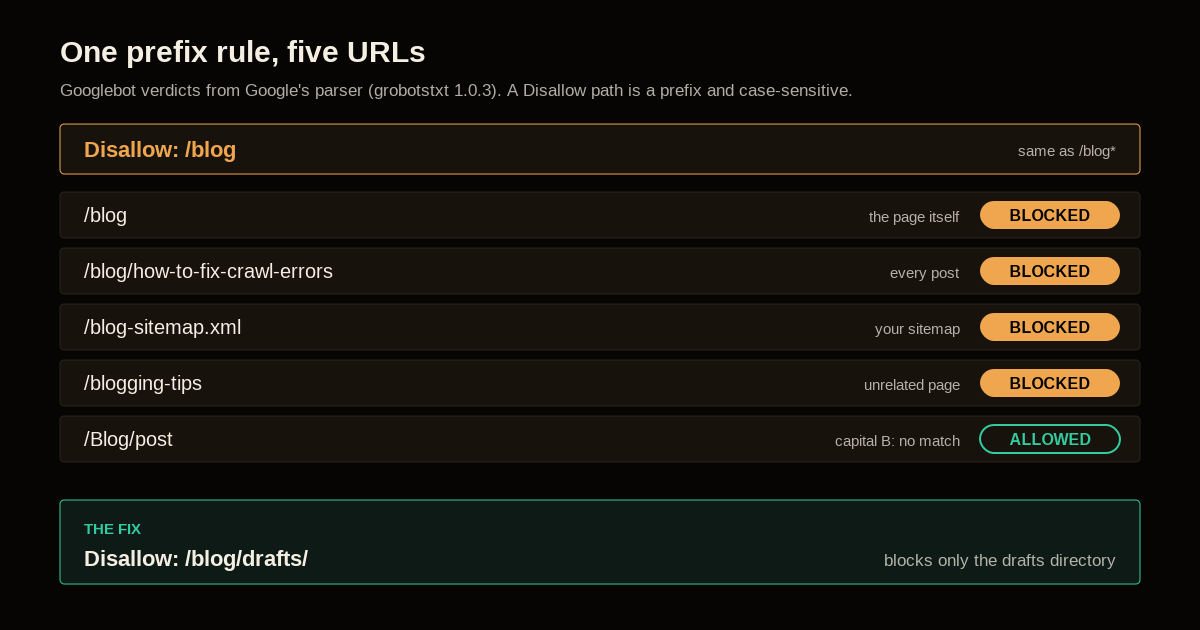
Prefix matching. Every Disallow path is a prefix unless it ends in $, and it’s case-sensitive. I ran each rule below through grobotstxt v1.0.3, a Go port of Google’s open-source C++ robots.txt parser that keeps Google’s test suite, for the Googlebot user agent:
| Rule | URL tested | Google’s verdict | What the author usually meant |
|---|---|---|---|
Disallow: /blog | /blog/how-to-fix-crawl-errors | Blocked | Block the /blog landing page only |
Disallow: /blog | /blog-sitemap.xml | Blocked | Nothing to do with the sitemap |
Disallow: /blog | /blogging-tips | Blocked | Nothing to do with this page |
Disallow: /*? | /blog?page=2 | Blocked | Block sort and session parameters |
Disallow: /*? | /pricing?utm_source=newsletter | Blocked | Same, but this URL is linked from every email |
Disallow: /*.js$ | /assets/app.js?v=3 | Allowed | Block all JavaScript (the $ stops at the ?) |
Disallow: /private/ | /private | Allowed | Block the directory and its index |
Disallow: /Admin/ | /admin/settings | Allowed | Block admin (paths are case-sensitive) |
Allow: /$ + Disallow: / | /about | Blocked | Allow the homepage, which it does, and nothing else |
The first three rows are the classic trap. Disallow: /blog is the same as Disallow: /blog*. It catches the sitemap, unrelated pages that share the first four letters, and every post. The /*? rule is the other big one: it blocks every URL with a query string, including pagination and the tracked links your newsletter and ads send people to.
Why Does My robots.txt Checker Say Allowed When Google Says Blocked?
Because most checkers aren’t Google’s parser. SEO crawlers, audit scripts and online testers each embed a parser, and they don’t all follow RFC 9309 the way Google does.
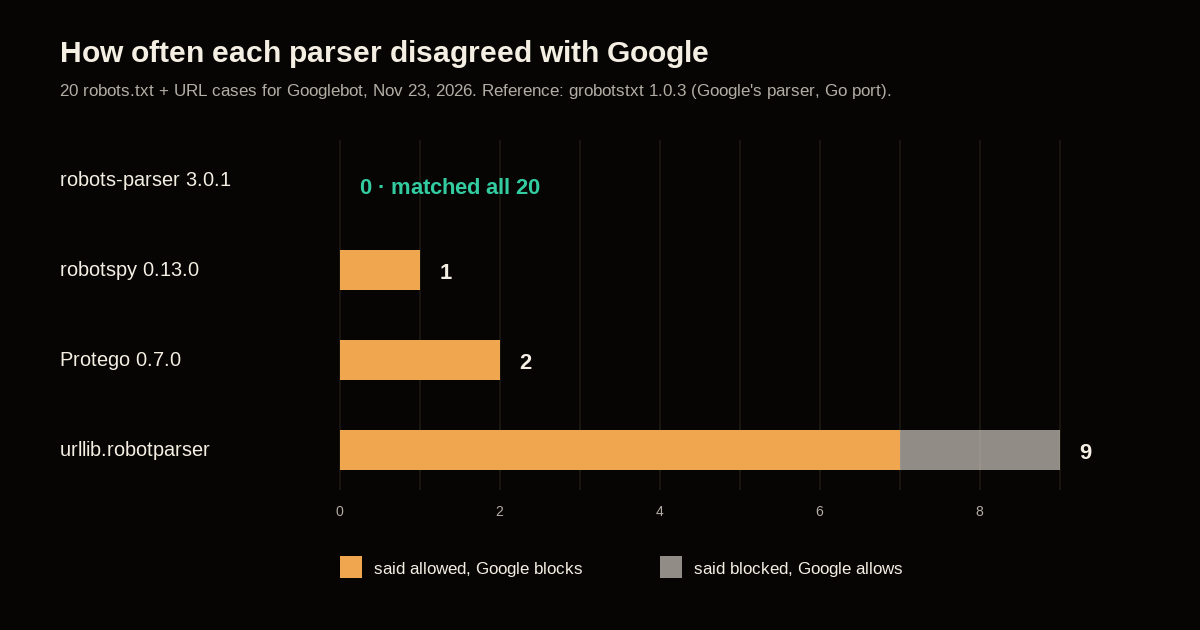
On November 23, 2026 I ran 20 test cases (each a robots.txt file and a URL, for Googlebot) through Google’s parser and four others: Python 3.11’s built-in urllib.robotparser, Protego 0.7.0 (Scrapy’s parser), robotspy 0.13.0, and the npm package robots-parser 3.0.1. These are the cases where at least one disagreed:
| Case | robots-parser | robotspy | Protego | urllib | |
|---|---|---|---|---|---|
UTF-8 byte order mark before User-agent: * | Block | Block | Allow | Allow | Allow |
User-agent: Googlebot/2.1 | Block | Block | Block | Allow | Allow |
Blank line between User-agent and Disallow | Block | Block | Block | Block | Allow |
Disallow: /*? on /blog?page=2 | Block | Block | Block | Block | Allow |
Disallow: /*.js$ on /assets/app.js | Block | Block | Block | Block | Allow |
Allow: /page + Disallow: /*.htm on /page.htm | Block | Block | Block | Block | Allow |
Longer Allow inside a Disallowd folder | Allow | Allow | Allow | Allow | Block |
Allow and Disallow of equal length | Allow | Allow | Allow | Allow | Block |
Across all 20 cases, robots-parser matched Google every time. robotspy missed 1, Protego missed 2, and urllib.robotparser missed 9. Every miss by robotspy and Protego was a false “allowed”, which is the direction that hides a Blocked by robots.txt problem.
The byte order mark case is the nastiest. Some Windows editors and CMS export tools save robots.txt as “UTF-8 with BOM”, which puts three invisible bytes before User-agent. Google strips them. Two of the four parsers don’t, so they never see the first group, and they report every URL as allowed. Your audit says the file is fine and Search Console disagrees.
The Googlebot/2.1 case comes from copying the full user-agent string into robots.txt. Google’s spec says non-matching text is ignored, so “both googlebot/1.2 and googlebot* are equivalent to googlebot.” Protego and urllib compare the whole value, so the group doesn’t match for them.
Here’s the checker I use. It fetches robots.txt once per origin, applies Google’s group and precedence rules, and prints the line that decided each URL. It agreed with grobotstxt on all 20 cases. Node 20+, no dependencies:
// robots-blame.mjs: which robots.txt line blocks each URL for Googlebot?
// usage: node robots-blame.mjs urls.txt [user-agent]   (one absolute URL per line)
import { readFile } from 'node:fs/promises';

const enc = (s) => s.replace(/%[0-9a-f]{2}/gi, (m) => m.toUpperCase())
  .replace(/[^!-~]/gu, (c) => encodeURIComponent(c));

export function parse(text) {
  const groups = []; let cur = null; let sawRule = false;
  text.replace(/^/, '').split(/\r\n|\r|\n/).forEach((raw, i) => {
    const line = raw.replace(/#.*/, '').trim();
    const at = line.indexOf(':'); if (at < 1) return;
    const key = line.slice(0, at).trim().toLowerCase(), val = line.slice(at + 1).trim();
    if (key === 'user-agent') {
      if (!cur || sawRule) { cur = { agents: [], rules: [] }; groups.push(cur); sawRule = false; }
      cur.agents.push(val === '*' ? '*' : (val.match(/^[a-z_-]+/i)?.[0] ?? '').toLowerCase());
    } else if ((key === 'allow' || key === 'disallow') && cur) {
      sawRule = true;
      if (val) cur.rules.push({ allow: key === 'allow', path: enc(val), line: i + 1, text: raw.trim() });
    }
  });
  return groups;
}

const matches = (pattern, path) => {
  const anchored = pattern.endsWith('$');
  const body = (anchored ? pattern.slice(0, -1) : pattern)
    .replace(/[.+?^${}()|[]\]/g, '\$&').replace(/*/g, '.*');
  return new RegExp(`^${body}${anchored ? '$' : ''}`).test(path);
};

export function decide(text, agent, url) {
  const groups = parse(text), token = agent.toLowerCase();
  let rules = groups.filter((g) => g.agents.includes(token)).flatMap((g) => g.rules);
  if (!groups.some((g) => g.agents.includes(token)))
    rules = groups.filter((g) => g.agents.includes('*')).flatMap((g) => g.rules);
  const u = new URL(url), path = enc(u.pathname + u.search) || '/';
  let best = null;
  for (const r of rules) {
    if (!matches(r.path, path)) continue;
    if (!best || r.path.length > best.path.length || (r.path.length === best.path.length && r.allow)) best = r;
  }
  return { allowed: !best || best.allow, rule: best };
}

if (import.meta.url === `file://${process.argv[1]}`) {
  const [file, agent = 'googlebot'] = process.argv.slice(2);
  const urls = (await readFile(file, 'utf8')).split('\n').map((s) => s.trim()).filter(Boolean);
  const cache = new Map();
  for (const url of urls) {
    const origin = new URL(url).origin;
    if (!cache.has(origin)) {
      const res = await fetch(`${origin}/robots.txt`, { redirect: 'follow' });
      const body = res.ok ? await res.text() : '';
      if (!res.ok) console.log(`# ${origin}/robots.txt → ${res.status}`
        + (res.status >= 500 ? ' (Google pauses crawling, then uses its cached copy)' : ' (Google treats as no robots.txt)'));
      cache.set(origin, body);
    }
    const { allowed, rule } = decide(cache.get(origin), agent, url);
    console.log(`${allowed ? 'ALLOW' : 'BLOCK'}  ${url}${rule ? `  ← line ${rule.line}: ${rule.text}` : ''}`);
  }
}
Paste the exported URLs into urls.txt and run node robots-blame.mjs urls.txt. Each blocked URL prints as BLOCK https://example.com/blog/post ← line 4: Disallow: /blog. That’s step 3 done for the whole export at once. It only covers what Google’s parser decides; whether a firewall lets Googlebot in is a separate problem, covered in stop Cloudflare blocking Googlebot.
What Happens When robots.txt Itself Returns an Error?
Google’s robots.txt specification defines what happens for each status code on the robots.txt request. The errors don’t all fail the same way:
| robots.txt response | What Google does | Effect on crawling |
|---|---|---|
| 2xx | Parses the file as served | Rules apply as written |
| 3xx | Follows at least five redirect hops, then treats it as a 404 | Rules from the redirect target apply |
| 4xx (except 429) | Treats it “as if a valid robots.txt file didn’t exist” | Nothing is blocked |
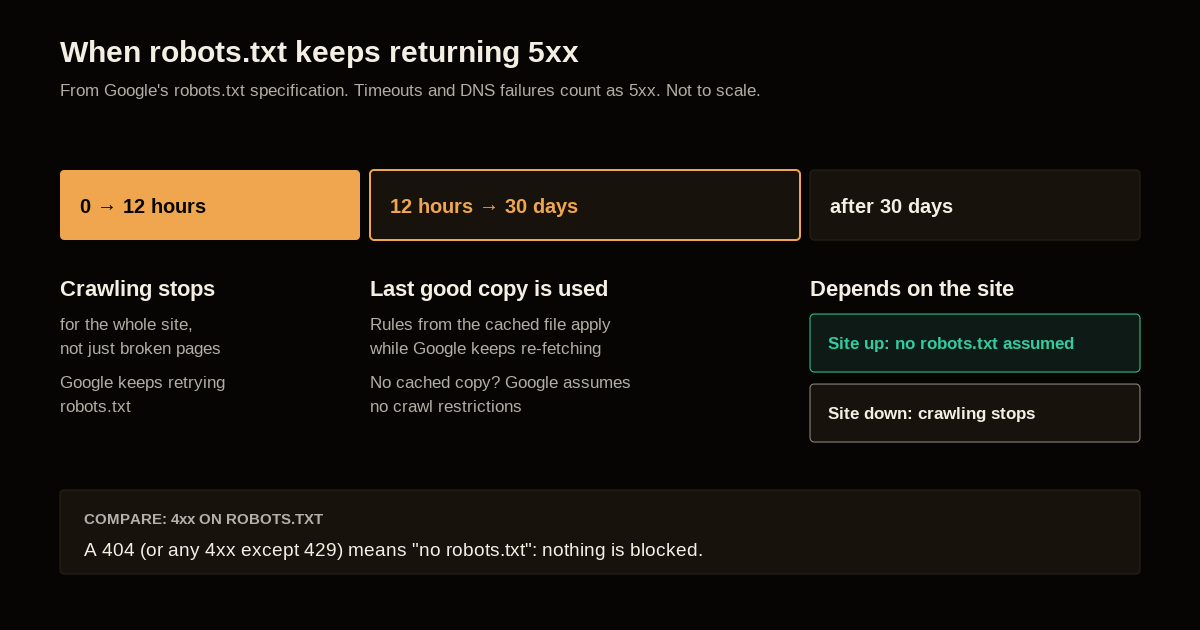
| 5xx, 429, timeout, DNS or connection error | “For the first 12 hours, Google stops crawling the site” | The whole site pauses, then Google uses the last good copy for up to 30 days |
| Over 500 KiB | Ignores everything after the limit | Rules past the cutoff are silently dropped |
The 5xx row is the one that turns a small outage into a crawl freeze. If robots.txt is served by the same origin as a struggling app, the robots.txt request fails along with it, and Googlebot stops crawling everything, not just the broken pages. After 30 days of errors Google behaves “as if there is no robots.txt file” if the rest of the site is reachable, and stops crawling if it isn’t. Serve robots.txt as a static file from your CDN so it doesn’t depend on the app being up. The Server error (5xx) post covers the page-level version of the same problem.
Caching matters for fixes too. Google says it “generally caches the contents of robots.txt file for up to 24 hours.” Ship a Disallow: / from staging by mistake and Google may keep that copy for up to a day. That’s also why Request a recrawl in the robots.txt report is worth a click after every fix.
When Is Blocked by robots.txt the Right Answer?
When the URLs are ones you’d never want a searcher to land on. Faceted filter combinations, internal search pages, carts and API routes are a sensible use of robots.txt, because they save crawl capacity for pages that matter. A growing count on this row is fine as long as the URLs in it are that kind of URL.
It’s the wrong answer when you want a page removed from Google. A blocked URL can still be indexed from links, which is Indexed, though blocked by robots.txt, and Google can’t see a noindex on a page it isn’t allowed to fetch. If you manage AI crawlers in the same file, syncing AI bot blocks into robots.txt shows how to add named groups without changing what Googlebot sees. If Search Console can’t read your sitemap either, that’s Sitemap couldn’t fetch. The AI search hub collects the rest of this Search Console series.
FAQ
What does Blocked by robots.txt mean in Search Console?
It means a rule in your robots.txt file stops Googlebot from crawling the URL, so Google hasn’t read the page and hasn’t indexed it. The URL usually came from a link or a sitemap. If the page is one you never wanted in Google, the status is correct and you can leave it alone.
How do I find which robots.txt rule is blocking a URL?
Fetch the robots.txt for the exact host and protocol of the URL, pick the group for Googlebot, and find the longest Allow or Disallow path that matches the URL’s path and query. On a tie, Allow wins. A Google-compatible checker or the script in this post prints the line number, and URL Inspection’s live test confirms it from Google’s side.
Why does my robots.txt tester say a URL is allowed when Search Console says it’s blocked?
Most testers aren’t Google’s parser. In 20 test cases, Python’s urllib.robotparser disagreed with Google’s parser 9 times, Scrapy’s Protego twice and robotspy once. The usual causes are wildcard and dollar-sign rules, a UTF-8 byte order mark at the top of the file, a blank line inside a group, or a User-agent line written as Googlebot/2.1.
How long does it take Google to notice a robots.txt fix?
Google generally caches robots.txt for up to 24 hours, so a fix can take a day to apply. You can ask for a faster refresh with Request a recrawl in Search Console’s robots.txt report. After that, the blocked URLs still need to be crawled again, which Validate fix in the Page indexing report speeds up.
What happens if robots.txt returns a 404 or a 500 error?
A 404 or any other 4xx except 429 means Google treats the site as having no robots.txt, so nothing is blocked. A 5xx or a timeout is worse: Google stops crawling the whole site for 12 hours, then uses its last cached copy for up to 30 days. After that it treats the file as absent if the site is otherwise up.
Sources
- Google Search Console Help, Page indexing report: robots.txt blocks as a legitimate reason for non-indexing, “probably intentionally blocked”, removing the blocking rule, and validating by sitemap
- Google Crawling Infrastructure, How Google interprets the robots.txt specification: status-code handling (3xx, 4xx, 5xx, 12 hours, 30 days), 24-hour caching, the 500 KiB limit, user-agent matching, and longest-match precedence
- Google Search Console Help, robots.txt report: the fetched version, parse warnings, and Request a recrawl
- IETF, RFC 9309: Robots Exclusion Protocol
- grobotstxt v1.0.3, the Go port of Google’s robots.txt parser used as the reference
- First-party measurement, November 23, 2026: 20 robots.txt-and-URL cases for the
Googlebotuser agent, run through grobotstxt 1.0.3, Python 3.11.18urllib.robotparser, Protego 0.7.0, robotspy 0.13.0 and robots-parser 3.0.1. Disagreements with grobotstxt: robots-parser 0, robotspy 1, Protego 2, urllib.robotparser 9. The robots-blame.mjs script above agreed on all 20.
Frequently asked questions
Google Search · Preferred sources
Prefer this site on Google
If you already read this writing, add umesh-malik.com as a Preferred Source. Google can then highlight it with a preferred badge in Top Stories, AI Overviews, and AI Mode — for you, not as a site-wide ranking boost.
Related Articles

Web Engineering
Fix Sitemap Couldn't Fetch in Search Console: Test First, Then Wait
Fix Sitemap couldn't fetch with one live URL test. If Googlebot gets a 200, the file is fine and Google deferred it. If not, a free script finds why.

Web Engineering
Fix Indexed, Though Blocked by robots.txt: Disallow Isn't noindex
Fix Indexed, though blocked by robots.txt: unblock the URL, then serve noindex. Disallow stops crawling, not indexing, and Googlebot may skip your * rules.

Web Engineering
Fix Offers, Review, or aggregateRating Error: 5 Hidden Causes
The offers, review, or aggregateRating error means a Product node has none of the three. 9 test variants passed the schema.org validator; 5 still failed.
Keep reading
Get new posts on AI, Claude Code & LLMs
New deep-dives on AI engineering, Claude Code, and developer tooling — follow along however you prefer.
About the Author

Software engineer writing about AI, Claude Code, LLMs, OpenAI, Anthropic, and developer tooling. 5+ years building production systems at Expedia Group, Tekion, and BYJU'S.