How to Fix Crawled Currently Not Indexed: 15 of 156 Posts Audited
How to fix crawled currently not indexed: split stuck pages by age first. 7 of 15 here were just queued; the old ones had gone 87 days without a crawl.

TL;DR — How to fix crawled currently not indexed pages: split the stuck URLs by age before you touch anything. On this site, 7 of 15 stuck posts were under 40 days old and 6 of them had been crawled the day they went live, so they only needed time. The other 8 were older than 90 days and Googlebot had not been back for a median of 87 days, against 7 days for indexed posts of the same age, and those are the only ones worth rewriting.
Crawled - currently not indexed is the Search Console status for a URL that Googlebot fetched and Google chose not to index. It is a decision, not an error, which is why the usual checklist fixes rarely move it.
The numbers below come from this site’s own Search Console URL Inspection report, committed to the repository on October 2, 2026. It covered 575 URLs, 156 of them blog posts with a verdict, and 15 of those posts were stuck.
What Does Crawled - Currently Not Indexed Mean?
Google’s Page indexing report help gives it one line: “The page was crawled by Google but not indexed.” It adds that this is “a common message for many sites,” and, more bluntly, “Don’t expect every URL on your site to be indexed.”
That line matters because the status is easy to confuse with its neighbours, and each one has a different fix:
| Status | What happened | Usual cause | First move |
|---|---|---|---|
| Crawled - currently not indexed | Fetched, then not indexed | Queue for new pages, value verdict for old ones | Split by age (below) |
| Discovered - currently not indexed | Known, not fetched yet | Crawl was rescheduled, often for load | Check server speed and crawl budget |
| Duplicate, Google chose different canonical | Fetched, folded into another URL | Near-duplicate content | Consolidate or fix canonicals |
| Excluded by ‘noindex’ tag | Fetched, told not to index | Your own meta robots | Intentional, or remove the tag |
If URL Inspection shows a Google-selected canonical that differs from yours, you are not looking at this problem at all. You have a duplicate, and the fix is consolidation.
What Did 156 Posts Show About the Usual Fixes?
Most advice for this status is a checklist: make the page longer, add images, add internal links, target a clearer query. I compared the 15 stuck posts with the 141 indexed ones on exactly those measures, pulled from each post’s source file:
| Measure | Indexed (141) | Stuck (15) |
|---|---|---|
| Median word count | 1,928 | 1,948 |
| In-body images, average | 1.87 | 2.07 |
| Outbound links to sources, average | 5.2 | 7.3 |
| In-article internal links, average | 7.0 | 6.5 |
| Recap or “X vs Y” title | 7.1% | 6.7% |
| Near-duplicate of another post’s title | 5.0% | 0% |
None of these separate the groups. The stuck posts were, if anything, slightly longer and better sourced. The orphan-page audit on the same report reached the same answer for site-wide inlinks, and the sitemap lastmod audit found stale and accurate dates indexed at the same 90% rate.
So padding a stuck page to pass a checklist is unlikely to work here. The signal was somewhere else.
Why Does Post Age Decide the Fix?
Sorting the same 156 posts by age on the report date gives a U-shaped curve:
| Post age on Oct 2 | Posts | Stuck | Stuck rate |
|---|---|---|---|
| 0-7 days | 7 | 3 | 42.9% |
| 8-30 days | 29 | 3 | 10.3% |
| 31-90 days | 73 | 1 | 1.4% |
| 91+ days | 47 | 8 | 17.0% |
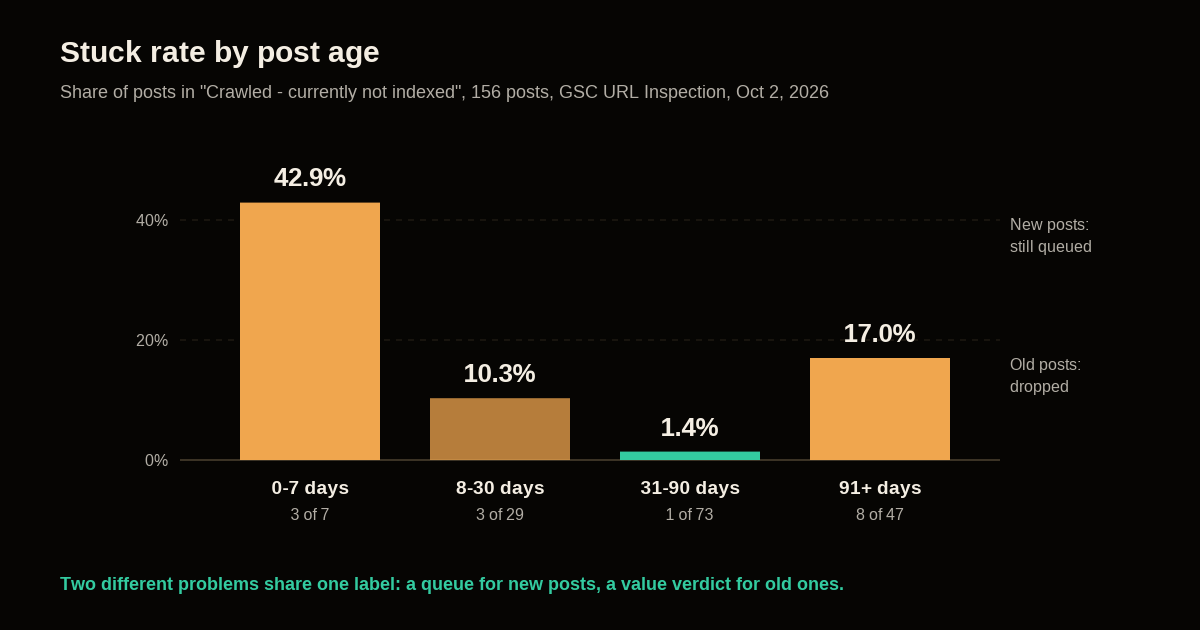
The left side of the curve is a queue. Six of the seven stuck posts under 40 days old were crawled on the day they were published, and the seventh 12 days in. Google had fetched them and not yet decided. Nothing on those pages was broken.
The right side is a verdict. Those 8 posts are 199 to 681 days old, and Google had plenty of time to decide. It decided no.
How Can You Tell a Verdict From a Queue?
The URL Inspection report has a Last crawl date for every URL. For the 47 posts older than 90 days, it split the two groups more cleanly than any content measure:
- The 39 indexed old posts had been crawled a median of 7 days before the report. 37 of 39 were crawled within 60 days.
- The 8 stuck old posts had a median of 87 days since their last crawl. Only 3 of 8 were crawled within 60 days.
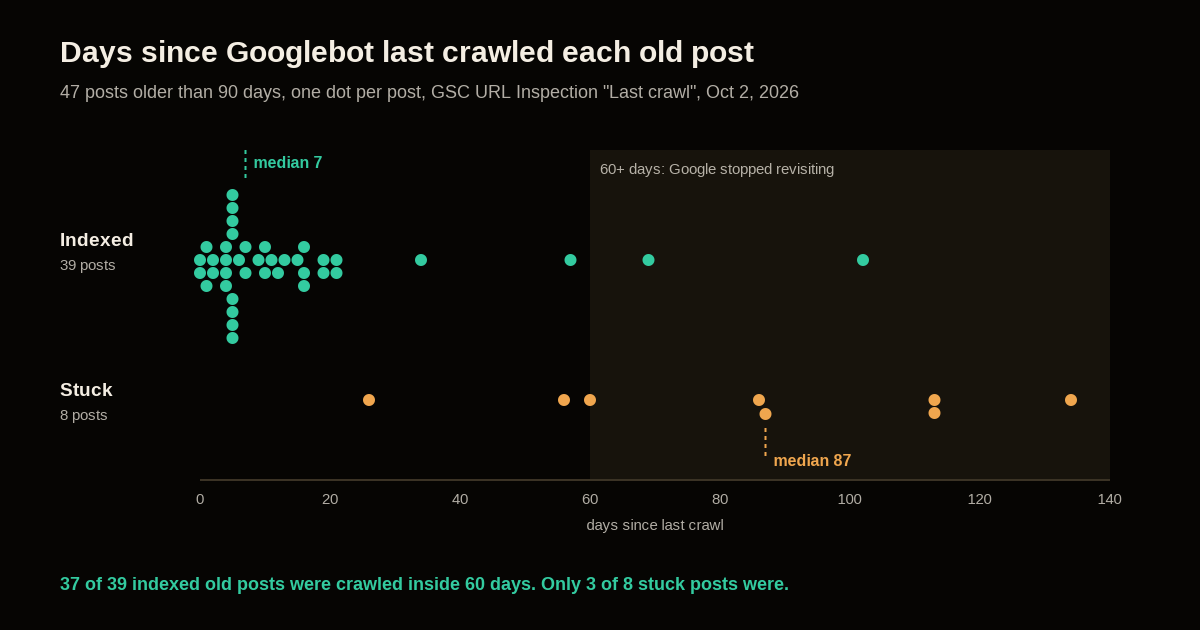
Read this as a symptom, not a cause. Google spends less crawl effort on pages it has chosen not to index, so a cold last-crawl date is the trace of the decision, not the reason for it. It is still the most useful field in the report, because it tells you Google has stopped reconsidering the page on its own. A minor edit won’t be seen for months.
How to Fix Crawled Currently Not Indexed in 6 Steps
Export the stuck URLs with their last crawl date. In Search Console, open Pages, click Crawled - currently not indexed, and export. For more than a handful, the URL Inspection API returns
coverageStateandlastCrawlTimeper URL. That is how this site’s report is built.Rule out a technical cause. Run a live test in URL Inspection on two or three of them. Confirm the page renders its main content, has no stray
noindex, and that the Google-selected canonical matches yours. Also confirm Googlebot is not being challenged by a bot filter. If any of these fail, fix that first.Leave anything under 30 days old alone. On this site the stuck rate dropped from 42.9% in the first week to 1.4% by the second and third month without anyone touching the posts. Clicking Request Indexing on a page Google crawled yesterday asks for something it already did.
Flag old pages Google has stopped recrawling. Older than 90 days, stuck, and a last crawl more than 60 days ago is the pattern to act on. Those pages will not be reconsidered on their own any time soon.
Give each flagged page a reason to exist, or retire it. Rewrite it around one task a searcher actually has, merge it into a stronger page and 301 the old URL, or remove it. The table below covers which.
Ship a significant change, then ask once. Update the body, set an honest
lastmod, and link to the page from a recent post that Google does crawl. Then click Request Indexing a single time. Google says validation “typically takes up to about two weeks,” so check back after that, not the next morning.
What Should You Do With Each Stuck Page?
The 8 old stuck posts here fall into three groups. This is my read of why they lost, not something Search Console reports. Some indexed posts share the same traits, so treat it as a prompt for a decision, not a rule:
| Stuck page type | Examples from this site | Likely problem | Fix |
|---|---|---|---|
| Broad head term | “React Performance Optimization: 10 Proven Techniques”, “Node.js Backend for Frontend Developers” | Competes with large docs sites on a query it cannot win | Narrow to one specific task, or merge |
| News commentary that aged out | A GTC 2026 strategy explainer, a Seedance 2.0 story, a take on someone else’s essay | Demand ended, and the original source is the better result | Retarget at a lasting task or let it go |
| Abstract essay | “Agentic AI Security: The New Enterprise Control Model” | No query maps to it | Rebuild around a concrete procedure |
| New post under 30 days | Six posts from September 2026 | None, still queued | Do nothing, re-check in 30 days |
Notice what is missing from that table: “add 500 words.” None of the old stuck posts were short on words.
The same report also had 4 tag archive pages in this status. Archive pages that list a few post titles add little on their own. This site already sends 33 other tag pages a noindex, and the 4 stuck ones are candidates for the same treatment.
What Breaks If You Get This Wrong?
Rewriting new posts. A post that is two weeks old and stuck is usually just queued. Rewriting it resets the work and teaches you a fix that did nothing.
Spamming Request Indexing. The button has a daily quota and no effect on a page that has not changed. Google’s help page says plainly to skip recrawl requests “unless there is an important change.”
Treating it as a sitewide penalty. 15 of 156 posts is 9.6%. Google says not every URL will be indexed. A few stuck pages are normal; a sudden jump across the site is the thing to investigate.
Fixing proxies instead of the page. Word count, image count and link count were equal across both groups here. Hitting a number on an audit tool will not change a verdict about whether the page is worth showing.
Missing the duplicate case. If Google chose another canonical, the page is not “not indexed,” it is folded into something else. Merging fixes that; rewriting does not.
How This Fits the Rest of a Technical SEO Audit
This status is the last step of the crawl pipeline, so check the earlier steps first. Googlebot has to reach the page, which is the bot-blocking audit. It has to find the page, which is the orphan-page audit. If Google found it but never fetched it, the row reads Discovered instead, and the fix is crawl capacity and demand: see how to fix Discovered currently not indexed. It needs an honest freshness hint, which is the lastmod fix. And a cheap recrawl helps, which is serving 304 Not Modified. URLs that should not exist at all need a real status code, which is the soft 404 fix. Pages you removed noindex from but Google never rechecked need the Excluded by noindex tag fix. If the URL is indexed but Google read no text from it at all, that is a fetch or render problem, covered in how to fix Page indexed without content. The AI search hub collects the rest of the series.
FAQ
What does Crawled - currently not indexed mean in Search Console?
It means Googlebot fetched the page but Google chose not to add it to the index, at least for now. It is not an error and it does not point at a specific defect. Google’s own help page calls it a common message and says not every URL on a site is expected to be indexed.
How long does it take for a crawled page to get indexed?
For a new post, often days to a few weeks. On this site, 42.9 percent of posts up to 7 days old were still in Crawled - currently not indexed, but only 1.4 percent of posts aged 31 to 90 days were. Give a new page about 30 days before you treat the status as a problem.
Should I click Request Indexing on every crawled but not indexed page?
No. Google already crawled the page, so asking it to crawl again changes nothing unless the page changed. Request Indexing once, after you ship a significant change to the content, and then wait about two weeks before checking again.
Does adding word count, images or internal links fix Crawled - currently not indexed?
Not by itself. On this site the stuck posts had a median of 1,948 words against 1,928 for indexed ones, more images on average, and nearly the same internal link count. Those checklist metrics did not separate the two groups, so padding a page to hit them is unlikely to change Google’s decision.
Should I delete or noindex pages stuck in Crawled - currently not indexed?
Only old pages that have no realistic task to serve. A page under a month old should be left alone. An old page that Google has stopped recrawling is a candidate for a rewrite, a merge into a stronger page with a 301 redirect, or removal if it no longer answers anything people search for.
Sources
- Google Search Console Help, Page indexing report
- Google for Developers, URL Inspection API: index.inspect
- Google Search Central, In-depth guide to how Google Search works
- First-party measurement: the umesh-malik.com Search Console URL Inspection report committed on October 2, 2026 (575 URLs, 156 blog posts with a verdict), joined against each post’s source file for word count, images, links and title intent, and against the report’s Last crawl date
Frequently asked questions
Google Search · Preferred sources
Prefer this site on Google
If you already read this writing, add umesh-malik.com as a Preferred Source. Google can then highlight it with a preferred badge in Top Stories, AI Overviews, and AI Mode — for you, not as a site-wide ranking boost.
Related Articles

Web Engineering
Fix Blocked by Page Removal Tool: The Live Test Won't Show It
To fix Blocked by page removal tool, cancel the Removals request or make it permanent before its ~6 months run out. 3 of 9 setups I tested come back.

Web Engineering
Fix Page Indexed Without Content: Check Googlebot's First 2MB
Page indexed without content means Google indexed the URL but read no text. Find the layer that ate it: a bot challenge, MIME type, JS render or the 2MB cutoff.

Web Engineering
How to Fix Soft 404 Errors: 1 Setting Sent 7 Dead URLs a 200
How to fix soft 404 errors: make dead URLs return a real 404. One hosting setting turned 7 of 7 dead URLs into 200 OK copies of the homepage. The test inside.
Keep reading
Get new posts on AI, Claude Code & LLMs
New deep-dives on AI engineering, Claude Code, and developer tooling — follow along however you prefer.
About the Author

Software engineer writing about AI, Claude Code, LLMs, OpenAI, Anthropic, and developer tooling. 5+ years building production systems at Expedia Group, Tekion, and BYJU'S.