Fix Blocked Due to Other 4xx Issue: It's Usually 400, 414 or 431
Fix Blocked due to other 4xx issue by finding the real code: usually 400, 405, 414 or 431. Five servers tested show which URL shapes trigger each, and the fix.

TL;DR — To fix Blocked due to other 4xx issue, find the actual status code first, because Search Console doesn’t show it. It’s almost always a 400 from a malformed or stale URL, a 405 from a POST-only endpoint Google found in a link, or a 414/431 from a URL longer than your server accepts. Fix the source that generates the URL, not the server’s answer to it, and only validate rows that are real pages.
Blocked due to other 4xx issue is Search Console’s catch-all row: Googlebot got a 4xx status code that isn’t one of the three with their own row. It’s the least specific status in the Page indexing report, and that’s why it lingers. You can’t fix it until you know which code it was.
What Does Blocked Due to Other 4xx Issue Mean?
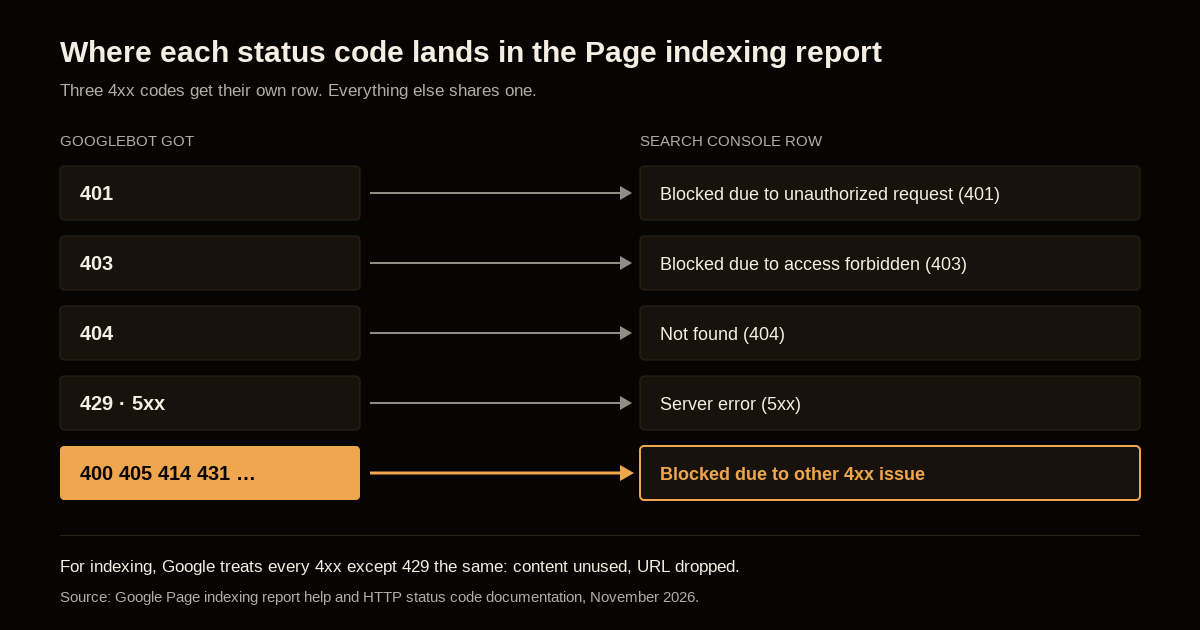
Google’s Page indexing report help defines it in one line: “The server encountered a 4xx error not covered by any other issue type described here.” The covered types are Blocked due to unauthorized request (401), Blocked due to access forbidden (403) and Not found (404). A 429 isn’t here either: Google counts it as a server error.
So this row holds everything else: 400, 405, 406, 411, 414, 431, 451 and the rest. Google’s HTTP status code documentation says “All 4xx errors, except 429, are treated the same.” The content isn’t used, “URLs that are already indexed and return a 4xx status code are removed from the index,” and the codes “have no effect on crawl rate.” The difference between a 400 and a 404 matters to you, not to Google.
Which 4xx Codes End Up in This Row?
Four codes cover nearly every case I’ve seen, and each has a different cause:
| Code | What the server is saying | Usual source of the URL |
|---|---|---|
| 400 Bad Request | “I can’t parse this request” | Broken percent-encoding, a null byte, an image-optimizer URL with bad parameters |
| 405 Method Not Allowed | “This path exists, but not for GET” | A form action or API route linked as a plain <a href> |
| 414 URI Too Long | “The request line is over my buffer” | Faceted navigation or tracking parameters stacking up |
| 431 Request Header Fields Too Large | “Your headers, including the URL, are over my limit” | The same long URLs on Node.js and Cloudflare |
A 451 (Unavailable For Legal Reasons) also lands here when a geo-block answers Google’s crawler, but if Googlebot gets a 451 you meant to send, the row is correct and there’s nothing to fix.
Which URL Shapes Return a 4xx on Which Server?
I didn’t want to guess, so on November 22, 2026 I ran the same 11 Googlebot-shaped GET requests against five local servers and this site’s live Cloudflare zone. Each server served a single static page; the probes changed only the URL. Here is what came back:
| Request | Next.js 15.5 | Express 4.22 | nginx 1.24 | Python 3.11 http.server | sirv (Vite preview) | Cloudflare |
|---|---|---|---|---|---|---|
| Valid page | 200 | 200 | 200 | 200 | 200 | 200 |
Trailing % | 404 | 404 | 400 | 404 | 404 | 307 |
Null byte %00 | 404 | 404 | 400 | reset | 404 | 400 |
| 16 KB query string | 200 | 200 | 414 | 200 | 200 | 200 |
| 70 KB query string | 431 | reset | 414 | 414 | reset | 431 |
| GET on a POST-only route | 405 | 404 | n/a | n/a | n/a | n/a |
/_next/image with w=123 | 400 | n/a | n/a | n/a | n/a | n/a |
Three things stand out. First, the same malformed URL gets a 400 from nginx and a 404 from every Node server, so whether a broken link shows up in this row or in Not found depends on what’s in front of your app. Second, URL length limits differ by a factor of four. Third, Next.js has two 4xx sources the others don’t: route handlers answer 405 for missing methods, and the image optimizer answers 400.
To pin down the length limits I binary-searched each server with a growing query string. nginx’s default buffer returned 414 from about 8,180 characters. Express and Next.js, both on Node’s 16 KB header limit, returned 431 from about 16,200. Cloudflare returned 431 from about 32,330. Google says nothing about a maximum URL length it will crawl, so the limit that matters is the first server in your request path.
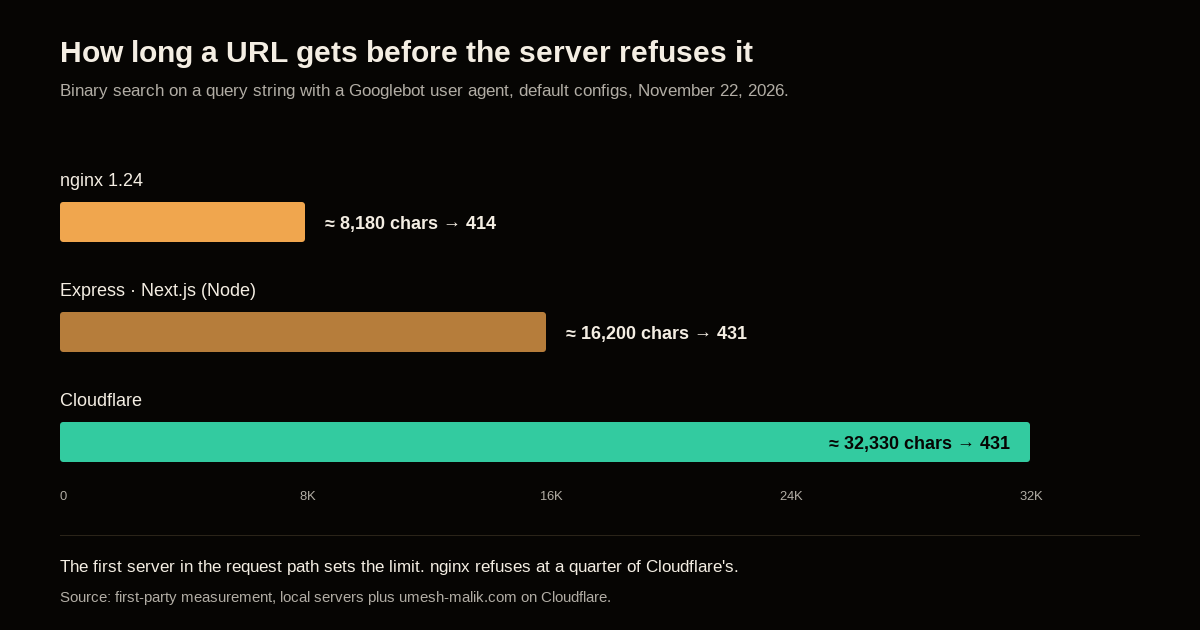
A faceted category URL with ten filters, UTM tags and a session parameter doesn’t get close to 8 KB. One that’s generated by appending filters on every click, or that re-encodes % into %25 on each redirect hop, does. When a crawler follows links, those URLs grow until one server in the chain refuses them.
How to Fix Blocked Due to Other 4xx Issue in 6 Steps
Export the rows and sort them by length and path. In Search Console, open Indexing → Pages → Blocked due to other 4xx issue and export the examples. Sort by URL length. Long URLs together point to 414/431. A shared prefix like
/_next/image,/api/or/cart/points to the route.Get the real code. Request a sample of each group yourself, without following redirects, using the script below. URL Inspection’s Test live URL shows the same thing from Google’s side. Your CDN or server access log, filtered to Googlebot and that path, shows what Google actually got on the crawl date.
Find what links to the URL. URL Inspection’s Referring page field and the Sitemaps field show where Google found it. Fix it there: a template emitting a raw
%, a form action exposed as a link, a filter widget that appends parameters forever, or a sitemap generator that doesn’t encode.Decide whether the URL should exist. A real page that answers 4xx needs fixing: raise the buffer, or better, shorten the URL. A junk URL should keep returning a 4xx; once nothing links to it, Google stops requesting it. Don’t redirect junk to the homepage, which only gives you soft 404s instead.
Fix the server only where the URL is legitimate. For nginx,
large_client_header_buffers 4 16k;raises the 8 KB request line limit. For Node,--max-http-header-sizedoes the same. Use it for real URLs you can’t shorten, not for unbounded query strings.Validate only the real pages. When every page you want indexed returns 200, click Validate fix. Google says validation “typically takes up to about two weeks.” If the row holds only junk URLs, skip validation; it fails as soon as it finds one URL still returning a 4xx.
This is the check for step 2. It reads URLs from a file, requests each one as Googlebot without following redirects, and prints the code, the URL length and a likely cause. Node 20+, no dependencies:
// gsc-4xx-triage.mjs: what did each URL really return?
// usage: node gsc-4xx-triage.mjs urls.txt   (one URL per line, e.g. pasted from the GSC export)
import { readFile } from 'node:fs/promises';

const UA = 'Mozilla/5.0 (compatible; Googlebot/2.1; +http://www.google.com/bot.html)';
const HINTS = {
  400: 'malformed URL or bad parameters (check encoding, /_next/image params)',
  405: 'GET on a POST-only route: find the link that exposes it',
  414: 'URL too long for the request line (nginx default is 8 KB)',
  431: 'URL plus headers over the server limit (Node 16 KB, Cloudflare ~32 KB)',
  451: 'legal or geo block: correct only if intended',
};

const urls = (await readFile(process.argv[2], 'utf8')).split('\n').map((s) => s.trim()).filter(Boolean);
for (const url of urls) {
  let status;
  try {
    const res = await fetch(url, { redirect: 'manual', headers: { 'User-Agent': UA } });
    status = res.status;
  } catch (err) {
    status = 'conn-error';
  }
  const hint = HINTS[status] ?? (status >= 400 && status < 500 ? 'other 4xx' : 'no 4xx now');
  console.log(`${status}\t${url.length}\t${hint}\t${url.slice(0, 120)}`);
}
A spoofed Googlebot user agent from your laptop doesn’t prove what Google saw, because firewalls treat it differently from a real Google IP. Use it to find the code and the URL shape, then confirm with the live test.
Why Does Next.js Return 400 for Images Googlebot Found?
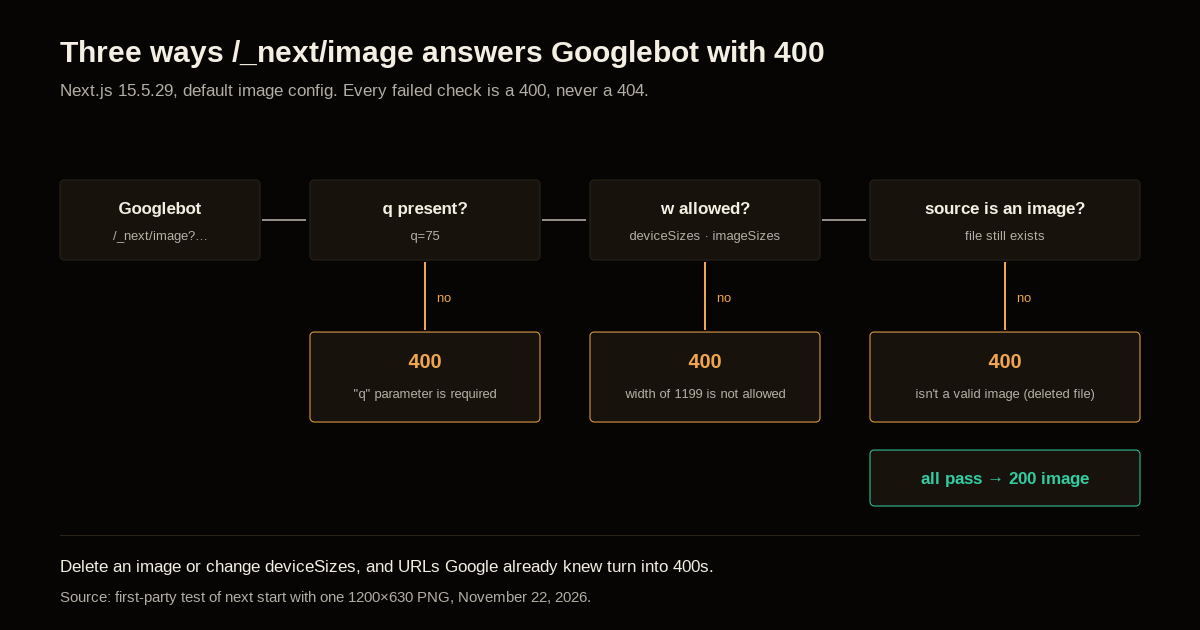
Because Google indexes image URLs from your srcset, and the image optimizer validates every parameter on every request. I tested Next.js 15.5.29 with its default image config:
w=123orw=1199returns 400 with"w" parameter (width) of 123 is not allowed. Only the configureddeviceSizesandimageSizesare accepted.- A request with no
qparameter returns 400:"q" parameter (quality) is required. - A valid width and quality for an image that’s been deleted returns 400,
The requested resource isn't a valid image, not 404.
That last one is the trap. Delete an image, or rename it during a redesign, and every optimizer URL Google already knew about becomes a 400. The same happens when you change images.deviceSizes: URLs from the old srcset request widths the new config refuses. Neither shows up as Not found, so nobody connects the row to the change.
The fix depends on intent. If the image is gone for good, the 400s are harmless and stop once Google refreshes the pages that referenced them. If you changed widths, add the old widths back to deviceSizes until Google recrawls the pages. And if you want image search traffic, serve important images from a stable static URL rather than only through the optimizer.
When Is a 4xx to Googlebot the Right Answer?
Most of the time, honestly. A 400 for a URL with a broken escape, a 405 for a GET on a form handler and a 414 for a 40 KB filter string are all correct responses. Google says it “continues to crawl all known URLs even after they return 4XX errors for a while,” and the frequency drops off on its own.
The row needs work in two cases: a page you want indexed is in it, or the row keeps growing, which means something on your site keeps producing bad URLs. For the second case, finding orphan pages uses the same crawl-your-own-links method to trace where URLs come from. If the 4xx turns into a redirect loop on its way to a fix, that’s Redirect error. The AI search hub has the rest of this Search Console series.
FAQ
What does Blocked due to other 4xx issue mean in Search Console?
It means Googlebot requested the URL and got a 4xx status code that isn’t 401, 403 or 404, which have their own rows in the Page indexing report. Typical codes are 400 Bad Request, 405 Method Not Allowed, 414 URI Too Long and 431 Request Header Fields Too Large. Google won’t index the URL and removes it if it was indexed.
How do I find which 4xx code Googlebot got?
Search Console doesn’t show the exact code in the report, so request the URL yourself without following redirects and read the status line, or run URL Inspection’s live test. Your server or CDN access logs for Googlebot requests on that path show the code too. Group the URLs by path and length first, because the pattern usually points to the cause.
Does Blocked due to other 4xx issue hurt SEO?
Only for the URLs listed. Google says all 4xx codes except 429 are treated the same: the content isn’t used, indexed URLs are removed, and crawl rate for the rest of the site isn’t affected. It matters when real pages are in the list, and it’s harmless when the rows are junk URLs nobody should land on.
Why does Next.js return 400 Bad Request on /_next/image URLs?
The Next.js image optimizer answers 400 when the w parameter isn’t one of the configured widths, when q is missing, or when the source image no longer exists or isn’t a valid image. In Next.js 15.5 a deleted source image returns 400, not 404, so removing an image puts its optimizer URLs into Blocked due to other 4xx issue.
Should I click Validate fix for Blocked due to other 4xx issue?
Only when the listed URLs are pages you want indexed and they now return 200. If they’re malformed or junk URLs, fix whatever links to them and leave the rows alone; they age out as Google stops recrawling them. Google says validation typically takes up to about two weeks.
Sources
- Google Search Console Help, Page indexing report: the definition of Blocked due to other 4xx issue, the separate 401, 403 and 404 rows, continued crawling of 4xx URLs, and validation timing
- Google Crawling Infrastructure, How HTTP status codes affect Google’s crawlers: all 4xx except 429 treated the same, index removal, no crawl-rate effect, 429 counted as a server error
- Next.js documentation, Image component configuration:
deviceSizes,imageSizesand the widths the optimizer accepts - First-party measurement, November 22, 2026: 11 Googlebot-user-agent GET probes each against Next.js 15.5.29, Express 4.22.3, nginx 1.24.0, Python 3.11.18
http.serverand sirv 3.0.2 running locally, plus umesh-malik.com on Cloudflare. URL length limits found by binary search on the query string: nginx 414 from about 8,180 characters, Node-based servers 431 from about 16,200, Cloudflare 431 from about 32,330.
Frequently asked questions
Google Search · Preferred sources
Prefer this site on Google
If you already read this writing, add umesh-malik.com as a Preferred Source. Google can then highlight it with a preferred badge in Top Stories, AI Overviews, and AI Mode — for you, not as a site-wide ranking boost.
Related Articles

Web Engineering
Fix Blocked Due to Access Forbidden (403): Your Firewall Did It
Fix Blocked due to access forbidden (403) by finding the firewall rule that took Googlebot for a bad bot. Verify by IP range, not a reverse DNS regex or UA.

Web Engineering
Fix Blocked Due to Unauthorized Request (401): Find the Leaked Link
Fix Blocked due to unauthorized request (401) by finding the public link that leaked a login-walled URL to Googlebot. Then remove the link, or drop the wall.

Web Engineering
Fix Not Found (404) in Search Console: Fix Only the 404s You Cause
Fix Not found (404) in Search Console by fixing only the 404s you cause: sitemap entries and your own links. A free checker finds them. Why the rest can stay.
Keep reading
Get new posts on AI, Claude Code & LLMs
New deep-dives on AI engineering, Claude Code, and developer tooling — follow along however you prefer.
About the Author

Software engineer writing about AI, Claude Code, LLMs, OpenAI, Anthropic, and developer tooling. 5+ years building production systems at Expedia Group, Tekion, and BYJU'S.