Fix Blocked Due to Unauthorized Request (401): Find the Leaked Link
Fix Blocked due to unauthorized request (401) by finding the public link that leaked a login-walled URL to Googlebot. Then remove the link, or drop the wall.

TL;DR — To fix Blocked due to unauthorized request (401), don’t start with the server. Start with the link: Googlebot never sends credentials, so every 401 row means something public pointed Google at a login-walled URL. Find that reference with URL Inspection and a crawl of your own pages, then remove it if the page is private, or remove the auth wall if it should be public.
Blocked due to unauthorized request (401) is the Search Console status for a URL where Googlebot got an HTTP 401 asking it to authenticate. Google can’t index it. Most of the time that’s the right outcome, and the real defect is the leak.
What Does Blocked Due to Unauthorized Request (401) Mean?
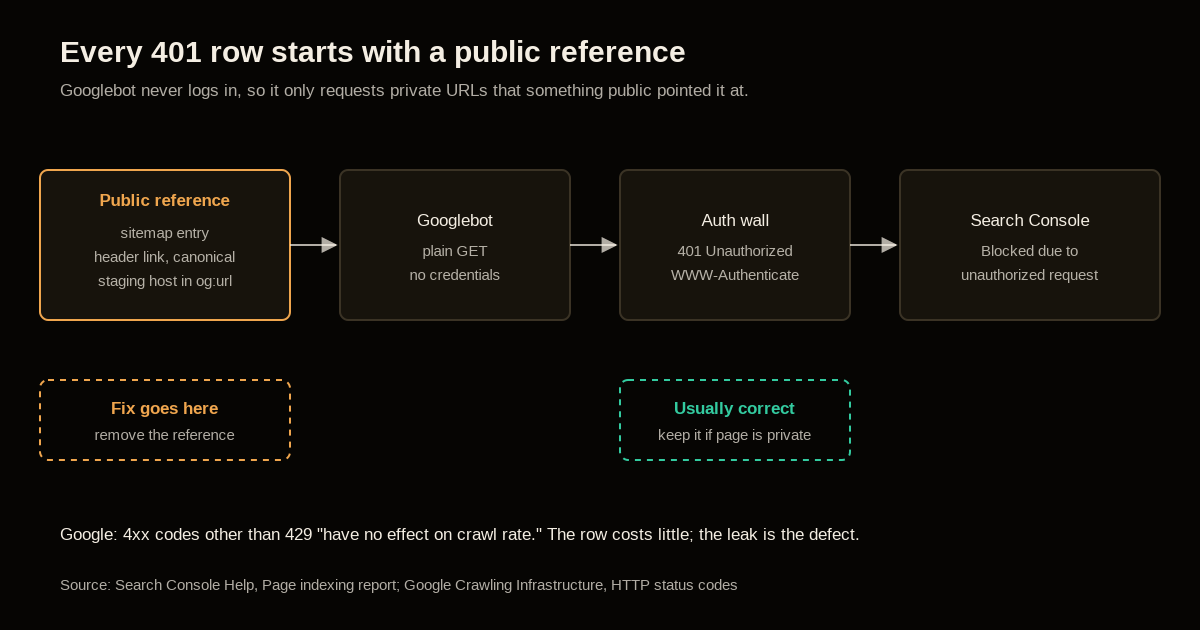
It means Googlebot fetched the URL and your server asked for credentials. Google’s Page indexing report help defines it in one line: “The page was blocked to Googlebot by a request for authorization.” Googlebot has no account on your site, so the request ends there.
Google then handles it like any other client error. From Google’s HTTP status code documentation: “All 4xx errors, except 429, are treated the same.” Google doesn’t index the URL, removes it if it was indexed before, and the documentation is explicit that “the 4xx status codes, except 429, have no effect on crawl rate.”
So a 401 row won’t hurt the rest of your site. What it tells you is more useful than what it costs you: Googlebot can only request URLs it found somewhere. A 401 row is a pointer back to a sitemap entry, a link, a canonical tag or a redirect you published. The page behind the wall is fine. The reference to it is the bug.
Where Do 401 URLs Leak From?
Almost always from one of five places. In rough order of how often they show up:
A staging or preview host inside a Domain property. A Domain property (
sc-domain:example.com) covers every subdomain, sostaging.example.combehind basic auth reports its 401s into your production report. The leak is usually an absolute URL built from an environment variable: a sitemap,og:url, canonical or hreflang that rendered the staging host during a build.Account and admin links in public templates. A “My account” or “Dashboard” link in the header is an ordinary followable link. Googlebot follows it, gets 401, and files the row.
Endpoints referenced from HTML. Googlebot crawls URLs it can parse out of
hrefattributes. An API route, a webhook URL or a private download linked from a public page gets requested with a plainGETand no token.Preview URLs posted in public places. Deploy bots post password-protected preview links into pull request comments and chat. If that thread is public, the link is crawlable.
Expired gated content. A page that was public, got indexed, then moved behind a paywall or login. Google will drop it over time, which may or may not be what you wanted.
Note what isn’t on the list: a 401 is never random. Unlike a Not found (404), which Google can pick up from typos and probes on other sites, a 401 URL exists on your infrastructure and was referenced by someone.
How to Fix Blocked Due to Unauthorized Request (401) in 5 Steps
Export the rows and group them by host and path prefix. In Search Console, open Indexing → Pages → Blocked due to unauthorized request (401) and export the examples. Twenty rows under
/account/are one problem. Twenty rows onstaging.are another.Inspect one URL from each group. In URL Inspection, expand Page indexing. The Discovery section lists the sitemaps and the referring page Google recorded. That’s your first lead on where the leak lives.
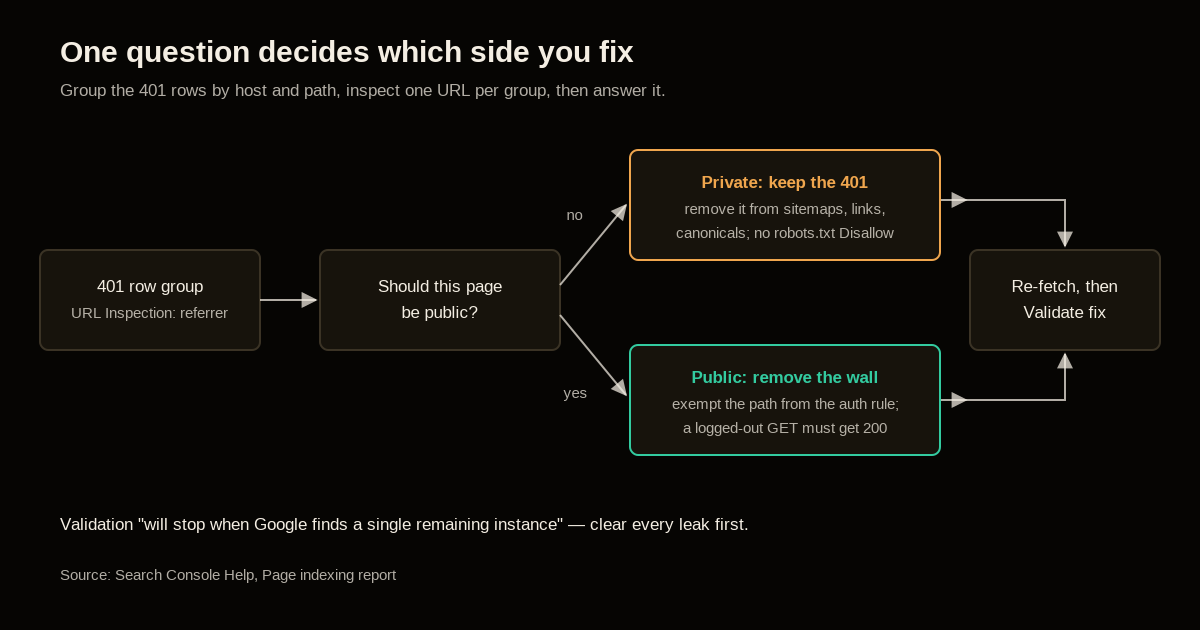
Decide whether the page should be public. This is the fork. If it’s an account page, an admin route or a staging copy, the 401 is correct and you keep it. If it’s a marketing page, a docs page or a product page that someone put behind auth by mistake, the 401 is the bug.
Fix the right side of the fork.
- Private page: remove every public reference to it. Drop it from the sitemap, rebuild absolute URLs from the production origin, and remove or gate header links to account pages. Leave the 401 in place. Don’t add a
Disallowfor it in robots.txt; Google can still index a blocked URL from links alone, which is the Indexed, though blocked by robots.txt trap. - Public page: take the path out of the auth rule (basic auth, a reverse-proxy
auth_request, an edge access policy or app middleware), then confirm a logged-out request gets 200.
- Private page: remove every public reference to it. Drop it from the sitemap, rebuild absolute URLs from the production origin, and remove or gate header links to account pages. Leave the 401 in place. Don’t add a
Re-fetch as Googlebot, then validate. Run the probe below against the exported URLs. When no URL you want indexed returns 401 and no public page still links to the private ones, click Validate fix. Google says validation “typically takes up to about two weeks,” and that it “will stop when Google finds a single remaining instance of that issue.” So clear every leaked reference first.
Here’s the probe. It’s dependency-free Node 20+, doesn’t follow redirects, and reads the headers that tell you which layer sent the 401:
// probe-4xx.mjs: re-fetch Search Console "Blocked due to ..." URLs as Googlebot and name the layer.
// usage: node probe-4xx.mjs urls.txt
import fs from 'node:fs';

const UA = 'Mozilla/5.0 (compatible; Googlebot/2.1; +http://www.google.com/bot.html)';

export function layer(status, h) {
  const auth = h.get('www-authenticate') ?? '';
  if (status === 401 && /^basic/i.test(auth)) return 'basic-auth (server or proxy config)';
  if (status === 401 && /^bearer/i.test(auth)) return 'token-protected API route';
  if (status === 401) return 'app or edge auth (no WWW-Authenticate)';
  if (status === 403 && h.get('cf-mitigated')) return 'edge bot challenge (WAF)';
  if (status === 403) return 'forbidden: firewall, IP rule or app';
  if (status === 405) return `method not allowed (Allow: ${h.get('allow') ?? '?'})`;
  if (status >= 300 && status < 400) return `redirect to ${new URL(h.get('location') ?? '/', 'http://x').host || 'same host'}`;
  if (status >= 400 && status < 500) return 'other 4xx';
  return 'ok';
}

const urls = fs.readFileSync(process.argv[2], 'utf8').split('\n').map((s) => s.trim()).filter(Boolean);
for (const url of urls) {
  try {
    const res = await fetch(url, { redirect: 'manual', headers: { 'user-agent': UA },
      signal: AbortSignal.timeout(10_000) });
    await res.arrayBuffer();
    console.log(`${res.status}\t${layer(res.status, res.headers)}\t${url}`);
  } catch (err) {
    console.log(`ERR\t${err.name}\t${url}`);
  }
}
A 302 to a login page on another host is worth a look too. Many single sign-on walls redirect instead of answering 401, and Google files those under Page with redirect rather than here. Same leak, different label.
Which Blocked Status Do You Actually Have?
Search Console splits auth and client errors across several labels, and the fix differs for each. The header the probe prints is what tells them apart:
| Googlebot gets | Search Console label | Usual cause | Fix |
|---|---|---|---|
401 + WWW-Authenticate | Blocked due to unauthorized request (401) | Basic auth, token-protected route, login wall | Remove the public reference, or the wall if the page is public |
| 403 | Blocked due to access forbidden (403) | WAF, bot rule, IP allow-list, hotlink rule | Allow verified Googlebot through |
| 405, 400, 406, 451 and other 4xx | Blocked due to other 4xx issue | Wrong method, bad parameters, content negotiation, legal block | Fix the link, or leave it if the endpoint is right |
| 302 to a login host | Page with redirect | SSO wall that redirects instead of returning 401 | Same as 401: remove the reference |
| 429 | Server error (5xx) | Rate limiter | Raise the limit for verified Googlebot |
| 404 or 410 | Not found (404) | Deleted page, broken link | Fix your own links, 301 moved content |
The 403 row deserves its own warning. Google’s help page says Googlebot “never provides credentials, so your server is returning this error incorrectly.” A 403 almost always means a firewall rule is stopping Google, which is a much bigger problem than a 401 on an account page. Fixing Blocked due to access forbidden (403) covers how to find that rule and verify Googlebot by IP range. Stopping Cloudflare from blocking Googlebot walks through the edge-side fix, and verifying crawlers by IP covers how to allow the real Googlebot without letting impostors in. And 429 isn’t a client error as far as Google is concerned. It’s filed with Server error (5xx) and it does slow crawling. For the 400, 405, 414 and 431 row, fixing Blocked due to other 4xx issue shows which URL shapes trigger each code on nginx, Node and Cloudflare.
What Did a 4xx Audit of This Site Find?
One real “other 4xx”, and it’s a correct response. On November 20, 2026, I ran a crawl of this site as Googlebot: all 638 URLs in sitemap.xml and blog-sitemap.xml, every <a> and <link> href on those pages, 1,376 unique internal targets, each fetched with redirect: 'manual'. 1,374 returned 200. One returned 301, a project page that moved. One returned 405.
That 405 is /mcp, this site’s Model Context Protocol endpoint. The homepage has a plain <a href="/mcp"> in its “how to read this site” section, aimed at AI agents. The endpoint speaks JSON-RPC over POST, and a GET without an event-stream Accept header gets 405 Method Not Allowed with Allow: GET, POST, OPTIONS and an RFC 9457 problem body. Googlebot sends a plain GET, so if it follows that link, the row lands in Blocked due to other 4xx issue. Zero rows are 401 or 403.
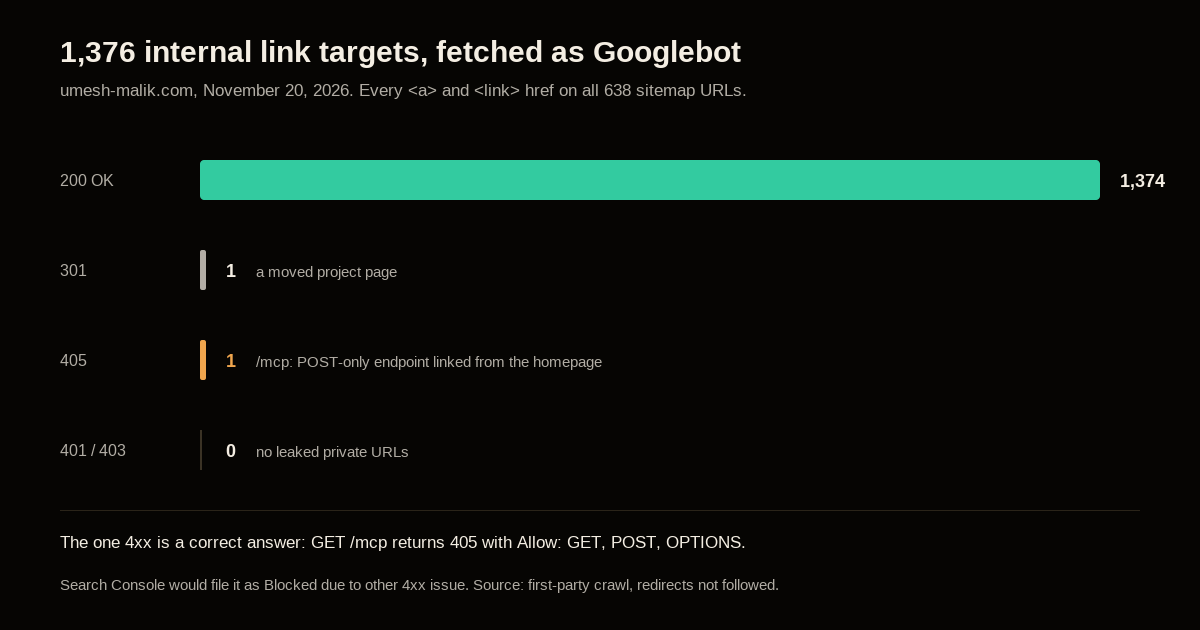
Is that worth fixing? Mostly no. The endpoint is right to refuse a plain GET, the URL was never meant to be indexed, and a 4xx row doesn’t touch crawl rate. The lesson for your own report is the same: before you “fix” a 401, 403 or 4xx row, check whether the status is the correct answer for that URL. If it is, the only change worth making is to the reference. A rel="nofollow" hint on agent-facing links, or leaving them alone, are both reasonable.
The same crawl doubles as a pre-check. Run it before you click Validate fix, because one leftover link to a private URL is enough to stop validation. If you’d rather start from the sitemap side, finding orphan pages uses the same link graph the other way round.
When Is a 401 in Search Console the Right Answer?
When the page is genuinely private. Authentication is the correct way to keep a staging site, an admin panel or an account page out of Google. It keeps out people as well as crawlers, and it works whether or not a crawler honours anything. noindex only works on pages Google can read, so it can’t protect private content, and a robots.txt Disallow can’t stop a URL from being indexed from links. If you’re mixing those up, the noindex post lays out which tool does which job.
What you shouldn’t do is serve Googlebot something different from what users get. Letting Googlebot past a wall that real visitors hit, by user agent, is cloaking. If content should rank, make it public for everyone. If it shouldn’t, keep the wall and stop advertising the URL. The AI search hub has the rest of this Search Console series.
FAQ
What does Blocked due to unauthorized request (401) mean in Search Console?
It means Googlebot requested the URL and the server answered HTTP 401, asking for credentials. Googlebot never logs in, so it could not read the page and Google will not index it. The row also tells you something public pointed Google at that URL, because Googlebot can only find URLs through links, sitemaps and similar references.
Is a 401 error in Search Console bad for SEO?
Not if the page is meant to be private. Google treats 401 like other 4xx codes: it doesn’t index the URL and the code has no effect on crawl rate. It is only a problem when the 401 page should be public, or when your own sitemap or links keep sending Googlebot to private URLs.
How do I find which page links to a 401 URL?
Open URL Inspection on the flagged URL and expand Page indexing, which lists the sitemaps and referring page Google recorded. Then crawl your own public pages for links, canonical tags and sitemap entries pointing at that path or host. Staging hostnames built from an environment variable are the most common source.
Should I use 401 or noindex to keep a staging site out of Google?
Use authentication. A 401 or a login wall keeps the content out of Google and away from people, while noindex only works if the page is publicly readable. Then stop linking to the staging host from public pages, sitemaps and canonical tags so the 401 rows stop appearing.
How long does Validate fix take for a 401 issue?
Google says validation typically takes up to about two weeks, and sometimes much longer. If Google finds a single remaining instance of the issue, validation stops, so remove every leaked reference before you click it. Do not click Validate fix again while it is still running.
Sources
- Google Search Console Help, Page indexing report: definitions of Blocked due to unauthorized request (401), Blocked due to access forbidden (403) and Blocked due to other 4xx issue, plus validation timing
- Google Crawling Infrastructure, How HTTP status codes affect Google’s crawlers: 4xx handling, removal from the index, and no effect on crawl rate except 429
- IETF, RFC 9110: HTTP Semantics: 401 Unauthorized and the
WWW-Authenticateheader - First-party measurement: a Googlebot-UA crawl of umesh-malik.com on November 20, 2026 (638 sitemap URLs, 1,376 unique internal
<a>/<link>targets, no redirects followed; 1,374 × 200, 1 × 301, 1 × 405 on/mcp, 0 × 401, 0 × 403)
Frequently asked questions
Google Search · Preferred sources
Prefer this site on Google
If you already read this writing, add umesh-malik.com as a Preferred Source. Google can then highlight it with a preferred badge in Top Stories, AI Overviews, and AI Mode — for you, not as a site-wide ranking boost.
Related Articles

Web Engineering
Fix Blocked Due to Access Forbidden (403): Your Firewall Did It
Fix Blocked due to access forbidden (403) by finding the firewall rule that took Googlebot for a bad bot. Verify by IP range, not a reverse DNS regex or UA.

Web Engineering
Fix Blocked Due to Other 4xx Issue: It's Usually 400, 414 or 431
Fix Blocked due to other 4xx issue by finding the real code: usually 400, 405, 414 or 431. Five servers tested show which URL shapes trigger each, and the fix.

Web Engineering
Fix Not Found (404) in Search Console: Fix Only the 404s You Cause
Fix Not found (404) in Search Console by fixing only the 404s you cause: sitemap entries and your own links. A free checker finds them. Why the rest can stay.
Keep reading
Get new posts on AI, Claude Code & LLMs
New deep-dives on AI engineering, Claude Code, and developer tooling — follow along however you prefer.
About the Author

Software engineer writing about AI, Claude Code, LLMs, OpenAI, Anthropic, and developer tooling. 5+ years building production systems at Expedia Group, Tekion, and BYJU'S.