Fix Blocked Due to Access Forbidden (403): Your Firewall Did It
Fix Blocked due to access forbidden (403) by finding the firewall rule that took Googlebot for a bad bot. Verify by IP range, not a reverse DNS regex or UA.

TL;DR — To fix Blocked due to access forbidden (403), look at your firewall before your app. Googlebot never sends credentials, so a 403 means a WAF rule, country block, rate limiter or fake-crawler check refused a real Google IP. Find which layer sent it from the response headers and edge logs, then allow verified Googlebot by its published IP ranges rather than by user agent or a reverse DNS pattern.
Blocked due to access forbidden (403) is the Search Console status for a URL where Googlebot got HTTP 403 Forbidden. Unlike a 401, it’s almost never the right answer for a page you published, and it can take a whole site out of Google in one rule change.
What Does Blocked Due to Access Forbidden (403) Mean?
It means a request from Googlebot was refused. Google’s Page indexing report help is unusually blunt about it: “HTTP 403 means that the user agent provided credentials, but was not granted access. However, Googlebot never provides credentials, so your server is returning this error incorrectly.”
Read that last clause again. For a 401, Google assumes you meant to lock the page and that something leaked the URL. For a 403, Google assumes you made a mistake. The page will not be indexed, and per Google’s HTTP status code documentation, a URL that was already indexed gets removed. The one mercy is that 4xx codes other than 429 “have no effect on crawl rate,” so the rest of the site keeps getting crawled.
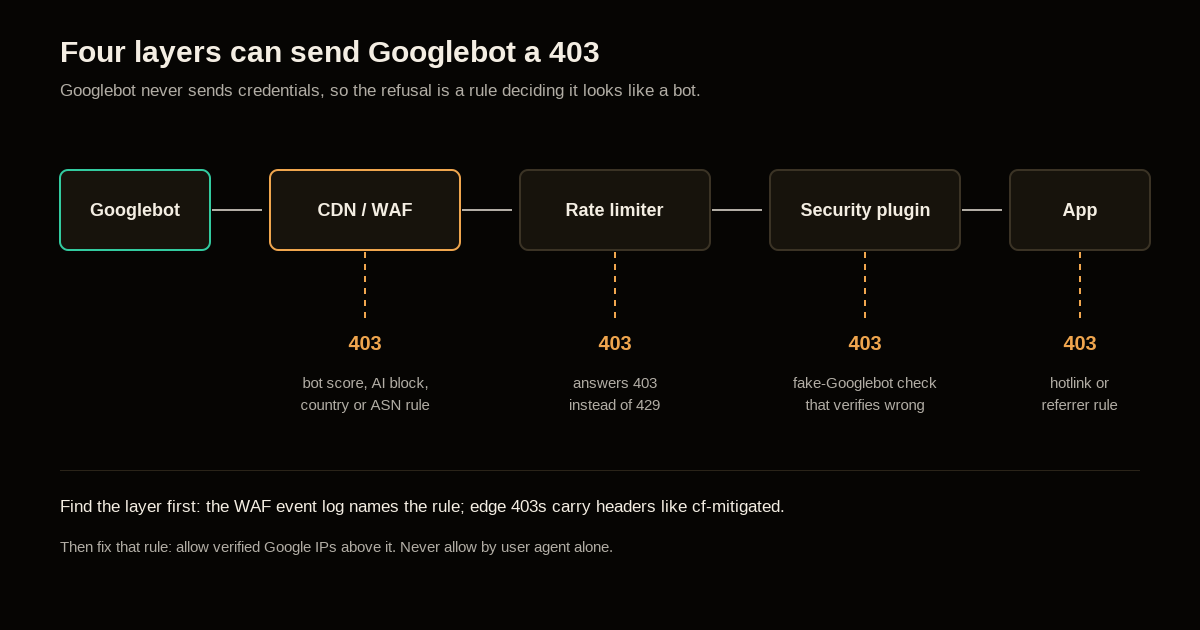
In practice the 403 rarely comes from your application. It comes from a layer in front of it that decided Googlebot looked like a bot. Googlebot is a bot. Every security product has to be told which bots to trust, and a 403 row is the receipt for one that wasn’t.
Why Is Googlebot Getting a 403?
Five causes cover nearly every case. In the order I’d check them:
A WAF or bot-management rule. Bot scores, “block AI crawlers” toggles, managed challenge rules and JavaScript challenges all decide on signals Googlebot fails: no cookies, no JavaScript execution on the first fetch, datacenter IPs, high request rates. On Cloudflare, the AI training block catches Googlebot too, which stopping Cloudflare from blocking Googlebot covers step by step.
A country or ASN block. Google’s crawlers come mostly from US addresses, but the published list also includes geo-distributed crawlers that resolve to
geo-crawl-*.geo.googlebot.com. A “block everything outside the EU” rule or a blanket block on cloud ASNs catches both.A rate limiter answering 403. Google handles 429 as a server-side signal and slows down. A limiter that answers 403 instead tells Google the page is forbidden, and the URL drops out of the index instead of being retried.
A fake-crawler check that verifies wrong. WordPress security plugins and custom middleware often ship a “block fake Googlebot” option. If the verification is broken (a bad regex, a DNS timeout treated as failure, a stale IP list), real Googlebot gets the 403 meant for impostors.
Hotlink and referrer rules. Image and PDF protections that require a same-site
Refererrefuse Googlebot, which sends none. These show up as 403 rows on asset URLs and quietly remove your images from Google Images.
How to Fix Blocked Due to Access Forbidden (403) in 6 Steps
Export the rows and group them. In Search Console, open Indexing → Pages → Blocked due to access forbidden (403) and export the examples. Group by path prefix and file type. All URLs at once means a sitewide rule. Only
/wp-content/uploads/means a hotlink rule. Only some days means a rate limiter.Run a live test in URL Inspection. Test live URL fetches from Google’s own IPs, so an IP-based rule reproduces there and a test from your laptop doesn’t. The live test identifies itself as
Google-InspectionTool, notGooglebot, so a rule keyed on the exact string “Googlebot” can treat the two differently. If the live test passes but rows keep appearing, the rule is time-based or rate-based.Find the layer in your logs. Search your CDN or WAF event log for the flagged path and a Googlebot user agent around the crawl date. The event names the rule. If the edge shows nothing, check the origin’s access log, then your security plugin’s log. Don’t guess from a spoofed
curl -A Googlebot: on this site’s Cloudflare zone a spoofed Googlebot user agent from a non-Google IP got 200 on 4 of 4 URLs, and on a zone with a fake-bot rule it would get 403. Either result tells you nothing about what real Googlebot saw.Verify the IPs in that log. Run every IP that received the 403 through the script below. If they’re Google, your rule is wrong. If they’re not, somebody spoofed Googlebot, your rule did its job, and those rows will stop on their own.
Allow verified Googlebot, then fix the rule. Add a skip or allow rule for verified Google crawler IPs above the rule that fired. Cloudflare and most CDNs expose a verified-bot field for exactly this. Change a rate limiter’s action to 429. Exempt Googlebot from hotlink rules. Don’t allow by user agent alone: that’s an open door for every scraper that sets the header.
Validate. When the live test returns 200 for every grouped URL, click Validate fix. Google says validation “typically takes up to about two weeks” and stops “when Google finds a single remaining instance of that issue.”
This is the check for step 4. It loads all four crawler range lists Google publishes, refuses to run on an empty list, and matches IPv4 and IPv6. Node 20+, no dependencies:
// google-ip-check.mjs: is this IP really Google? Matches against every published crawler range.
// usage: node google-ip-check.mjs 66.249.66.1 34.101.50.145 203.0.113.9
const BASE = 'https://developers.google.com/static/crawling/ipranges/';
const LISTS = ['common-crawlers', 'special-crawlers', 'user-triggered-fetchers',
  'user-triggered-fetchers-google'];

function toBig(ip) {
  if (ip.includes('.')) return [4, ip.split('.').reduce((n, o) => (n << 8n) | BigInt(o), 0n)];
  const [head, tail = ''] = ip.split('::');
  const h = head ? head.split(':') : [], t = tail ? tail.split(':') : [];
  const parts = [...h, ...Array(8 - h.length - t.length).fill('0'), ...t];
  return [6, parts.reduce((n, p) => (n << 16n) | BigInt(parseInt(p || '0', 16)), 0n)];
}

export function inCidr(ip, cidr) {
  const [base, bits] = cidr.split('/');
  const [v, a] = toBig(ip), [w, b] = toBig(base);
  if (v !== w) return false;
  const width = v === 4 ? 32n : 128n, shift = width - BigInt(bits);
  return a >> shift === b >> shift;
}

const ranges = [];
for (const name of LISTS) {
  const res = await fetch(BASE + name + '.json'); // fetch() follows redirects by default
  const json = await res.json();                   // throws on an HTML redirect page: good
  const prefixes = json.prefixes.map((p) => p.ipv4Prefix ?? p.ipv6Prefix);
  if (prefixes.length === 0) throw new Error(`${name}: empty list, refusing to continue`);
  for (const cidr of prefixes) ranges.push({ name, cidr });
}

for (const ip of process.argv.slice(2)) {
  const hit = ranges.find((r) => inCidr(ip, r.cidr));
  console.log(hit ? `GOOGLE\t${hit.name}\t${hit.cidr}\t${ip}` : `NOT-GOOGLE\t-\t-\t${ip}`);
}
Run against 66.249.66.1, 34.101.50.145 and 203.0.113.9, it prints GOOGLE common-crawlers 66.249.66.0/27, GOOGLE common-crawlers 34.101.50.144/28 and NOT-GOOGLE. The second address is a geo crawler, which is where the next section comes in.
Which Googlebot Check Should Your Firewall Use?
Every fake-crawler check uses one of four methods. Google’s verification guide documents two of them. The other two are what people actually ship:
| Method | Stops impostors? | Blocks real Googlebot? | Verdict |
|---|---|---|---|
| User agent contains “Googlebot” | No, anyone can send it | No | Never use alone |
Reverse DNS matches ^crawl-.*\.googlebot\.com$ | Yes | Yes, geo crawlers and some ranges | Broken, replace it |
Reverse DNS in googlebot.com, google.com or googleusercontent.com, then forward lookup | Yes | Only if DNS times out and you fail closed | Correct, but slow per request |
| IP in Google’s published range files | Yes | Only if the list is stale or empty | Best for firewalls |
The regex row is the one that produces 403 rows. It’s built from the example in every old tutorial, crawl-66-249-66-1.googlebot.com, and it doesn’t know the hostname has other shapes. Google’s guide lists crawl-***-***-***-***.googlebot.com or geo-crawl-***-***-***-***.geo.googlebot.com for common crawlers, plus google.com and googleusercontent.com hostnames for the other categories.
What Did Reverse DNS on 170 Googlebot Ranges Show?
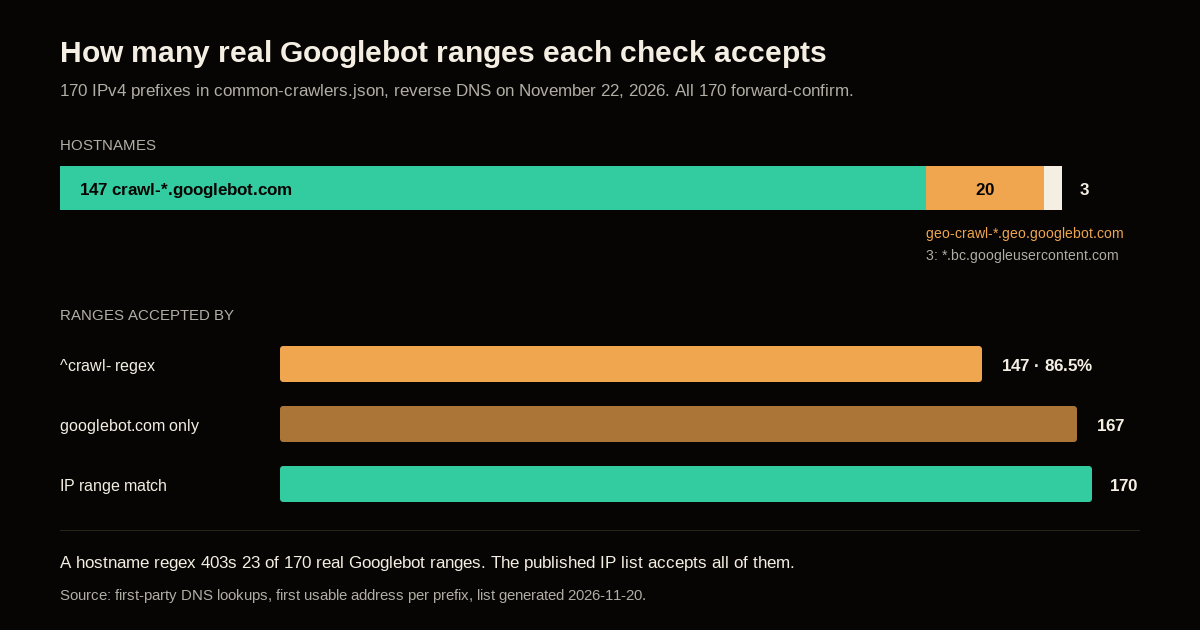
That a hostname pattern misses about one Googlebot range in seven. On November 22, 2026, I took Google’s common-crawlers.json (generated November 20, 2026: 317 prefixes, 170 IPv4 and 147 IPv6) and ran a reverse DNS lookup on the first usable address in each of the 170 IPv4 prefixes, then a forward lookup on the result.
All 170 forward lookups returned the original IP, so every address verified correctly under Google’s documented method. The hostnames did not all look alike:
- 147 resolved to
crawl-*.googlebot.com - 20 resolved to
geo-crawl-*.geo.googlebot.com - 3 resolved to
*.bc.googleusercontent.com, even though they’re in the common crawler list
A firewall using the ^crawl- regex would treat 23 of 170 ranges (13.5%) as fake and answer them with 403. One that only accepts the googlebot.com domain would still reject the three googleusercontent.com ranges. Matching against the published IP list accepts all 170.
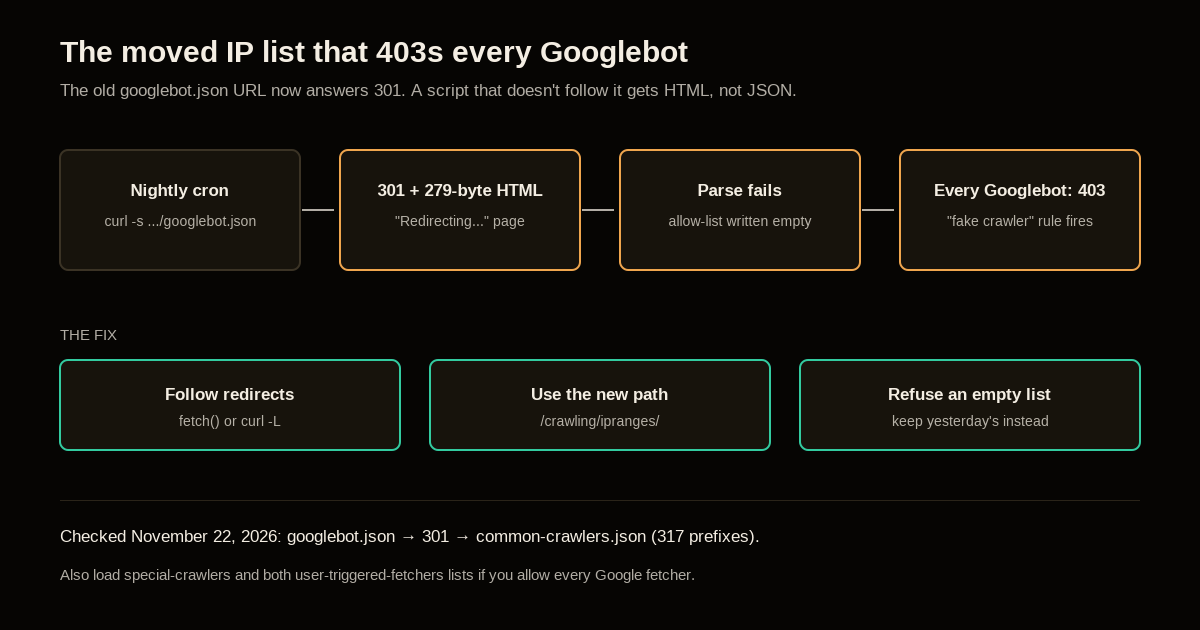
The second finding is about the list itself. The URL most allow-list scripts and tutorials use, https://developers.google.com/static/search/apis/ipranges/googlebot.json, now answers with a 301 to /static/crawling/ipranges/common-crawlers.json. Fetched with plain curl -s, which doesn’t follow redirects, the response is a 279-byte HTML “Redirecting…” page, not JSON.
A cron job that pipes that into jq fails. What happens next depends on the script. If it writes an empty allow-list and the firewall rule says “block any Googlebot user agent not on the list,” every real Googlebot request gets a 403 from that night on. That’s why the script above uses fetch(), which follows redirects, and throws on an empty list instead of shipping one.
When Is a 403 to Googlebot Correct?
Only when the request wasn’t Googlebot. If step 4 says the IPs aren’t Google’s, the 403 is your firewall working, and the rows usually come from spoofed traffic that Search Console attributed to the URL. Leave the rule alone.
A 403 is the wrong tool for anything you want out of the index on purpose. For a page you want hidden but public, use noindex, which Excluded by noindex tag covers. For a private page, use authentication and a 401. And for crawling you want to slow down, return 429 or 503 briefly; a 5xx and a 429 both land in Server error (5xx), where Google backs off instead of dropping the URL.
Don’t serve Googlebot a different page from the one users get once it’s through, either. If a challenge page comes back with a 200 instead of a 403, the challenge itself gets indexed, which is the Page indexed without content failure. The AI search hub has the rest of this Search Console series, and verifying AI crawlers by IP applies the same range-matching approach to GPTBot, ClaudeBot and the rest. If Googlebot is getting a 400, 405, 414 or 431 instead, that’s Blocked due to other 4xx issue.
FAQ
What does Blocked due to access forbidden (403) mean in Search Console?
It means Googlebot requested the URL and your server or something in front of it answered HTTP 403 Forbidden. Google won’t index the page. Because Googlebot never sends credentials, Google’s own help page says your server is returning the error incorrectly, which almost always points at a firewall, bot rule or security plugin.
Why is my website blocking Googlebot with a 403?
The usual causes are a WAF or bot-management rule that scores Googlebot as automated traffic, a country block that catches Google’s US or geo-distributed crawlers, a rate limiter that answers 403 instead of 429, or a fake-crawler check that verifies Googlebot incorrectly. The response headers and your edge logs tell you which layer sent it.
How do I verify that a request is really from Googlebot?
Match the request IP against Google’s published crawler IP range files, or run a reverse DNS lookup followed by a forward lookup that returns the same IP. Never trust the user agent string, because anyone can send it. If you use reverse DNS, accept the whole googlebot.com, google.com and googleusercontent.com domains, not one hostname pattern.
Will a 403 hurt my site’s SEO?
On the affected URLs, yes: Google won’t index them and drops them if they were indexed. Google treats 403 like other 4xx codes, so it doesn’t slow crawling of the rest of the site. A sitewide 403 to Googlebot is still the fastest way to lose search traffic, which is why the rule causing it matters.
How long does Validate fix take for a 403 issue?
Google says validation typically takes up to about two weeks and can take longer. It stops as soon as Google finds one remaining instance, so confirm every affected URL returns 200 to a verified Google IP before clicking it. Don’t click Validate fix again while a validation is still running.
Sources
- Google Search Console Help, Page indexing report: the definition of Blocked due to access forbidden (403), “Googlebot never provides credentials,” and validation timing
- Google Crawling Infrastructure, Verify requests from Google crawlers and fetchers: the three crawler categories, reverse DNS masks including
geo-crawl-*.geo.googlebot.com, and the IP range files - Google Crawling Infrastructure, How HTTP status codes affect Google’s crawlers: 4xx handling, index removal, and no crawl-rate effect except 429
- First-party measurement, November 22, 2026: reverse and forward DNS on the first usable address of all 170 IPv4 prefixes in
common-crawlers.json(generated 2026-11-20): 147crawl-*.googlebot.com, 20geo-crawl-*.geo.googlebot.com, 3*.bc.googleusercontent.com, 170 of 170 forward-confirmed. The legacygooglebot.jsonURL returned a 301 with a 279-byte HTML body. A spoofed Googlebot user agent from a non-Google IP got 200 on 4 of 4 umesh-malik.com URLs.
Frequently asked questions
Google Search · Preferred sources
Prefer this site on Google
If you already read this writing, add umesh-malik.com as a Preferred Source. Google can then highlight it with a preferred badge in Top Stories, AI Overviews, and AI Mode — for you, not as a site-wide ranking boost.
Related Articles

Web Engineering
Fix Blocked Due to Other 4xx Issue: It's Usually 400, 414 or 431
Fix Blocked due to other 4xx issue by finding the real code: usually 400, 405, 414 or 431. Five servers tested show which URL shapes trigger each, and the fix.

Web Engineering
Fix Blocked Due to Unauthorized Request (401): Find the Leaked Link
Fix Blocked due to unauthorized request (401) by finding the public link that leaked a login-walled URL to Googlebot. Then remove the link, or drop the wall.

Web Engineering
Fix Not Found (404) in Search Console: Fix Only the 404s You Cause
Fix Not found (404) in Search Console by fixing only the 404s you cause: sitemap entries and your own links. A free checker finds them. Why the rest can stay.
Keep reading
Get new posts on AI, Claude Code & LLMs
New deep-dives on AI engineering, Claude Code, and developer tooling — follow along however you prefer.
About the Author

Software engineer writing about AI, Claude Code, LLMs, OpenAI, Anthropic, and developer tooling. 5+ years building production systems at Expedia Group, Tekion, and BYJU'S.