Fix Page Indexed Without Content: Check Googlebot's First 2MB
Page indexed without content means Google indexed the URL but read no text. Find the layer that ate it: a bot challenge, MIME type, JS render or the 2MB cutoff.

TL;DR — Page indexed without content means Google kept the URL in its index but read no text from it. The cause is almost never the page itself: it’s the response Googlebot got, which can be a bot challenge, a non-HTML content type, an empty JavaScript shell that failed to render, or content pushed past the 2MB that Googlebot reads. Fetch the URL the way Googlebot does, find the layer that emptied it, and fix that layer.
Page indexed without content is a Search Console status for a URL that’s in Google’s index, but with nothing Google could read. With no text, there’s nothing to match a query against, so the URL is indexed in name only.
What Does Page Indexed Without Content Mean?
It means Googlebot fetched the URL, kept it, and found no content. Google’s Page indexing report help says the page “appears in the Google index, but for some reason Google could not read the content.” It names two possible reasons: “the page might be cloaked to Google or the page might be in a format that Google can’t index.” It also rules one out: “This is not a case of robots.txt blocking.”
Read that carefully, because it tells you where to look. Your browser shows a full page. Google says it saw nothing. So Googlebot and your browser got different responses, or the same response was processed differently. The bug lives in the gap between those two fetches.
There’s also a third reason the help page doesn’t spell out but the crawler documentation does. The Googlebot documentation says that “when crawling for Google Search, Googlebot crawls the first 2MB of a supported file type.” Once it hits that, “Googlebot stops the fetch and only sends the already downloaded part of the file for indexing consideration,” and “the file size limit is applied on the uncompressed data.” Content after byte 2,097,152 doesn’t exist as far as Google is concerned.
Which Layer Ate the Content?
Every Page indexed without content row traces back to one of four layers between your server and Google’s index. Each one looks fine in a browser:
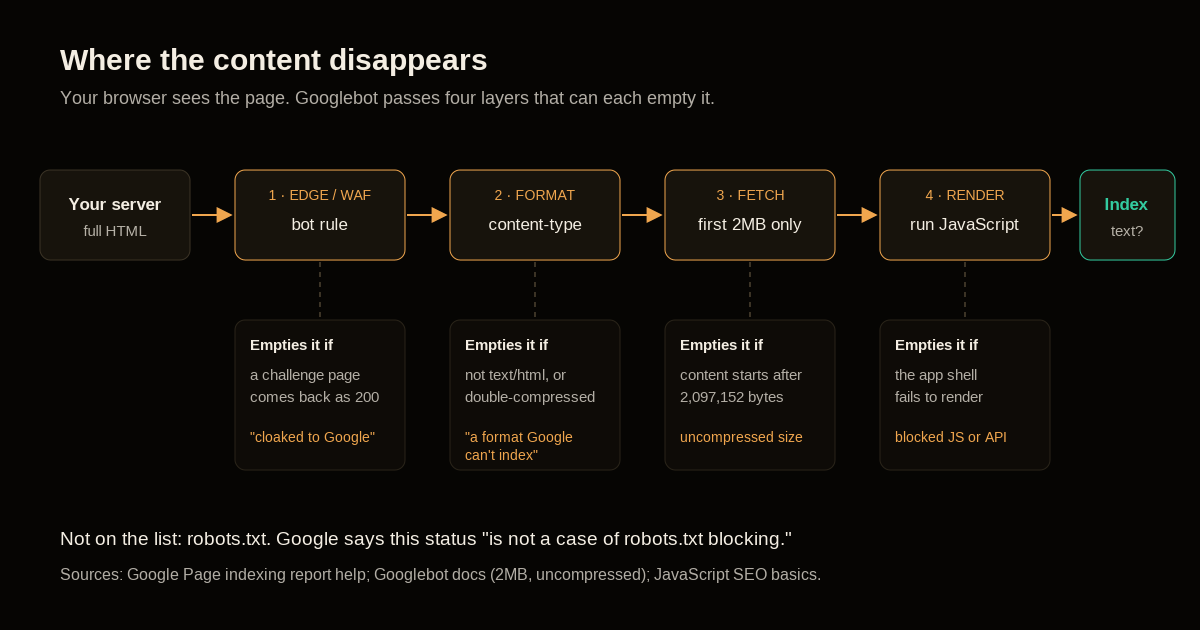
| Layer | What Googlebot gets | What your browser gets | How to spot it | Fix |
|---|---|---|---|---|
| Edge, WAF or bot rule | A 200 challenge or interstitial page | The real page | Live test screenshot shows “Just a moment” or a CAPTCHA | Allow verified Googlebot; don’t serve it a challenge |
| Response format | application/octet-stream, a PDF-like body, or double-compressed bytes | Rendered page (the browser sniffs it) | content-type isn’t text/html | Send text/html; charset=utf-8 and one Content-Encoding |
| 2MB fetch cutoff | The first 2MB of a bloated HTML file | The whole file | Content starts after byte 2,097,152 | Move content first, payloads last, paginate |
| JavaScript rendering | An empty <div id="root"> that never filled | A fully hydrated app | HTML tab shows the shell; console shows errors | Server-render or prerender the content |
The first row is the one Google means by “cloaked.” It’s usually not deliberate. A bot-management product decides Googlebot looks automated, which it is, and serves it a JavaScript challenge. Some products send that challenge with a 200 status, and then the page Googlebot indexes is the challenge. If the challenge comes back as a 403 instead, you’ll see Blocked due to access forbidden (403), and stopping Cloudflare from blocking Googlebot covers both.
The fourth row is the classic single-page-app problem. Google’s JavaScript SEO basics describe it directly: in an app shell, “the initial HTML does not contain the actual content and Google needs to execute JavaScript before being able to see the actual page content.” If that JavaScript fails for Googlebot (a blocked bundle, an API that rate-limits it, a script over the 2MB limit, an error thrown on a missing browser API), the render is empty and so is the index entry.
How to Fix Page Indexed Without Content in 6 Steps
Export the affected URLs and group them by template. In Search Console, open the issue under Indexing → Pages and export the examples. Forty product pages with the same problem is one bug in one template, not forty bugs.
Run a live test on one URL per group. In URL Inspection, click Test live URL, then View tested page. Check three things: the Screenshot (is it the page or a challenge?), the HTML tab (is your main text in it?), and More info (page resources that failed to load and JavaScript console errors). This is the only test that runs from Google’s own IP addresses with Google’s renderer, so it beats anything you can do locally.
Probe the raw response as Googlebot. Run the script below. It fetches each URL twice, as Googlebot and as a browser, and reports the content type, the uncompressed size, the word count before JavaScript, and where the first
<h1>sits.Name the layer from the output. A challenge marker or a big word gap between the two agents means the edge. A wrong content type means the format layer. More than 2MB, or an
<h1>that never shows up in the first 2MB, means the cutoff. Near-zero words for both agents means everything depends on JavaScript.Fix that layer, not the page. Allow verified Googlebot through the bot rule. Correct the
Content-Typeheader. Move the main content above large inline payloads, or paginate. Server-render or prerender the content so it’s in the initial HTML.Re-test live, then validate. When the live test shows your text in the HTML tab, request indexing for the most important URLs and click Validate fix. Google says validation “typically takes up to about two weeks,” and it stops if it finds a single remaining instance, so fix every template first.
Here’s the probe. It’s dependency-free Node 20+:
// probe-content.mjs: what does Googlebot's first 2MB of this URL actually contain?
// usage: node probe-content.mjs https://example.com/page [more URLs...]
const CUTOFF = 2 * 1024 * 1024; // Googlebot reads the first 2MB of HTML, uncompressed
const AGENTS = {
  googlebot: 'Mozilla/5.0 (compatible; Googlebot/2.1; +http://www.google.com/bot.html)',
  browser: 'Mozilla/5.0 (Windows NT 10.0; Win64; x64) AppleWebKit/537.36 Chrome/131.0 Safari/537.36',
};

function words(html) {
  const text = html
    .replace(/<(script|style|noscript|template)[^]*?<[/](script|style|noscript|template)>/gi, ' ')
    .replace(/<[^>]+>/g, ' ')
    .replace(/&[#a-z0-9]+;/gi, ' ');
  return text.split(/[ \t\n\r]+/).filter(Boolean).length;
}

async function probe(url, ua) {
  const res = await fetch(url, { headers: { 'user-agent': ua }, signal: AbortSignal.timeout(15_000) });
  const raw = Buffer.from(await res.arrayBuffer()); // fetch has already decoded gzip/br
  const seen = raw.subarray(0, CUTOFF).toString('utf8');
  const body = seen.match(/<body[^]*/i)?.[0] ?? seen;
  return {
    status: res.status,
    type: res.headers.get('content-type') ?? '(none)',
    bytes: raw.length,
    words: words(body),
    h1At: seen.search(/<h1[^a-z0-9-]/i),
    challenge: Boolean(res.headers.get('cf-mitigated')) ||
      /just a moment|challenge-platform|captcha|enable javascript/i.test(seen.slice(0, 20_000)),
  };
}

for (const url of process.argv.slice(2)) {
  const g = await probe(url, AGENTS.googlebot);
  const b = await probe(url, AGENTS.browser);
  const issues = [];
  if (!/^text[/]html|xhtml/i.test(g.type)) issues.push(`content-type ${g.type}`);
  if (g.challenge) issues.push('bot challenge in the response');
  if (g.bytes > CUTOFF) issues.push(`${(g.bytes / 1048576).toFixed(2)}MB: past the 2MB cutoff`);
  if (g.h1At < 0) issues.push('no <h1> in the first 2MB: content is JS-rendered or truncated');
  if (g.words < 50) issues.push(`only ${g.words} words before JavaScript runs`);
  if (b.words > 0 && g.words < b.words * 0.5) issues.push(`Googlebot gets ${g.words} words, a browser gets ${b.words}`);
  console.log(`${issues.length ? 'FAIL' : 'ok  '} ${g.status} ${g.bytes}B ${g.words}w ${url}`);
  for (const issue of issues) console.log(`     - ${issue}`);
}
One limit to keep in mind: changing the user agent doesn’t change your IP address. Firewalls that verify Googlebot by reverse DNS or IP range will treat this probe as an impostor, which is correct behavior on their part. If the probe says ok but the live test shows a challenge, the rule is keyed on IP, and the fix is to verify crawlers by IP, not user agent.
How Close Is a Real Site to the 2MB Cutoff?
Closer than I expected. On November 21, 2026, I ran that measurement across this site: every URL in sitemap.xml and blog-sitemap.xml, fetched as Googlebot, uncompressed, no JavaScript. 637 of 638 URLs returned 200 (one is a 301). All 637 had a <main> element and an <h1> in the raw HTML, because every page here is prerendered. No page depends on JavaScript for its content.
Size was a different story. The median page is 153,262 bytes, and 95% of pages are under 294,167 bytes. The blog index at /blog is 1,399,824 bytes, which is 67% of the 2MB cutoff, and it’s the only page anywhere near it.
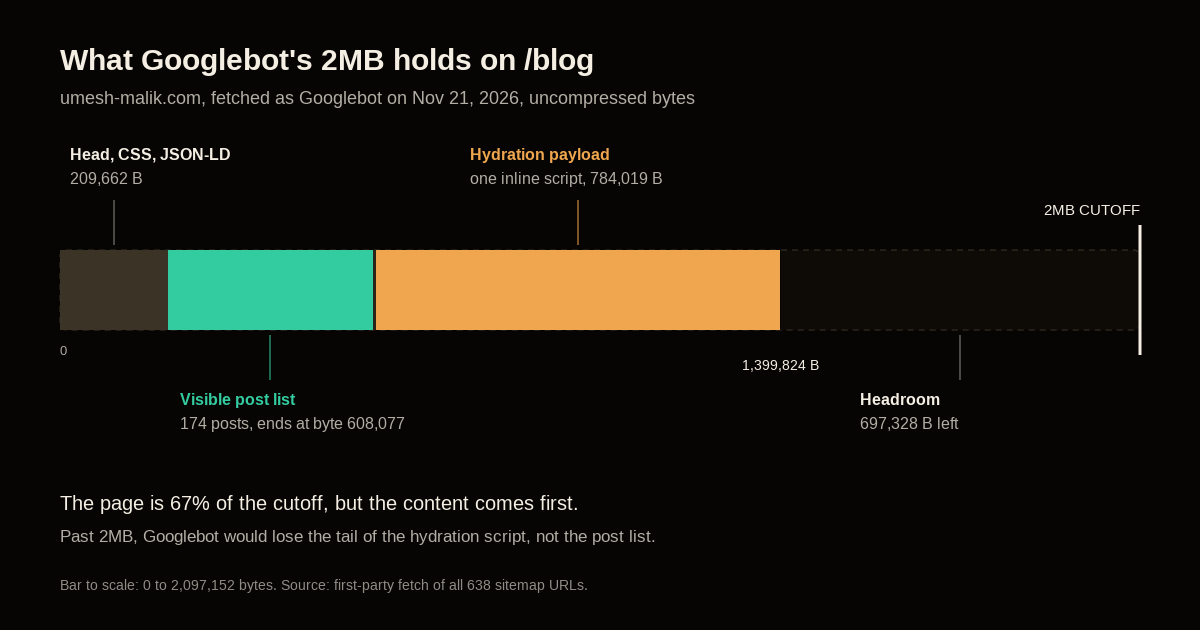
The byte map explains why. The visible content, a list of 174 posts, sits between byte 209,662 and byte 608,077. After it comes one inline script of 784,019 bytes: the framework’s hydration data, which repeats the metadata of every post so the page can become interactive. That script is 56% of the file.
Two things follow from that, and both apply to your site too:
- Order matters more than size. Because the content comes first, even if this page grew past 2MB, the cutoff would chop off the hydration script, not the post list. A framework that puts a big JSON blob before the markup would lose the content instead.
- Listing pages grow without anyone noticing. At 1,399,824 bytes for 174 posts,
/blogcosts about 8,045 bytes per listed post. The remaining 697,328 bytes buy roughly 86 more posts. At two posts a day that’s about six weeks, so this page is getting paginated before then.
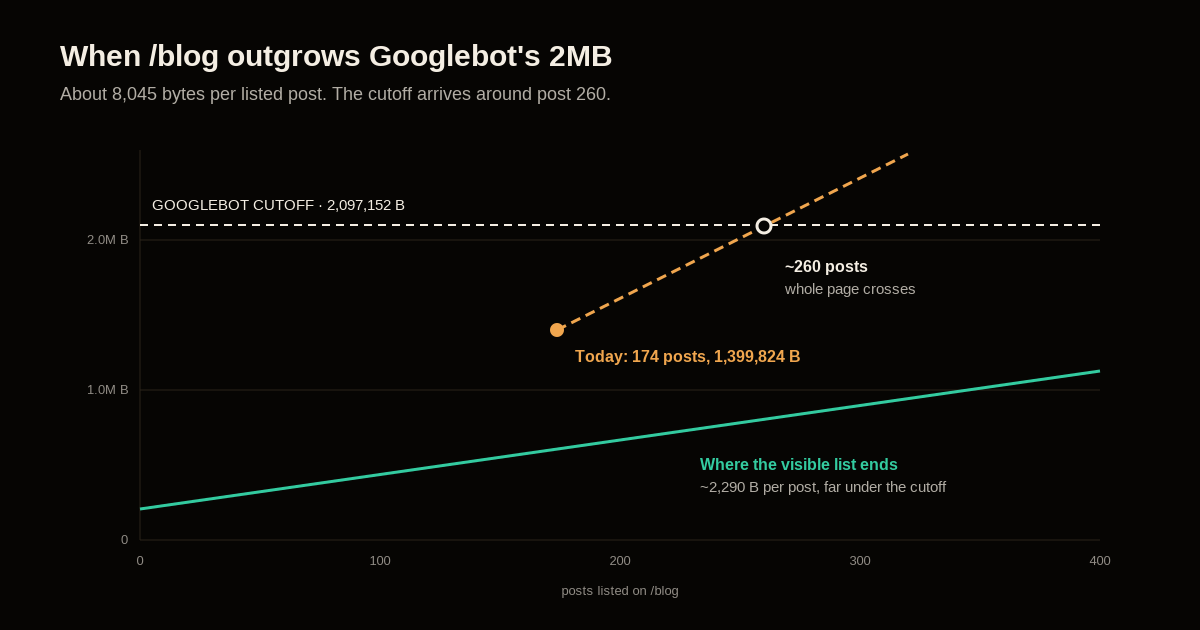
If you run the probe on your own listing pages, category archives and long product grids are the usual suspects. Inline base64 images, inline SVG sprites and serialized state stores are the usual bloat.
What Doesn’t Fix Page Indexed Without Content?
A few common reactions waste a validation cycle:
- Rewriting the content. The text was never the problem. Google didn’t judge it; it didn’t receive it. Thin or duplicate content shows up as Crawled, currently not indexed instead.
- Serving Googlebot a special version. Detecting Googlebot by user agent and sending it a stripped-down page is the cloaking Google’s help text is warning about. Send everyone the same HTML.
- Adding
noindexto make the row go away. That removes the URL from search. If the page should rank, it hides the symptom and loses the page. - Testing only in a browser. Your browser runs JavaScript, has cookies, and comes from a residential IP. It’s the one client guaranteed to see the page fine.
The related trap on the JavaScript side is an app shell that renders an error view with a 200 status, which Google files as a soft 404 rather than here. Same root cause, different label. If you inject content with inline scripts, the document.currentScript rendering post covers what Google’s renderer does and doesn’t execute. The rest of this Search Console series lives in the AI search hub.
FAQ
What does Page indexed without content mean in Search Console?
It means the URL is in Google’s index, but Google could not read any content from it. Google’s help page names two likely reasons: the page might be cloaked to Google, or it might be in a format Google can’t index. It is not caused by robots.txt blocking the page.
Is Page indexed without content caused by JavaScript?
It can be. If the HTML Googlebot downloads is an empty app shell and rendering fails, Google has no text to index. Rendering fails when the JavaScript bundle or the API it calls is blocked, errors, or returns something different to Googlebot. Server-side rendering or prerendering removes that risk entirely.
Does Googlebot really stop reading HTML after 2MB?
Yes. Google’s Googlebot documentation says that when crawling for Google Search it fetches the first 2MB of a supported file type, measured uncompressed, and sends only that part for indexing. Each CSS and JavaScript file is fetched separately under the same limit. Content placed after the cutoff is never seen.
How do I see what Googlebot actually received?
Run URL Inspection on the URL, click Test live URL, then View tested page. The HTML tab shows the rendered HTML, the screenshot shows what the renderer painted, and More info lists page resources and JavaScript console messages. That is the only view that uses Google’s real IP addresses and renderer.
How long does it take Google to fix Page indexed without content?
After you fix the response, request indexing for the most important URLs and click Validate fix for the issue. Google says validation typically takes up to about two weeks, and stops if it finds a single remaining instance. Fix every affected URL pattern before you start validation.
Sources
- Google Search Console Help, Page indexing report: definition of Page indexed without content, the cloaking and format reasons, and validation timing
- Google Search Central, Googlebot: the 2MB fetch limit for Google Search, applied to uncompressed data and to each referenced resource separately
- Google Search Central, Understand the JavaScript SEO basics: the crawl, render and index phases and the app shell model
- First-party measurement: a Googlebot-UA fetch of all 638 sitemap URLs on umesh-malik.com on November 21, 2026 (637 × 200, 1 × 301; 637 of 637 with
<main>and<h1>before JavaScript; median 153,262 bytes, p95 294,167 bytes;/blogat 1,399,824 bytes with a 784,019-byte inline hydration script and its post list between bytes 209,662 and 608,077)
Frequently asked questions
Google Search · Preferred sources
Prefer this site on Google
If you already read this writing, add umesh-malik.com as a Preferred Source. Google can then highlight it with a preferred badge in Top Stories, AI Overviews, and AI Mode — for you, not as a site-wide ranking boost.
Related Articles

Web Engineering
How to Fix Crawled Currently Not Indexed: 15 of 156 Posts Audited
How to fix crawled currently not indexed: split stuck pages by age first. 7 of 15 here were just queued; the old ones had gone 87 days without a crawl.

Web Engineering
How to Fix Soft 404 Errors: 1 Setting Sent 7 Dead URLs a 200
How to fix soft 404 errors: make dead URLs return a real 404. One hosting setting turned 7 of 7 dead URLs into 200 OK copies of the homepage. The test inside.

Web Engineering
Fix Offers, Review, or aggregateRating Error: 5 Hidden Causes
The offers, review, or aggregateRating error means a Product node has none of the three. 9 test variants passed the schema.org validator; 5 still failed.
Keep reading
Get new posts on AI, Claude Code & LLMs
New deep-dives on AI engineering, Claude Code, and developer tooling — follow along however you prefer.
About the Author

Software engineer writing about AI, Claude Code, LLMs, OpenAI, Anthropic, and developer tooling. 5+ years building production systems at Expedia Group, Tekion, and BYJU'S.