Fix Server Error (5xx) in Search Console Before the 2-Day Clock Runs
Fix Server error (5xx) in Search Console by re-fetching each URL as Googlebot first. Sort persistent, intermittent and bot-only errors, then fix before day 2.

TL;DR — To fix Server error (5xx) in Search Console, re-fetch every flagged URL several times as Googlebot and as a browser before you touch code. The pattern tells you the cause: always failing is a bug, sometimes failing is capacity, bot-only failing is a firewall. Fix it within a day or two, because Google says URLs that return 5xx for multiple days may be dropped from the index.
Server error (5xx) is the Search Console status for a URL where Googlebot got a 500-level response, timed out, or got no answer. It’s a record of one bad fetch, and it usually tells you less than it seems to.
What Does Server Error (5xx) Mean in Search Console?
It means Google tried to crawl the page and your server didn’t hand back a usable response. Google’s Page indexing report help defines it as “Googlebot couldn’t access your URL, the request timed out, or your site was busy.” So a 5xx row isn’t proof your code returned a 500. A timeout, a dropped connection, or an overloaded origin all land in the same bucket.
What Google does with that response is stricter than most people assume. From Google’s HTTP status code documentation: “Any content Google receives from URLs that return a 5xx status code is ignored.” A styled error page with your nav and footer still counts for nothing.
Here’s how the server-side statuses compare:
| Response Googlebot gets | Search Console label | What Google does | Fix |
|---|---|---|---|
| 500, 502, 504, timeout | Server error (5xx) | Ignores content, slows crawling across the site | Fix the bug or the capacity limit |
| 503 | Server error (5xx) | Same, and it’s the code meant for planned downtime | Keep it short, ideally under a day |
| 429 | Server error (5xx) | Treated as “the server is overloaded”, slows crawling | Raise the limit for verified Googlebot |
| 200 with an error message | Soft 404 | May drop it as an error page | Return a real status code |
| 403 or challenge page | Blocked due to access forbidden (403) | Can’t read the page | Allow verified Googlebot through the WAF |
The 429 row catches people out. A rate limiter that looks like a client-side “slow down” is a server error as far as Google is concerned.
How Long Can a Page Return 5xx Before Google Drops It?
About one to two days. Google’s guide to reducing crawl rate allows returning 500, 503 or 429 “for a short period of time (for example, a couple of hours, or 1-2 days).” It also warns: “if Googlebot observes these status codes on the same URL for multiple days, the URL may be dropped from Google’s index.”
Two things happen in that window. First, crawling slows site-wide. Google says the decrease “is proportionate to the number of individual URLs” returning errors, so one broken template that fails 300 URLs slows crawling of every healthy page next to them. Second, indexed pages stay indexed for now. Google keeps them while it waits, and “once the server starts responding with a 2xx status code, Google gradually increases the crawl rate.”
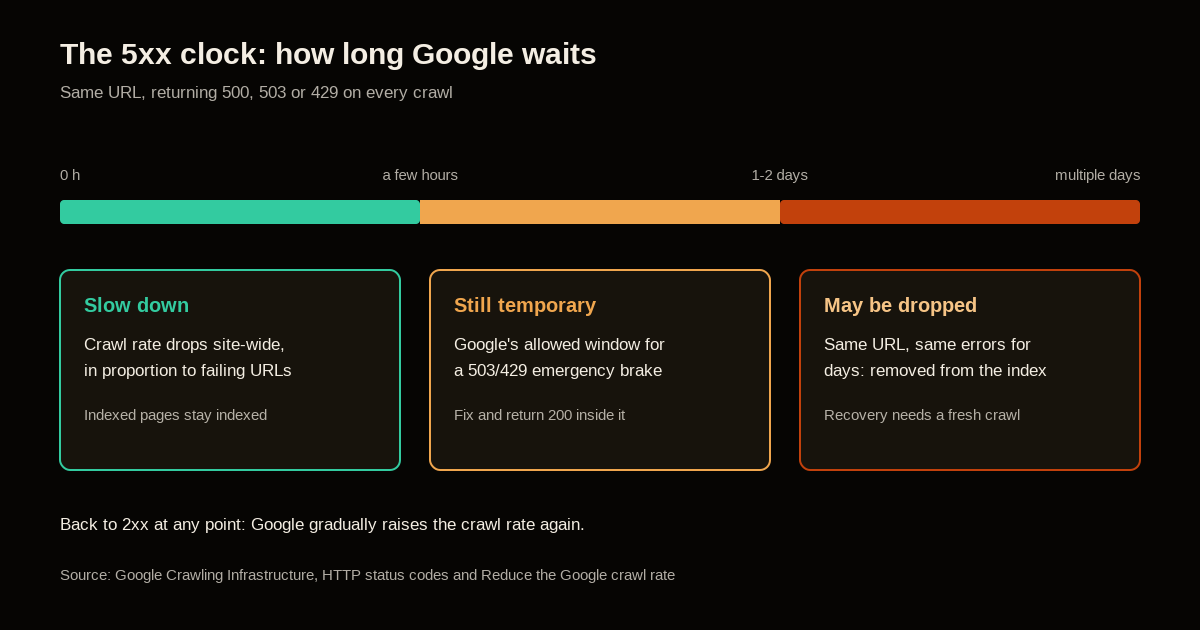
So the clock matters more than the count. Ten URLs that failed once last Tuesday are noise. One URL that has failed every crawl since Friday is a page about to leave the index.
How to Fix Server Error (5xx) in Search Console in 6 Steps
Export the rows. In Search Console, open Indexing → Pages → Server error (5xx) and export the example URLs. Note the Last crawled date on each one.
Re-fetch each URL as Googlebot and as a browser, at least three times each. Use the probe script below. One fetch tells you nothing about an intermittent fault. Six tells you which pattern you’re in.
Classify the result. Every request fails: it’s persistent. Some fail: it’s intermittent. Only the Googlebot user agent fails: it’s bot-dependent. Nothing fails: it was already fixed, or it was a one-off.
Line it up with your logs. URL Inspection shows the exact crawl time. Search your origin and CDN logs for that minute. Then check Settings → Crawl stats → Host status, which Google’s help page recommends for “persistent or large-scale problems.”
Fix the cause for that pattern (next section). Don’t add capacity to fix a bug, and don’t hunt for a bug that’s really a rate limit.
Validate. Click Validate fix in the Page indexing report and run URL Inspection → Request Indexing on the few URLs that matter most. Google says validation usually takes up to about two weeks, and you shouldn’t click it again until it succeeds or fails.
Here’s the probe. It’s dependency-free Node 20+ and doesn’t follow redirects, so a redirect to an error page shows up as what it is:
// probe-5xx.mjs — re-fetch Search Console "Server error (5xx)" URLs and classify them.
// usage: node probe-5xx.mjs urls.txt [rounds=3]
import fs from 'node:fs';

const UAS = {
  googlebot: 'Mozilla/5.0 (compatible; Googlebot/2.1; +http://www.google.com/bot.html)',
  browser: 'Mozilla/5.0 (Macintosh; Intel Mac OS X 14_0) AppleWebKit/537.36 Chrome/130 Safari/537.36',
};
const isErr = (s) => s === 0 || s === 429 || s >= 500;

async function hit(url, ua) {
  const t0 = performance.now();
  try {
    const res = await fetch(url, { headers: { 'user-agent': ua }, redirect: 'manual',
      signal: AbortSignal.timeout(10_000) });
    await res.arrayBuffer();
    return { status: res.status, ms: Math.round(performance.now() - t0),
      challenged: res.headers.get('cf-mitigated') === 'challenge' };
  } catch {
    return { status: 0, ms: Math.round(performance.now() - t0), challenged: false }; // timeout / reset
  }
}

export function classify(bot, human) {
  const botErr = bot.filter((r) => isErr(r.status)).length;
  const humanErr = human.filter((r) => isErr(r.status)).length;
  if (bot.some((r) => r.challenged) || (botErr && !humanErr && botErr === bot.length)) return 'ua-dependent';
  if (botErr === bot.length) return 'persistent';
  if (botErr > 0) return 'intermittent';
  if (bot.some((r) => r.ms > 5000)) return 'slow';
  return 'healthy-now';
}

const [file, roundsArg] = process.argv.slice(2);
const rounds = Number(roundsArg ?? 3);
const urls = fs.readFileSync(file, 'utf8').split('\n').map((s) => s.trim()).filter(Boolean);
const tally = {}; const lat = [];
for (const url of urls) {
  const bot = [], human = [];
  for (let i = 0; i < rounds; i++) { bot.push(await hit(url, UAS.googlebot)); human.push(await hit(url, UAS.browser)); }
  lat.push(...bot.map((r) => r.ms));
  const verdict = classify(bot, human);
  (tally[verdict] ??= []).push(url);
  if (verdict !== 'healthy-now') console.log(`${verdict.padEnd(13)} ${url}  [${bot.map((r) => r.status).join(',')}]`);
}
lat.sort((a, b) => a - b);
const p = (q) => lat[Math.min(lat.length - 1, Math.floor(q * lat.length))];
console.log(JSON.stringify({ urls: urls.length, requests: urls.length * rounds * 2,
  verdicts: Object.fromEntries(Object.entries(tally).map(([k, v]) => [k, v.length])),
  googlebotMs: { p50: p(0.5), p95: p(0.95), max: lat.at(-1) } }));
Faking the Googlebot user agent only tests rules keyed on the user agent. A firewall that verifies Googlebot by IP will treat your probe as an impostor, which is useful in its own way: if the browser passes and the fake bot gets challenged, your WAF has a user-agent rule that real Googlebot may also be hitting. Verifying crawlers by IP, not user agent covers how to tell them apart.
Which Kind of 5xx Error Do You Have?
The probe sorts every URL into one of four buckets, and each bucket has a different fix:
| Verdict | What it looks like | Usual cause | Fix |
|---|---|---|---|
| Persistent | Every request returns 5xx | A crashing route, a missing env var, a bad deploy, a dead upstream | Read the stack trace, roll back, fix the template |
| Intermittent | Some 5xx, some 200 | Origin overload, cold starts, connection limits, a flaky upstream | Cache HTML at the edge, raise limits, add retries upstream |
| Bot-dependent | Browser gets 200, Googlebot gets 5xx, 429 or a challenge | WAF, bot-fight mode, a rate limit on bot traffic | Allow verified Googlebot; see stop Cloudflare blocking Googlebot |
| Healthy now | All 200 | Already fixed, or a one-off blip | Validate fix and move on |
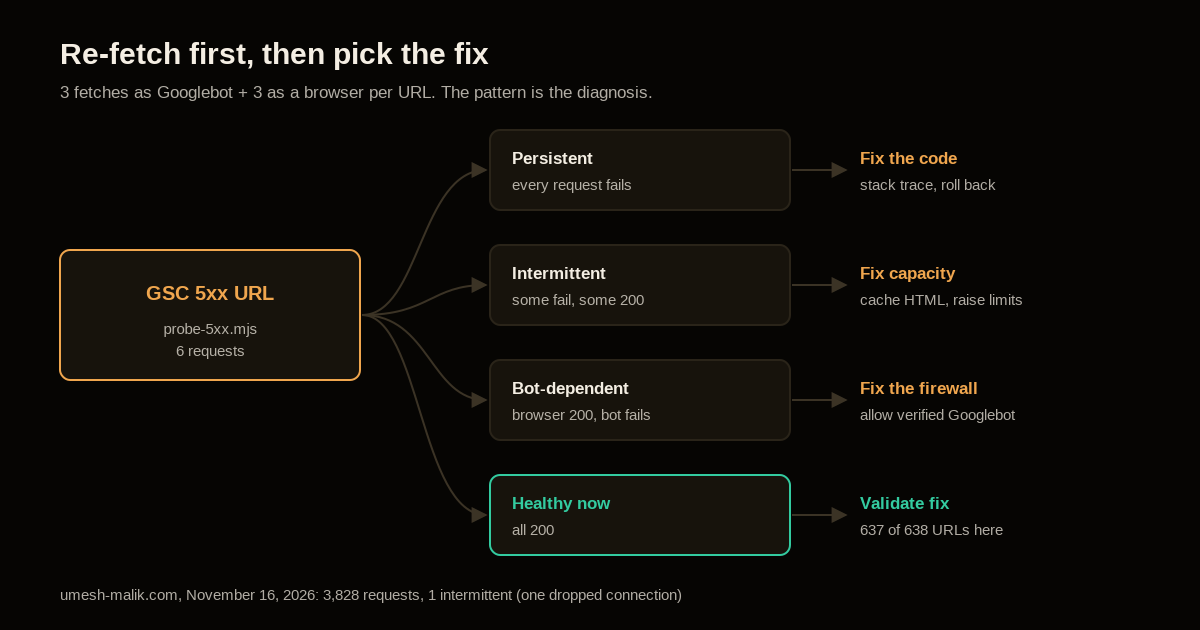
I ran the probe against this site on November 16, 2026: all 638 URLs in sitemap.xml and blog-sitemap.xml, three rounds per user agent, 3,828 requests. 637 came back healthy. One URL went into the intermittent bucket: one dropped connection out of 1,914 Googlebot requests, with 200s before and after it. Googlebot-UA latency was 122 ms at p50, 352 ms at p95, 1,296 ms at worst.
That single failure shows why step 2 says three rounds. The probe ran from a cloud container through an outbound proxy, so a dropped connection there proves nothing about the server. If Googlebot had hit the same blip, Search Console would have filed it as Server error (5xx) anyway. One fetch would have sent you hunting a bug that doesn’t exist. Three fetches show it’s noise.
What Took This Site Down With Error 1027?
A rate limit nobody thought of as one. This site runs on Cloudflare Workers, and the Workers Free plan has a daily request cap. Cloudflare’s Workers error reference lists code 1027 as “Worker exceeded free tier”. Once you hit it, Cloudflare serves its own error page in place of your Worker until the daily limit resets.
The trigger was a custom analytics widget. Every open tab polled the Worker on a 10-second timer plus a 30-second heartbeat, roughly 14 requests a minute, with no check for a hidden tab. That’s 20,160 requests a day from one backgrounded tab, so five tabs left open all day use up a 100,000-request cap on their own. After that, every request that goes through the Worker gets the 1027 page. Googlebot included.
What decides how bad that gets is how many URLs go through the Worker at all. Cloudflare’s run_worker_first setting controls it:
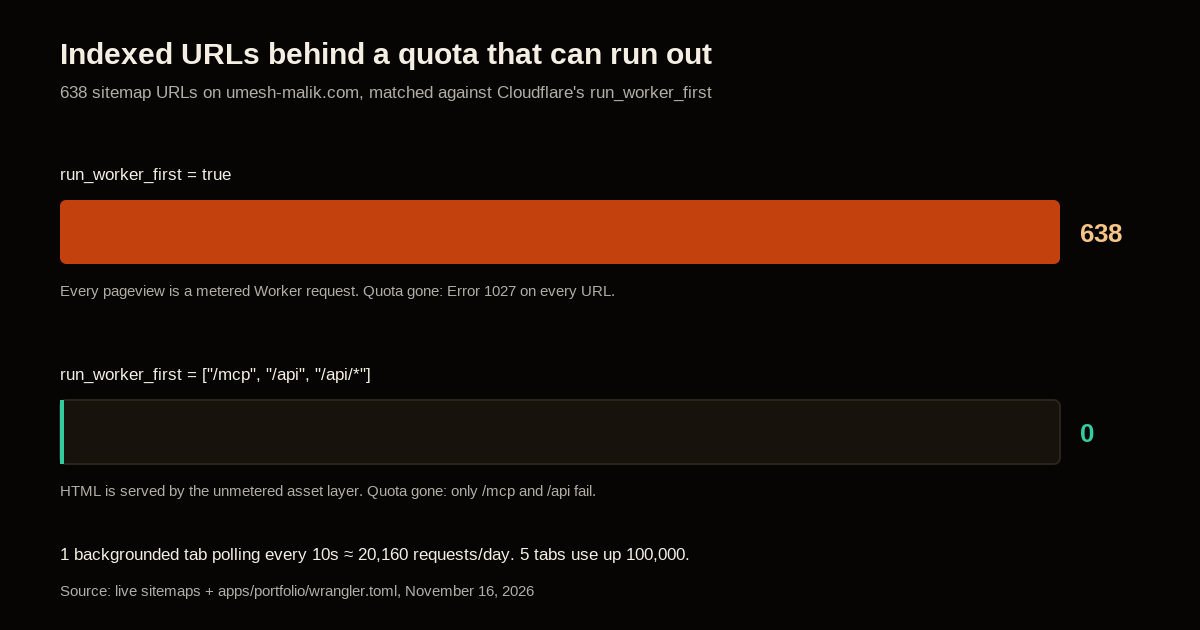
With run_worker_first = true, every one of the 638 sitemap URLs runs through the metered Worker. Today it’s ["/mcp", "/api", "/api/*"], and I checked: 0 of 638 sitemap URLs match those paths. HTML now comes from Cloudflare’s static asset layer, which isn’t metered. The polling widget was deleted rather than tuned.
The general lesson for Server error (5xx): any per-request quota between Googlebot and your HTML is a 5xx waiting to happen. That covers serverless invocation caps, database connection pools, upstream API rate limits and bot-traffic limits. Keep indexable pages on a path that can’t run out. If you don’t know what status code your platform’s quota page returns, check it with curl -i before Googlebot does.
What Else Causes 5xx Errors for Googlebot Only?
Three causes come up again and again in this report:
- robots.txt returning 5xx. This is worse than one bad page. Google’s robots.txt rules say a 5xx on robots.txt stops crawling of the whole site for the first 12 hours. The robots.txt post covers what happens after that.
- Crawl bursts on an uncached origin. Googlebot’s revisits plus AI crawlers can overload a server that handles human traffic fine. Caching HTML and answering revalidation with 304 Not Modified make each fetch cheap, and stopping AI scrapers from overloading your server handles the rest.
- Error pages served as 200. That’s the opposite mistake. It doesn’t show up as 5xx, it shows up as Soft 404.
What to Check After You Fix It
Once the URL returns 200 again, it goes back into the normal crawl queue. If Google fetches it and still doesn’t index it, the row moves to Crawled – currently not indexed, which is a content-quality problem, not a server one. Keep an eye on Crawl stats → Host status for a week afterwards, because the crawl rate recovers gradually, not all at once. The AI search hub collects the rest of this technical SEO series.
FAQ
What does Server error (5xx) mean in Google Search Console?
It means Googlebot requested the URL and got a 500-level response, a timeout, or no answer at all. Google ignores any content sent with a 5xx response, so the page could not be indexed from that crawl. The label records what happened on Google’s last fetch, not what your server does right now.
Will 5xx errors remove my pages from Google?
Short outages will not. Google keeps already indexed URLs while it slows its crawling, and it recovers once the server returns 200 again. Google warns that a URL returning 500, 503 or 429 for multiple days may be dropped from the index, so persistent errors do cost rankings.
How do I find the cause of a 5xx error Googlebot saw?
Re-fetch the exact URL several times with a Googlebot user agent and with a normal browser user agent, then compare. If every request fails it is a code or configuration bug, if some fail it is capacity, and if only the bot fails it is a firewall or bot rule. Match the time in your server or CDN logs to the crawl time in URL Inspection.
Should I return 503 or 429 to slow Googlebot down?
Only as a short emergency brake. Google says returning 500, 503 or 429 to cut crawl rate is fine for a few hours or one to two days, and not longer. For anything longer, fix capacity or cache the pages instead of rate limiting the crawler.
How long does Validate fix take for Server error (5xx)?
Google says validation usually takes up to about two weeks. Google recrawls the affected URLs over that window and marks the issue fixed once they return a healthy status. Do not restart validation while it is still running.
Sources
- Google Crawling Infrastructure, How HTTP status codes affect Google’s crawlers
- Google Crawling Infrastructure, Reduce the Google crawl rate
- Google Search Console Help, Page indexing report
- Google Search Central, How Google interprets the robots.txt specification
- Cloudflare Docs, Workers errors and exceptions and Workers limits
- First-party measurement:
probe-5xx.mjsrun against all 638 URLs in the live umesh-malik.comsitemap.xml+blog-sitemap.xmlon November 16, 2026 (3 rounds × 2 user agents, 3,828 requests; 637 healthy, 1 intermittent from a single dropped connection; Googlebot-UA p50 122 ms, p95 352 ms, max 1,296 ms), plus the site’srun_worker_firstconfig matched against the same 638 URLs (0 Worker-routed)
Frequently asked questions
Google Search · Preferred sources
Prefer this site on Google
If you already read this writing, add umesh-malik.com as a Preferred Source. Google can then highlight it with a preferred badge in Top Stories, AI Overviews, and AI Mode — for you, not as a site-wide ranking boost.
Related Articles

Web Engineering
Fix Offers, Review, or aggregateRating Error: 5 Hidden Causes
The offers, review, or aggregateRating error means a Product node has none of the three. 9 test variants passed the schema.org validator; 5 still failed.

Web Engineering
Fix Unparsable Structured Data: 16 Ways It Breaks, 1 Fix
Unparsable structured data means Google hit a JSON syntax error and dropped the block. I broke JSON-LD 16 ways; one serializer change fixed every one.

Web Engineering
Fix CLS Issue More Than 0.1: From 0.25 to 0 in Three Changes
CLS issue more than 0.1 means a quarter of mobile visits saw the page jump. Image dimensions halved my test page's 0.25 and still failed. Three fixes hit 0.
Keep reading
Get new posts on AI, Claude Code & LLMs
New deep-dives on AI engineering, Claude Code, and developer tooling — follow along however you prefer.
About the Author

Software engineer writing about AI, Claude Code, LLMs, OpenAI, Anthropic, and developer tooling. 5+ years building production systems at Expedia Group, Tekion, and BYJU'S.