How to Serve Googlebot 304 Not Modified: 637 Pages Had No ETag
How to serve Googlebot 304 Not Modified: our 637 HTML pages sent no ETag, so each recrawl moved 24.2 MB. The edge setting and build cascade behind it.

TL;DR — How to serve Googlebot 304 Not Modified: give every HTML response a stable ETag, because Googlebot replays it as If-None-Match when it recrawls. On this site all 637 HTML pages in the sitemap shipped with no ETag and no Last-Modified, so every recrawl downloaded 24.2 MB of bodies that a 304 would have cut to about 0.85 MB of headers. The edge dropped the ETag on HTML only, and even with it restored, every deploy rewrites 640 of 641 pages because each one embeds a hashed entry-chunk name.
A 304 Not Modified is the HTTP response that says “the copy you already have is still current.” It has no body. A crawler can only get one if the server first handed it a validator, an ETag or a Last-Modified date, and then recognised that validator on the next request. Lose the validator and every recrawl is a full download, no matter how little changed.
What Does a 304 Not Modified Do for Googlebot?
Google’s crawler documentation says Googlebot “supports caching when re-crawling URLs for Google Search.” It works the standard way. Googlebot stores the ETag from the first fetch and sends it back as If-None-Match on the next one. If the server answers 304, Googlebot keeps its stored copy.
Three details from that page matter for setup:
- ETag wins. When a response carries both validators, Google’s crawlers use the
ETag, as the HTTP standard requires. - Google prefers ETag. “For Google’s crawlers specifically, we recommend using
ETaginstead of theLast-Modifiedheader,” because a malformed date breaksIf-Modified-Sincesilently. - Nothing else counts. “Other HTTP caching directives aren’t supported.”
Cache-Control: max-agedoes not stop Googlebot from recrawling.
Almost nobody gets this right. In its December 2024 caching post, Google said that ten years earlier about 0.026% of its fetches were cacheable, and that the share had fallen to 0.017%. This site was in the other 99.98%, and I only found out by measuring.
How Much Did Missing ETags Cost?
I fetched every URL in the site’s two sitemaps with Googlebot’s user agent and Accept-Encoding: gzip, deflate, br, and recorded the status, the validators and the compressed body size. Of the 638 URLs, 637 returned 200 and one returned 301, a stale project URL that the sitemap still listed.
| Response type | URLs checked | ETag | Last-Modified | Conditional request result |
|---|---|---|---|---|
HTML pages (text/html) | 637 | 0 of 637 | 0 of 637 | Always 200 with full body |
Sitemaps and feeds (.xml, feed.json) | 4 | 4 of 4 | 0 | 304 with 0 body bytes (tested on blog-sitemap.xml) |
robots.txt, llms.txt | 2 | 2 of 2 | 0 | Validator present, so a 304 is possible |
Markdown twins (/blog/<slug>.md) | spot check | Yes | 0 | 304 with 0 body bytes |
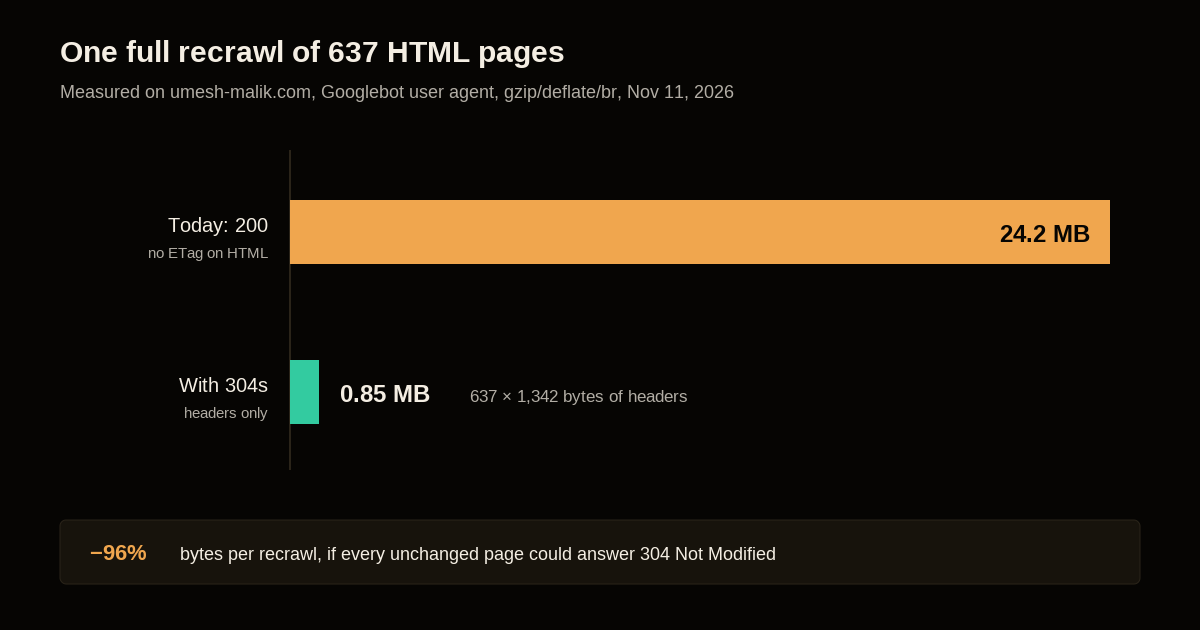
The 637 HTML bodies added up to 24,196,138 bytes compressed, about 38 KB per page. A 304 from the same edge carries headers only, and this site’s HTML responses measured 1,342 bytes of headers each, mostly the long Link header that advertises the agent resources. So one full recrawl would cost about 0.85 MB as 304s instead of 24.2 MB as 200s, roughly 96% less.
If-Modified-Since did not help either. With no Last-Modified anywhere on the site, a conditional request by date returned 200 on HTML and on Markdown alike. The only validator this platform issues is the ETag, so the ETag is the whole game.
Who Removed the ETag?
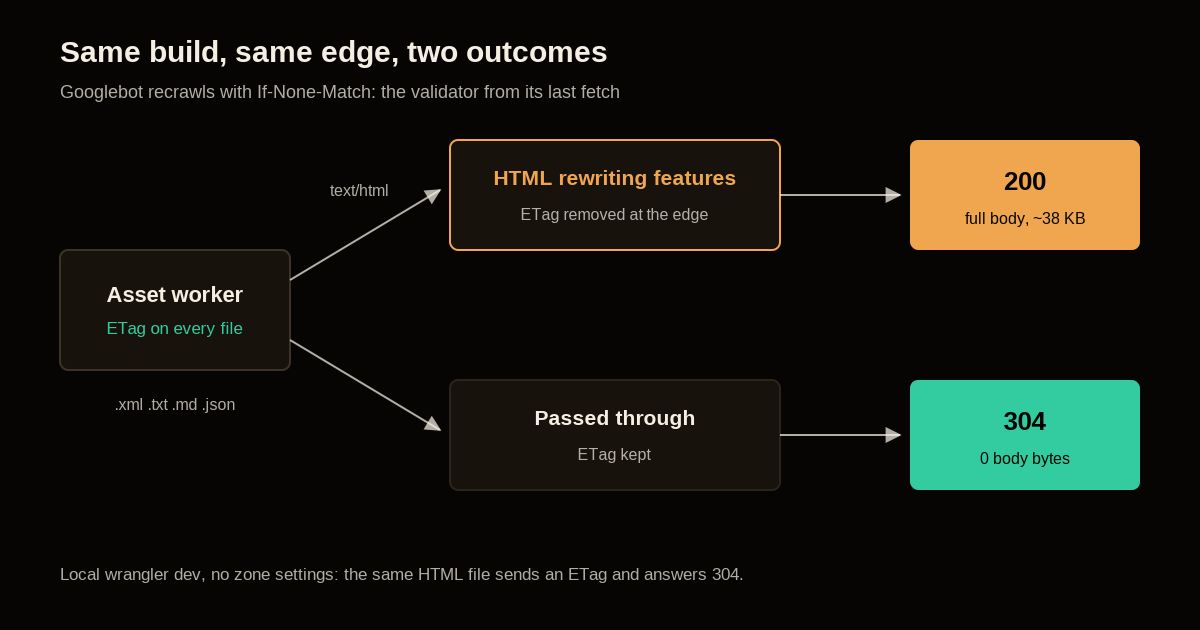
The split by content type was the clue. The same Cloudflare asset worker serves the HTML, the XML and the Markdown from one build/ directory, and only the HTML came back bare. So I ran the identical build through npx wrangler dev, which runs the asset worker locally with no zone settings in front of it:
curl -sD - -o /dev/null http://localhost:8787/terms | grep -i etag
# ETag: "fe1f4c3567abeea3f7a21900242558f1"

curl -s -o /dev/null -w '%{http_code}\n'
  -H 'If-None-Match: "fe1f4c3567abeea3f7a21900242558f1"' http://localhost:8787/terms
# 304
Locally, the HTML had a strong ETag and answered If-None-Match with a 304. In production, the same file had none. The asset worker issues it, and something between the asset worker and the visitor drops it for HTML only.
Cloudflare’s ETag reference names the suspects. To keep ETags, “it is necessary to disable certain features such as” Email Obfuscation, Automatic HTTPS Rewrites, and Replace insecure JavaScript libraries, and Rocket Loader also removes strong ETags. All four are body-rewriting features that act on HTML responses, which fits the pattern exactly. The production body was byte-for-byte the same size as the build file, so whichever feature is on rewrote nothing here and still cost the validator. I did not have zone API access for this run, so I can’t tell you which of the four is switched on. The fix below covers all of them at once.
Why Does Every Deploy Change Every Page?
Restoring the header was only half the problem. An ETag from a static asset host is a hash of the file. If the file changes on every deploy, the ETag changes too, and Googlebot gets a 200 anyway.
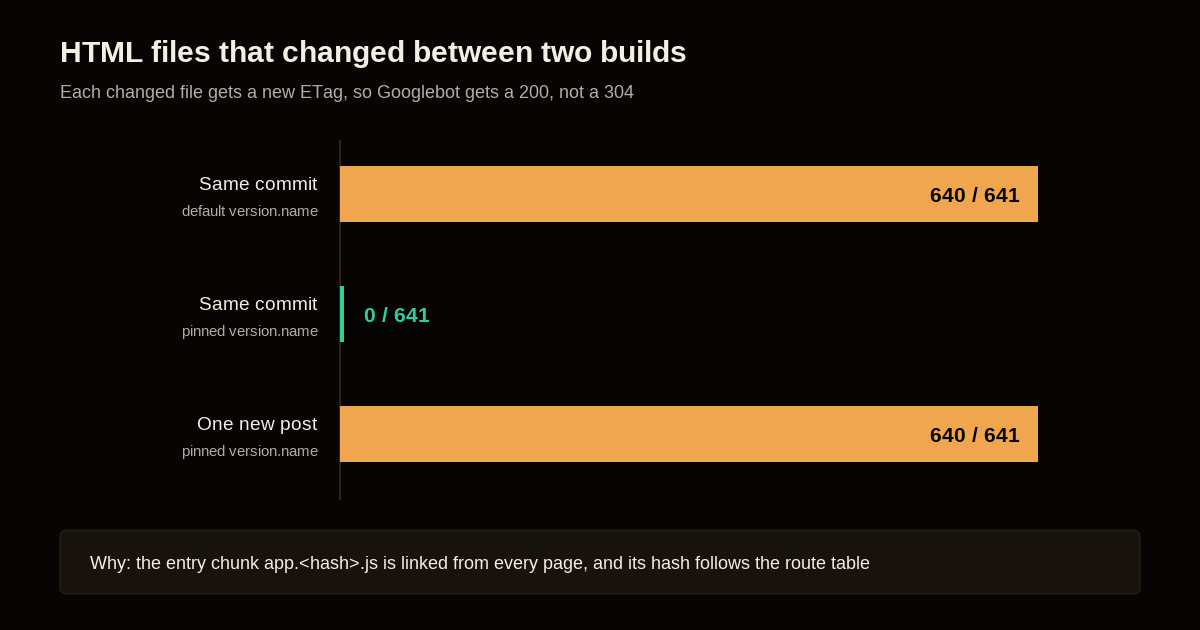
So I built the same commit twice on the same machine and diffed the output. 640 of 641 HTML files changed. Every diff was the same set of lines: the hashed /_app/immutable/ script names, the CSP hash of the inline bootstrap script, and a global called __sveltekit_8hpdrm that became __sveltekit_1376pv4.
The cause is one default. SvelteKit’s kit.version.name falls back to Date.now().toString() (line 320 of @sveltejs/kit/src/core/config/options.js in 2.61.1). That timestamp is baked into the app entry chunk, which changes its hash, which changes every chunk that imports it, which changes the modulepreload links on every prerendered page. A blog that deploys twice a day therefore hands Googlebot a new ETag for every page twice a day, and a restored ETag would almost never produce a 304.
Pinning the version name removed the noise. With version: { name: 'fixed-test' } in svelte.config.js, two builds of the same commit produced 0 changed HTML files out of 641. So far, so good.
Then I added this post to the pinned build, and 640 of the 641 existing HTML files changed again. This time each page differed in only three places: the app.<hash>.js entry link, the import() of that same file in the inline bootstrap script, and the CSP hash of that script. The entry chunk holds the client route table, and the route table references the blog post node by its content hash. A new post changes that node, so its hash changes. That changes the entry chunk’s hash, which is printed into every prerendered page. One new post rewrites every page on the site.
That changes what a 304 can do for a statically built site. A content hash ETag only survives until the next deploy that touches any route, so 304s only build up between deploys. On a blog that ships twice a day, Googlebot gets a 304 only when it recrawls a page twice within the same half-day. On a docs site that deploys weekly, most recrawls fall inside one deploy, and the edge fix alone recovers most of the 24 MB.
How to Serve Googlebot 304 Not Modified in 6 Steps
Check the validators on a real HTML page. Run
curl -sD - -o /dev/null https://example.com/some-page | grep -iE 'etag|last-modified'. No output means no 304 is possible. Check an XML or text file next to it to see whether the gap is HTML-only.Replay the validator. Copy the
ETagvalue and send it back withcurl -s -o /dev/null -w '%{http_code}' -H 'If-None-Match: <value>' <url>. You want304. Include the quotes, and theW/prefix if it is a weak ETag.Compare with the origin. Hit the same file without the CDN in front, through
wrangler dev, your origin’s IP, or a staging hostname. If the origin sends the ETag and the edge does not, the edge removed it.Stop the edge from removing it. Add a Cloudflare Cache Rule for your hostname with Respect strong ETags enabled. Cloudflare’s docs say this “automatically disables Rocket Loader, Email Obfuscation, and Automatic HTTPS Rewrites” for matching requests, so a static site that already ships HTTPS-only markup loses nothing. Then turn off Replace insecure JavaScript libraries, which the rule does not cover.
Measure your build churn. Build the same commit twice and run
diff -rq build-a build-b | grep -c '\.html', then add one piece of content and diff again. On SvelteKit, setkit.version.nameso identical commits produce identical files; the docs suggest the git commit hash. If one content change still rewrites every page, as it does here, your 304s will only cover the time between deploys. Plan around that rather than expecting a 304 on every recrawl.Verify with Google. Open Search Console, go to Settings → Crawl stats, and watch the Crawl responses table. A working setup shows a growing Not modified (304) share within a couple of weeks. Server logs filtered to Googlebot with status 304 confirm it sooner.
What Breaks If You Get the 304 Wrong?
A 304 is a promise that nothing changed, and Googlebot believes it. Get the promise wrong and Google keeps a stale page.
| Mistake | What Googlebot sees | Result |
|---|---|---|
| No validator at all | Always 200 | Full body every recrawl; safe but wasteful |
| Validator changes on every deploy | Always 200 | Same cost as no validator, and harder to notice |
| ETag computed from something other than the body (build time, inode) | 304 after a content edit | Google keeps the old content until a later full fetch |
| Weak ETag compared strongly by a proxy | 200 where a 304 was possible | Lost savings, nothing worse |
Last-Modified in the wrong date format | If-Modified-Since ignored | Always 200 |
The dangerous row is the third one. If you hand-roll ETags in a Worker or an origin server, derive them from the response body or a content hash, never from a deploy timestamp or a file’s modification time. Cloudflare’s static asset hashes are body hashes, which is why fixing the edge and the build is enough here.
When Does This Not Matter?
Be honest about the scale. Google says crawl budget is mainly a concern for very large sites and sites whose pages change very often, and a 637-page blog is neither. Googlebot was not going to stop crawling this site over 24 MB.
What the 304 buys a small site is efficiency, not rankings. It means fewer bytes per recrawl, less edge work, and a crawl log where a 200 means something changed. It matters far more on a 500,000-page catalog, where every unchanged page that answers 200 is real crawl capacity spent on nothing. That kind of site usually renders HTML from a template and a database, so its bytes don’t churn with every deploy and the edge fix pays off on almost every recrawl.
For this site, the edge fix is one Cache Rule and is worth doing today. The build cascade is a bigger change, and twice-daily deploys limit what it can win, so it is tracked separately from this post. The measurements above are from the live site and from local builds on November 11, 2026.
For more on how this site handles crawlers at the edge, read how to stop Cloudflare blocking Googlebot, how to verify AI crawler IPs instead of user agents, and how to audit rel=next pagination headers. For another Cloudflare cache setting that silently wastes transfer, see setting up Cloudflare Origin Range Requests. If your pages render content with inline scripts, auditing document.currentScript rendering for SEO covers the other half of what Googlebot sees. To check that every page Googlebot recrawls is also reachable through your own links, see how to find orphan pages. The sitemap-side freshness signal has the same build-churn trap, covered in how to fix sitemap lastmod. The AI search hub collects the rest.
FAQ
Does Googlebot support ETag and If-None-Match?
Yes. Google’s crawler documentation says Googlebot supports HTTP caching when it recrawls URLs for Google Search, using ETag with If-None-Match and Last-Modified with If-Modified-Since. When both validators are present, Googlebot uses the ETag, and Google recommends ETag because it avoids date-formatting mistakes.
Does a 304 Not Modified hurt rankings or indexing?
No. A 304 tells Googlebot the copy it already holds is still current, so it keeps using that copy. It only saves the transfer and the work of reprocessing an unchanged body. The risk runs the other way: if your server answers 304 when the page did change, Google keeps the stale version.
Why does Cloudflare remove the ETag from my HTML pages?
Cloudflare documents that features which rewrite the response body can strip ETags, including Email Obfuscation, Automatic HTTPS Rewrites, Rocket Loader, and Replace insecure JavaScript libraries. Those features act on HTML, which is why HTML can lose its ETag while XML, JSON, and text files on the same site keep theirs. A Cache Rule with Respect Strong ETags turns the conflicting features off.
Should I also send Last-Modified?
Google recommends ETag for its own crawlers but suggests setting both, because other clients may only understand one. Cloudflare’s Workers static assets send an ETag and no Last-Modified, so on that platform the ETag is the validator you have. If you do send Last-Modified, it must use the HTTP date format, such as Fri, 04 Sep 1998 19:15:56 GMT.
Do small sites need to care about 304 responses?
Less than large ones. Google says crawl budget is mainly a concern for sites with very many pages or pages that change very often. A 304 still saves bandwidth and origin work on every recrawl, and it costs nothing once your validators are stable, so it is worth fixing whenever the fix is a setting rather than a project.
Sources
- Google Search Central, Overview of Google crawlers and fetchers: HTTP caching
- Google Search Central Blog, Crawling December: HTTP caching (December 2024)
- Google Search Central, Large site owner’s guide to managing your crawl budget
- Cloudflare Docs, ETag headers
- SvelteKit Docs, Configuration: version
- First-party measurement: 638 sitemap URLs on umesh-malik.com fetched with the Googlebot user agent, plus local
wrangler devand repeatedpnpm buildruns, November 11, 2026
Frequently asked questions
Google Search · Preferred sources
Prefer this site on Google
If you already read this writing, add umesh-malik.com as a Preferred Source. Google can then highlight it with a preferred badge in Top Stories, AI Overviews, and AI Mode — for you, not as a site-wide ranking boost.
Related Articles

Web Engineering
How to Fix Soft 404 Errors: 1 Setting Sent 7 Dead URLs a 200
How to fix soft 404 errors: make dead URLs return a real 404. One hosting setting turned 7 of 7 dead URLs into 200 OK copies of the homepage. The test inside.

Web Engineering
Fix Page Indexed Without Content: Check Googlebot's First 2MB
Page indexed without content means Google indexed the URL but read no text. Find the layer that ate it: a bot challenge, MIME type, JS render or the 2MB cutoff.

Web Engineering
Fix Duplicate Without User-Selected Canonical: 812 Copies Had None
Fix Duplicate without user-selected canonical with a canonical Google can read. My site had 812 Markdown twins with none; one Cloudflare header rule fixed them.
Keep reading
Get new posts on AI, Claude Code & LLMs
New deep-dives on AI engineering, Claude Code, and developer tooling — follow along however you prefer.
About the Author

Software engineer writing about AI, Claude Code, LLMs, OpenAI, Anthropic, and developer tooling. 5+ years building production systems at Expedia Group, Tekion, and BYJU'S.