Fix Sitemap Couldn't Fetch in Search Console: Test First, Then Wait
Fix Sitemap couldn't fetch with one live URL test. If Googlebot gets a 200, the file is fine and Google deferred it. If not, a free script finds why.

TL;DR — To fix Sitemap couldn’t fetch in Search Console, paste the sitemap URL into URL Inspection and run a live test before touching anything. If the test fails, a technical problem is blocking Googlebot (robots.txt, a 403 from your firewall, a 404, an HTML page instead of XML), and the checker script below finds which one. If the test passes, the file is fine: Google says it uses the same label when it simply hasn’t spent time on your sitemap, so the fix is crawl demand, not XML.
Sitemap couldn’t fetch is the Search Console status for a submitted sitemap that Google has no successful read of. It’s the most misread status in the Sitemaps report, because one label covers both “we got an error” and “we didn’t try yet.”
What Does Sitemap Couldn’t Fetch Mean in Search Console?
Google’s Sitemaps report help gives a sitemap one of three statuses, and the definition of the one you’re looking at is short:
| Status | Google’s definition | What it usually means | What to do |
|---|---|---|---|
| Success | “The sitemap was loaded and processed successfully with no errors.” | All listed URLs are queued for crawling | Nothing |
| Has errors | “The sitemap could be fetched, but has one or more errors.” | Googlebot read the file; something inside is wrong | Open the error, fix the entries |
| Couldn’t fetch | “The sitemap could not be fetched for some reason.” | Fetch failed, or Google hasn’t spent time on it | Live-test the URL, then branch |
The difference between the last two rows matters. Has errors means the fetch worked and the content failed: a parsing error, an invalid date, a URL on another domain. Couldn’t fetch means there’s no usable read at all. The same help page says “Google will retry for a few days, and then stop if the sitemap continues to be unavailable or has critical errors,” and that Google “will continue to recrawl the sitemap at a pace independent of the site crawl schedule.”
So the status is a snapshot of Google’s last attempt, or of the absence of one. It isn’t a verdict on your file until you’ve tested the file yourself.
Why Does a Valid Sitemap Still Say Couldn’t Fetch?
Because Google uses the same label for a sitemap it hasn’t gotten around to. In a discussion covered by Search Engine Journal on October 6, 2026, Martin Splitt described a sitemap that was “valid, it’s publicly accessible, and it’s linked from the robots.txt,” and still showed the error. John Mueller explained why:
- “It could be the case that we don’t have any time to crawl this sitemap file because we’re too busy with other things.”
- “Then we would also position that as ‘couldn’t fetch’ because we didn’t have time to actually fetch it.”
- On low demand: “we’re just going to skip the sitemap file because we got enough already.”
- And the uncomfortable one: “the crawl demand is very often based on the perceived quality of a website.”
That splits every Couldn’t fetch row into two cases that need opposite fixes:
| Technical fetch failure | Google deferring the file | |
|---|---|---|
| Live URL Inspection test | Fails (blocked, 4xx, 5xx, timeout) | Passes: Crawl allowed Yes, Page fetch Successful |
curl as Googlebot | Not a 200 XML response | 200, XML, correct root element |
| Cause | Your server, CDN or robots.txt | Google’s scheduling and your site’s crawl demand |
| Fix | Fix the response, resubmit once | Improve the pages and internal links; leave the sitemap alone |
| Resubmitting helps? | Yes, once, after the fix | No |
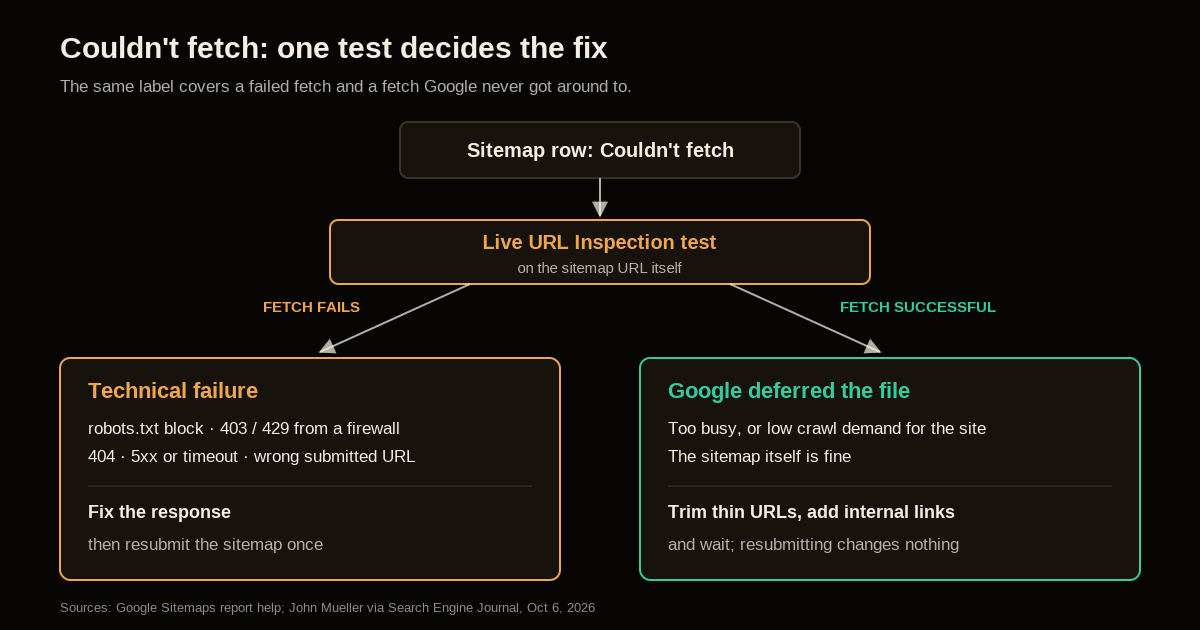
The second column is the same mechanism behind Discovered, currently not indexed: Google knows about the URLs and hasn’t decided they’re worth the fetch yet.
How to Fix Sitemap Couldn’t Fetch in 7 Steps
Check the URL you submitted, character by character. Open Indexing → Sitemaps and read the submitted URL. A trailing slash, a
wwwon a non-wwwproperty,httpinstead ofhttps, or a stray space can point Google at a URL that isn’t your sitemap. If it’s wrong, delete the row and submit the exact final URL.Run a live URL Inspection test on the sitemap URL. Paste it into the inspection bar and click Test live URL. Google’s help says to “expand the Page availability section to see why Google isn’t able to fetch the sitemap.” You want Crawl allowed? = Yes and Page fetch = Successful. This one test decides which branch you’re on.
If the test fails, reproduce it from outside. Run
curl -sI -A "Googlebot" https://example.com/sitemap.xmland read the status line. A 403 from a CDN that passes your browser but blocks bots is common enough to have its own fix for Cloudflare. A 5xx belongs in the server error guide.Run the checker script below. It fetches the sitemap the way Googlebot does and flags every cause in the next section: robots.txt, status, redirects, HTML bodies, size, URL count, off-host URLs, bad dates and nested indexes.
Fix what it finds, then resubmit once. Click Submit on the corrected URL. Google says “the sitemap should be fetched immediately,” though crawling the listed URLs “can take some time.”
If the live test passes, stop editing the sitemap. The file works. Mueller’s quotes above put the cause in crawl demand, so spend the effort there: remove thin or duplicate URLs from the sitemap, and make sure every listed page has real internal links pointing at it. The orphan-page audit finds the ones that don’t.
Recheck in a week, not an hour. Watch the Last read column. A date there means Google got the file. If the status stays Couldn’t fetch for weeks while the live test passes, check the Page indexing report instead: pages getting crawled through links matters more than the sitemap row.
Which Technical Problems Cause Couldn’t Fetch?
When the live test fails, it’s almost always one of these. The first four stop the fetch. The rest let the fetch through but leave Google with a file it can’t use, which usually shows up as Has errors instead:
| Cause | What Googlebot gets | How to spot it | Fix |
|---|---|---|---|
| Blocked by robots.txt | Nothing; it doesn’t ask | Disallow rule covering the sitemap path | Remove the rule (robots.txt pitfalls) |
| Firewall or bot protection | 403, 429 or a challenge page | curl -A Googlebot differs from your browser | Allow verified Googlebot |
| Wrong URL or deleted file | 404 | Status line of the fetch | Submit the real URL; regenerate the file |
| Server errors or timeouts | 5xx or no response | Slow or failing origin | Serve it static or cached |
| SPA fallback | 200 with an HTML page | Body starts with <!doctype html> | Generate the XML file at build time |
| Too large | Truncated or rejected file | Over 50MB or 50,000 URLs | Split it and use a sitemap index |
| URLs on another host | “URL not allowed” | <loc> host differs from the sitemap’s | Match host and protocol exactly |
| Index inside an index | Nested index ignored | <sitemapindex> listing a <sitemapindex> | Flatten to one index of sitemaps |
The size limit comes from Google’s sitemap documentation: “All formats limit a single sitemap to 50MB (uncompressed) or 50,000 URLs.” The nesting rule is from the Sitemaps report help: “A sitemap index file can’t list other sitemap index files, only sitemap files.”
The SPA fallback deserves a second look. Static hosts and single-page app setups often answer every unknown path with a 200 copy of index.html. If your sitemap generator didn’t run, /sitemap.xml still returns 200, your browser shows a page, and Google gets HTML where it expected XML. A 200 status doesn’t prove you have a sitemap.
A Free Script That Fetches Your Sitemap Like Googlebot
It’s dependency-free Node 20+. Point it at a sitemap or a sitemap index; it follows the index into each child and exits non-zero if anything fails, so it works in CI too:
// check-sitemap.mjs: fetch a sitemap the way Googlebot would and report
// every reason Search Console could say "Couldn't fetch" or "Has errors".
// Usage: node check-sitemap.mjs https://example.com/sitemap.xml
const UA = 'Mozilla/5.0 (compatible; Googlebot/2.1; +http://www.google.com/bot.html)';
const MAX_BYTES = 50 * 1024 * 1024; // 50MB uncompressed
const MAX_URLS = 50_000;
const W3C_DATE = /^d{4}-d{2}-d{2}(Td{2}:d{2}(:d{2}(.d+)?)?(Z|[+-]d{2}:d{2}))?$/;

async function robotsAllows(url) {
  const u = new URL(url);
  const res = await fetch(`${u.origin}/robots.txt`, { headers: { 'user-agent': UA } });
  if (!res.ok) return true; // a 4xx robots.txt means "no rules"
  // Google obeys only the most specific matching group: Googlebot's, else *.
  const groups = []; let cur = null;
  for (const raw of (await res.text()).split('\n')) {
    const line = raw.split('#')[0].trim();
    const i = line.indexOf(':'); if (i < 0) continue;
    const key = line.slice(0, i).trim().toLowerCase(), val = line.slice(i + 1).trim();
    if (key === 'user-agent') {
      if (!cur || cur.rules.length) groups.push((cur = { agents: [], rules: [] }));
      cur.agents.push(val.toLowerCase());
    } else if (cur && (key === 'allow' || key === 'disallow')) {
      if (val) cur.rules.push({ allow: key === 'allow', path: val });
    }
  }
  const pick = (a) => groups.filter((g) => g.agents.includes(a)).flatMap((g) => g.rules);
  const rules = groups.some((g) => g.agents.includes('googlebot')) ? pick('googlebot') : pick('*');
  const match = rules.filter((r) => u.pathname.startsWith(r.path.replace(/*$/, '')))
    .sort((a, b) => b.path.length - a.path.length)[0];
  return !match || match.allow;
}

async function check(url, depth = 0) {
  const pad = '  '.repeat(depth), problems = [];
  if (!(await robotsAllows(url))) problems.push('Blocked by robots.txt');
  const t0 = performance.now();
  const res = await fetch(url, { headers: { 'user-agent': UA }, redirect: 'manual' });
  const ms = Math.round(performance.now() - t0);
  if (res.status >= 300 && res.status < 400) problems.push(`Redirects (${res.status}) to ${res.headers.get('location')}; submit the final URL`);
  else if (res.status !== 200) problems.push(`HTTP ${res.status} (Search Console: General HTTP error)`);
  const type = res.headers.get('content-type') || '';
  const body = res.status === 200 ? await res.text() : '';
  const bytes = new TextEncoder().encode(body).length;
  if (body && /^s*<!doctype html|<html[s>]/i.test(body)) problems.push('Body is HTML, not XML (SPA fallback or error page)');
  else if (body && !/<(urlset|sitemapindex)[s>]/.test(body)) problems.push('No <urlset> or <sitemapindex> root (Unsupported format)');
  if (type && !/xml|text/plain/i.test(type)) problems.push(`Content-Type is ${type}`);
  if (bytes > MAX_BYTES) problems.push(`${bytes} bytes > 50MB (Sitemap too large)`);
  const isIndex = /<sitemapindex[s>]/.test(body);
  const locs = [...body.matchAll(/<loc>s*([^<]+?)s*</loc>/g)].map((m) => m[1]);
  const pageLocs = isIndex ? locs : [...body.matchAll(/<url>s*<loc>s*([^<]+?)s*</loc>/g)].map((m) => m[1]);
  if (pageLocs.length > MAX_URLS) problems.push(`${pageLocs.length} entries > 50,000`);
  if (body && pageLocs.length === 0) problems.push('Empty sitemap');
  const origin = new URL(url).origin;
  const offHost = pageLocs.filter((l) => !l.startsWith(origin));
  if (offHost.length) problems.push(`${offHost.length} URLs outside ${origin} (URL not allowed), e.g. ${offHost[0]}`);
  const badDates = [...body.matchAll(/<lastmod>s*([^<]+?)s*</lastmod>/g)].map((m) => m[1]).filter((d) => !W3C_DATE.test(d));
  if (badDates.length) problems.push(`${badDates.length} invalid <lastmod> (Invalid date), e.g. ${badDates[0]}`);
  console.log(`${pad}${problems.length ? '✗' : '✓'} ${url}  ${res.status} · ${type || 'no type'} · ${(bytes / 1024).toFixed(1)}KB · ${pageLocs.length} ${isIndex ? 'sitemaps' : 'URLs'} · ${ms}ms`);
  for (const p of problems) console.log(`${pad}    - ${p}`);
  let failed = problems.length > 0;
  if (isIndex) {
    for (const child of pageLocs) {
      const r = await check(child, depth + 1);
      if (r.nestedIndex) { console.log(`${pad}    - ${child} is itself an index (an index can't list an index)`); failed = true; }
      failed ||= r.failed;
    }
  }
  return { failed, nestedIndex: isIndex && depth > 0 };
}

const target = process.argv[2];
if (!target) { console.error('usage: node check-sitemap.mjs <sitemap-url>'); process.exit(2); }
const { failed } = await check(target);
process.exit(failed ? 1 : 0);
It’s deliberately simple. The robots.txt matcher handles prefix rules and a trailing *, not every wildcard pattern, and it uses regexes instead of a full XML parser, so treat a pass as “nothing obvious is wrong,” not as Google’s verdict. The live URL Inspection test stays the final word.
What Did the Checker Find on This Site?
I tested it on November 18, 2026 in two passes.
Planted failures. Against a local server, I served five broken sitemaps: one under a path that robots.txt disallows, one that was an HTML page, one with a URL on another domain and a lastmod of 18/11/2026, an index that listed another index, and a URL that didn’t exist. The checker flagged all five, with the Search Console error name next to each.
This site’s live sitemaps. Pointed at umesh-malik.com’s sitemap-index.xml, it followed the index into both children:
sitemap-index.xml: 200,application/xml, 0.3KB, 2 sitemapssitemap.xml: 200,application/xml, 84.7KB, 478 URLsblog-sitemap.xml: 200,application/xml, 274.6KB, 174 URLs- Every file answered in under 140 ms from a Cloudflare cache, and robots.txt explicitly allows Googlebot.
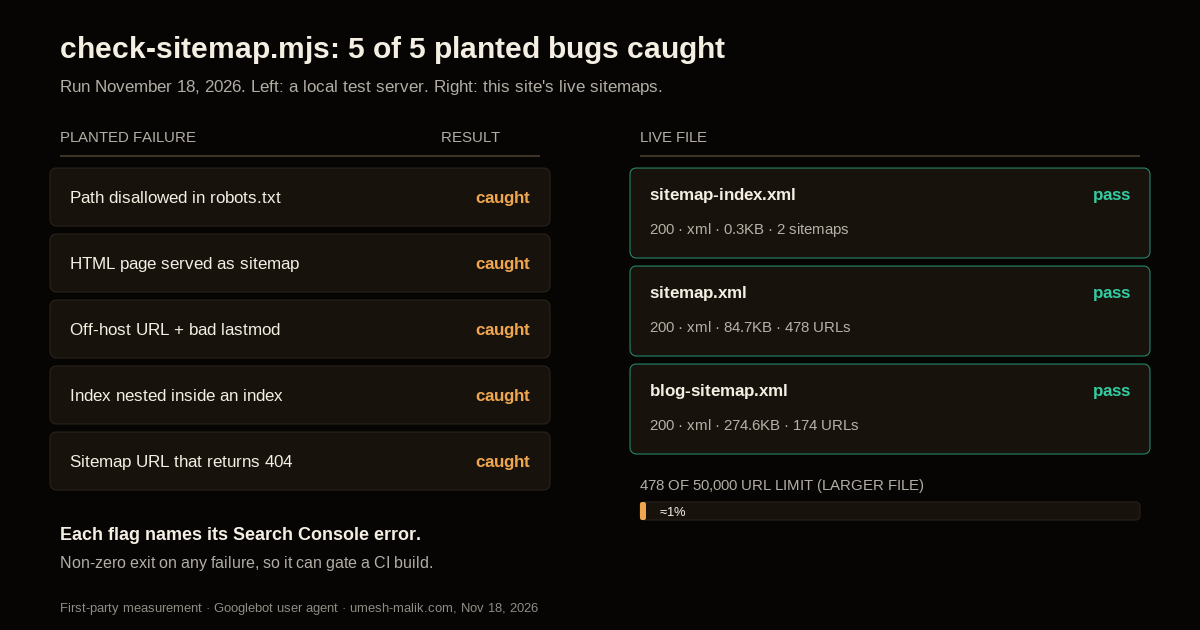
That leaves a lot of headroom: the bigger file uses about 1% of the URL limit and about 0.5% of the size limit. Two choices keep it clean, and both are copyable. The sitemaps are generated at build time as real files, so there’s no runtime code path that can return HTML instead. And unknown paths return a real 404, so a mistyped sitemap URL fails loudly instead of quietly serving a page. Keeping the lastmod values honest is a separate job, covered in fixing sitemap lastmod dates.
When Is Couldn’t Fetch Safe to Ignore?
When the live test passes and your pages are getting indexed anyway. A sitemap is a discovery hint, not an indexing switch. Google finds most pages on a well-linked site through links, so a Couldn’t fetch row on a reachable file mostly costs you speed of discovery for new or deep pages.
It’s worth acting on in three cases:
- The live test fails. That’s a real bug, and it may be blocking more than the sitemap. A firewall that 403s the sitemap often 403s pages too.
- New pages aren’t getting found. If fresh URLs sit unknown in URL Inspection, the sitemap was doing work that internal links weren’t. Fix the links.
- It’s been weeks with a passing test. Mueller’s quality comment applies. Trim the sitemap to pages you’d actually want ranked, since a file full of thin tag or filter pages is a weak demand signal.
What not to do: resubmit the same unchanged URL every day, add a second copy of the sitemap under a new name, or press Request Indexing on the sitemap URL. None of those changes what Google thinks the file is worth. The 404 guide covers the matching case where the sitemap lists pages that are gone, and the AI search hub collects the rest of this technical SEO series.
FAQ
What does Couldn’t fetch mean for a sitemap in Search Console?
Google’s Sitemaps report help defines it as: the sitemap could not be fetched for some reason. It covers two different situations. Either Googlebot tried and got something other than a usable 200 response, or Google has not spent time on the file yet. A live URL Inspection test on the sitemap URL tells you which one you have.
Why does my valid sitemap still say Couldn’t fetch?
Google’s John Mueller said in October 2026 that Google reports a sitemap as Couldn’t fetch when it has not had time to fetch it, for example because its systems are busy or crawl demand for the site is low. He added that crawl demand is very often based on the perceived quality of a website. In that case the file is fine and the fix is to make the site worth crawling.
Should I keep resubmitting a sitemap that says Couldn’t fetch?
Resubmit once, after you have fixed something. Google says it continues to recrawl submitted sitemaps at its own pace and retries a failing one for a few days. Clicking Submit again on an unchanged, reachable sitemap does not change crawl demand, so it does not change the outcome.
How do I test whether Googlebot can fetch my sitemap?
Paste the sitemap URL into the URL Inspection tool in Search Console and run a live test. Google’s help says to expand the Page availability section to see why Google could not fetch it. You want Crawl allowed to say Yes and Page fetch to say Successful.
What is the size limit for an XML sitemap?
Google’s documentation limits a single sitemap to 50MB uncompressed or 50,000 URLs, whichever comes first. Above that, split the file and list the parts in a sitemap index. A sitemap index can list up to 50,000 sitemaps but cannot list another sitemap index.
Does Couldn’t fetch stop my pages from being indexed?
Not on its own. A sitemap is a discovery hint, and Google can still find and index pages through internal links. It matters most for new or deep pages that nothing links to, which is why fixing internal links is part of the fix whenever the sitemap itself is reachable.
Sources
- Google Search Console Help, Manage your sitemaps using the Sitemaps report
- Google Search Central, Build and submit a sitemap
- Search Engine Journal, Google Explains The “Couldn’t Fetch” Sitemap Errors (Roger Montti, October 6, 2026), quoting John Mueller and Martin Splitt of Google
- Google Search Console Help, Page indexing report
- First-party measurement:
check-sitemap.mjsrun on November 18, 2026 against a local Python test server with five planted failures (robots.txt block, HTML body, off-host URL plus invalid date, nested index, 404; all caught), and against umesh-malik.com’ssitemap-index.xml,sitemap.xmlandblog-sitemap.xml(3 files, 652 URLs, 359KB, all passing)
Frequently asked questions
Google Search · Preferred sources
Prefer this site on Google
If you already read this writing, add umesh-malik.com as a Preferred Source. Google can then highlight it with a preferred badge in Top Stories, AI Overviews, and AI Mode — for you, not as a site-wide ranking boost.
Related Articles

Web Engineering
Fix Blocked by robots.txt: 3 of 4 Checkers Miss What Google Blocks
Fix Blocked by robots.txt by finding the exact line Google matched. In 20 tests, 3 of 4 popular parsers missed blocks Google enforces. Here are the cases.

Web Engineering
Fix Offers, Review, or aggregateRating Error: 5 Hidden Causes
The offers, review, or aggregateRating error means a Product node has none of the three. 9 test variants passed the schema.org validator; 5 still failed.

Web Engineering
Fix Unparsable Structured Data: 16 Ways It Breaks, 1 Fix
Unparsable structured data means Google hit a JSON syntax error and dropped the block. I broke JSON-LD 16 ways; one serializer change fixed every one.
Keep reading
Get new posts on AI, Claude Code & LLMs
New deep-dives on AI engineering, Claude Code, and developer tooling — follow along however you prefer.
About the Author

Software engineer writing about AI, Claude Code, LLMs, OpenAI, Anthropic, and developer tooling. 5+ years building production systems at Expedia Group, Tekion, and BYJU'S.