Fix Discovered Currently Not Indexed: Why 0 of 575 URLs Got Stuck
Fix Discovered currently not indexed by raising crawl demand, not just server speed. My audit: 0 of 575 URLs stuck, but 66.6% of my sitemap was thin tag pages.

TL;DR — To fix Discovered currently not indexed, make Google want the URL and make sure your server can take the fetch: fast 200s with no 5xx or 429, a sitemap that lists only pages worth indexing, and real internal links into every one of them. Speed is the half everyone checks, and demand is the half that usually breaks. On this site, all 124 probed URLs answered 200 in at most 310 ms and none of 575 inspected URLs were stuck in Discovered, but 66.6% of the sitemap was thin tag pages, the exact inventory that drags crawl demand down.
Discovered, currently not indexed is the Search Console status for a URL Google has found but has not fetched. No crawl has happened, so there is nothing on the page for Google to judge yet. The decision being made is about scheduling, not quality.
What Does Discovered, Currently Not Indexed Mean?
Google’s Page indexing report documentation defines it as: “The page was found by Google, but not crawled yet. Typically, Google wanted to crawl the URL but this was expected to overload the site; therefore Google rescheduled the crawl.” That’s also why the Last crawl column is empty for these rows.
It’s easy to mix up with its neighbour. Here is how the three “not indexed yet” states differ:
| Search Console status | Has Google fetched it? | Where it stalled | Usual cause | First fix |
|---|---|---|---|---|
| URL is unknown to Google | No | Discovery | No sitemap entry, no links | Add it to the sitemap and link to it |
| Discovered, currently not indexed | No | Crawl scheduling | Slow or erroring server, or low crawl demand | Fix server capacity, prune inventory, add links |
| Crawled, currently not indexed | Yes | Indexing | Thin, duplicate or low-value page | Improve or merge the page |
The last row has its own playbook in Crawled, currently not indexed. This post is about the middle one, where the page never got a turn.
Why Does Google Find a URL but Not Crawl It?
Because every crawl is a trade between two limits, and Google’s crawl budget guide names both.
Crawl capacity limit is how hard Google can hit your server. In Google’s words it “limits the total amount of time your server spends holding connections open for Google.” It goes down when “the site slows down (latency increases or response times become longer)”, and when Google sees “server errors (5xx HTTP status codes)” or “rate-limiting signals (such as HTTP 429).”
Crawl demand is how much Google wants your URLs at all. The guide lists three inputs:
- Perceived inventory: “Without guidance from you, Google tries to crawl all or most of the URLs that it knows about on your site.”
- Popularity: “URLs that are more popular on the Internet tend to be crawled more often.”
- Staleness: Google recrawls often enough “to pick up any changes.”
A URL lands in Discovered when its turn comes up and one of those limits says no. The report’s wording blames overload, and on a struggling origin that’s the real story. On a fast, CDN-cached site it almost never is. There, the usual cause is demand: you handed Google hundreds of URLs that look like pages it has already learned aren’t worth much, so new URLs that match the pattern wait.
The guide even names this status as its warning sign. It’s meant for sites with “a large portion of their total URLs classified by Search Console as Discovered - currently not indexed.”
What Did a Crawl Audit of 575 URLs Show?
I audited this site on November 16, 2026, on three layers: Search Console data, the live server and the build output.
Search Console. The daily URL Inspection report this repo commits covers 575 URLs. None are in Discovered, currently not indexed. 501 are indexed, 19 are Crawled, currently not indexed, and 34 are excluded: 33 tag pages Google last saw with a noindex, plus one redirect.
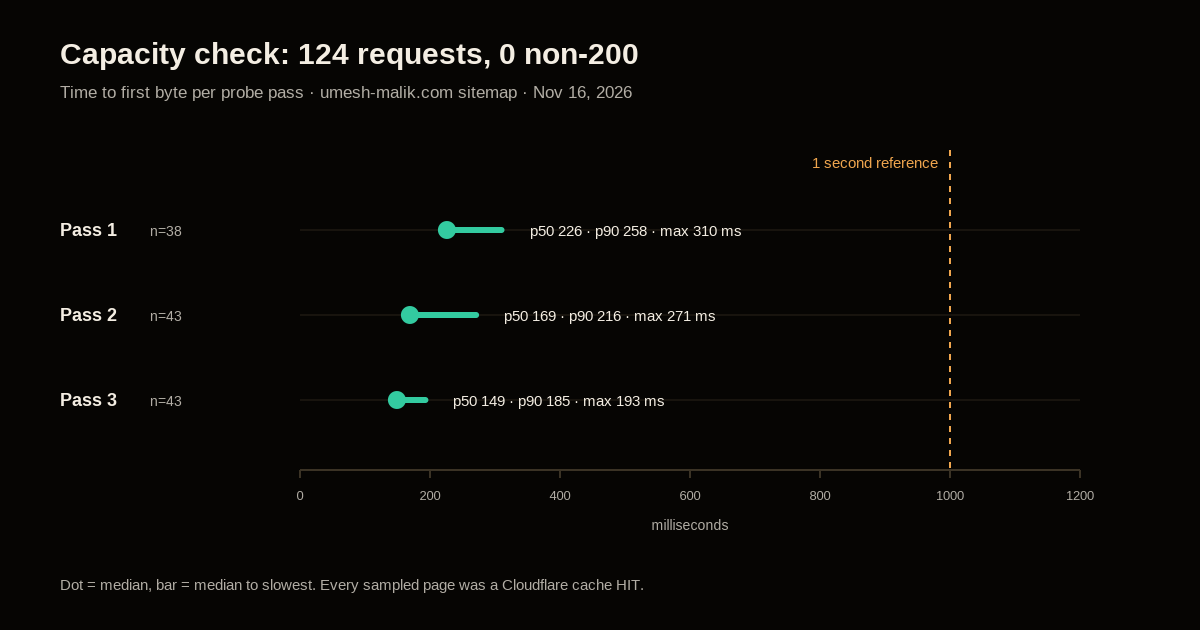
Capacity. I ran the probe below three times against the live sitemap: 124 requests, one at a time, from a cloud container behind a proxy. Every one returned 200, the median time to first byte stayed between 149 and 226 ms per pass, and the slowest response was 310 ms. Every sampled page was a Cloudflare cache HIT. Google has no reason to throttle a server that looks like that.
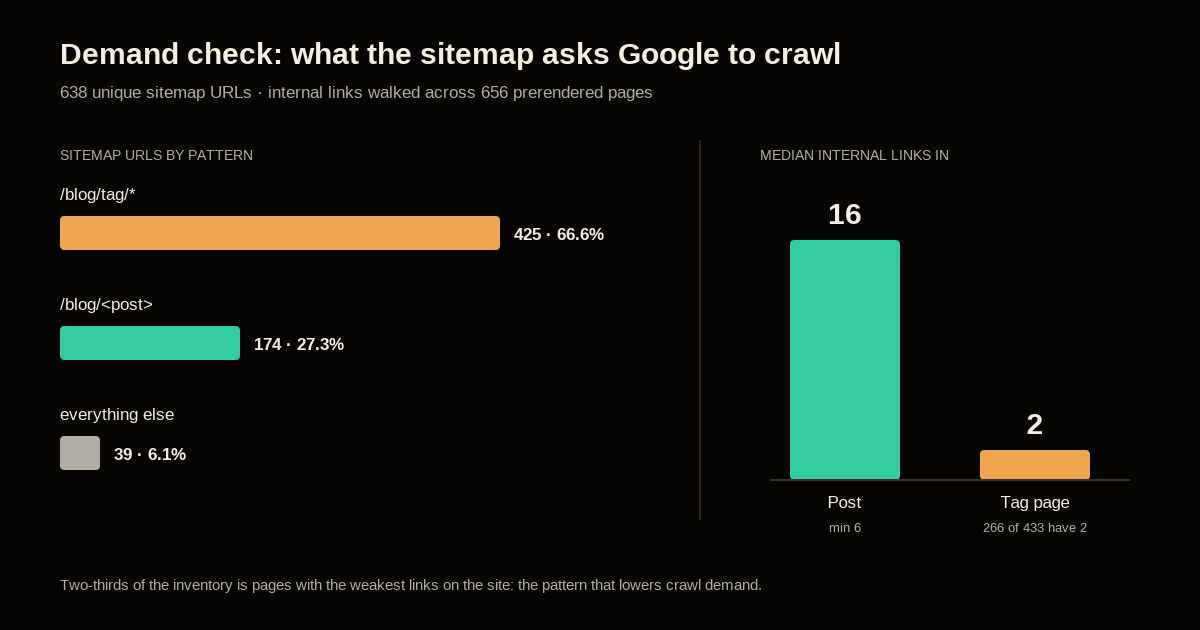
Demand. This is where the risk lives. The live sitemaps list 638 unique URLs, and 425 of them (66.6%) are /blog/tag/* pages. Posts are 174 URLs, 27.3%. In the build, I walked every internal <a href> across 656 prerendered pages:
| URL pattern | Pages | Click depth from home | Internal links in (median) | Pages with only 2 links in |
|---|---|---|---|---|
/blog/<post> | 182 | 1-2 | 16 (min 6) | 0 |
/blog/tag/<tag> | 433 | 2 | 2 | 266 (61%) |
Every page is two clicks from the homepage, so depth isn’t the problem. Link weight is. A typical post has 16 internal links pointing at it. A typical tag page has two: the tags index and the single post that uses the tag. The four tag pages in the Crawled, currently not indexed bucket have between 2 and 5 links in each, against a post median of 16.
That’s the mechanism behind most Discovered backlogs on small sites. Google crawls a sample of a URL pattern, finds near-empty pages, and lowers its appetite for the whole pattern. When you publish the 434th tag page, it inherits that low priority on day one. This site hasn’t tipped over yet because posts carry strong links and the server is fast. A slower origin with the same inventory would.
How to Fix Discovered Currently Not Indexed in 6 Steps
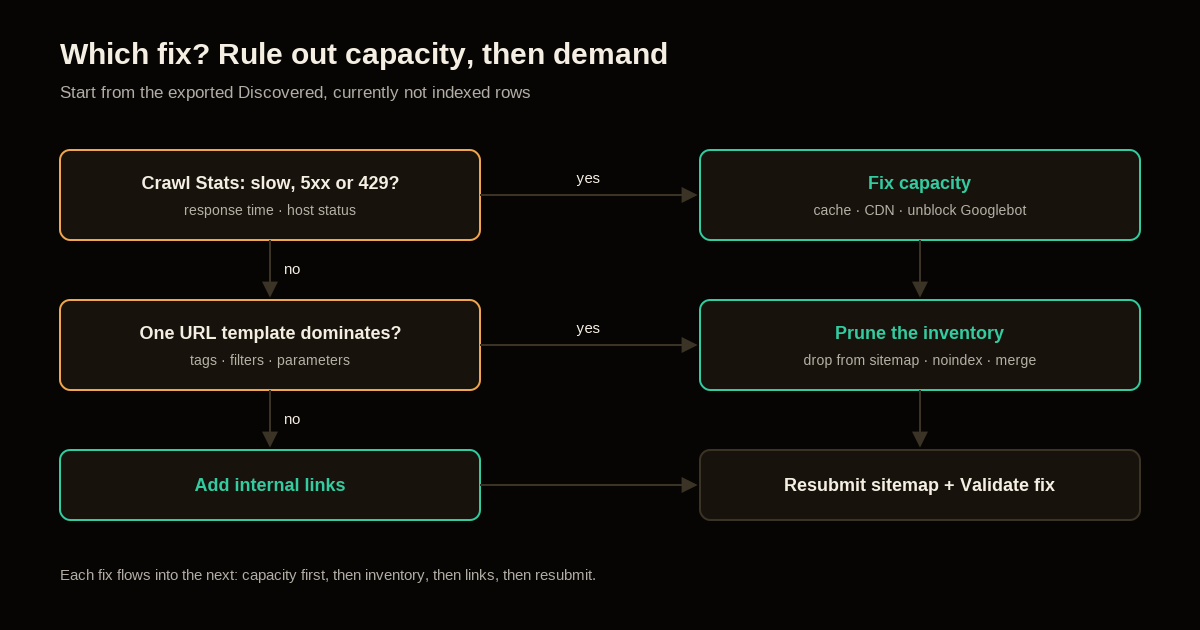
Export the rows and look for a pattern. In Search Console, open Indexing → Pages → Discovered, currently not indexed and export it. Group the URLs by path pattern. One template (tags, filters, parameters, pagination) taking most of the rows is the common case, and it tells you this is a demand problem.
Check capacity in Crawl Stats. Open Settings → Crawl stats. Look at average response time, the share of 5xx and 429 responses, and the Host status panel. Rising response times or server errors mean Google is backing off. Fix the origin, add caching, or move static HTML behind a CDN. If your firewall or bot rules are challenging Googlebot, that counts as an error too; stop Cloudflare blocking Googlebot first.
Cut the inventory you hand Google. Remove from the sitemap every URL you don’t want indexed. Then decide what each thin template is for. Tag pages with one post can be
noindex(see Excluded by noindex tag for doing that without confusing Google), merged into a category, or not generated at all. Block infinite spaces, like faceted filters and calendar pages, inrobots.txt.Link to the pages you do want. A sitemap entry is a weak hint. A crawlable link from a page Google already values is a strong one: Google uses links “to find new pages to crawl” and can only follow an
<a>element with anhref. Run an orphan-page audit and link each stuck URL from a relevant, indexed page.Make recrawls cheap. Send accurate
lastmoddates so Google doesn’t refetch unchanged URLs, and answer conditional requests with 304 so the fetches it does make cost almost nothing.Resubmit and validate. Resubmit the sitemap, use Request Indexing on the few URLs that matter most, and click Validate fix. Google says validation “typically takes up to about two weeks.”
Here’s the probe. Point it at a sitemap or sitemap index. It prints the URL patterns that dominate your inventory, then times a sample of URLs one request at a time:
// crawl-probe.mjs — usage: node crawl-probe.mjs https://example.com/sitemap.xml [sample=40]
// Answers the two questions behind "Discovered - currently not indexed":
// 1. Capacity: do sampled URLs answer 200, fast, without 5xx/429?
// 2. Demand: which URL patterns dominate the inventory you hand Google?
const [entry, sample = 40] = process.argv.slice(2);
const locsOf = async (u) =>
  [...(await (await fetch(u)).text()).matchAll(/<loc>([^<]+)</loc>/g)].map((m) => m[1]);

let urls = await locsOf(entry);
if (urls.every((u) => u.endsWith('.xml'))) urls = (await Promise.all(urls.map(locsOf))).flat();
urls = [...new Set(urls)];

// Demand: share of the inventory per URL pattern (/blog/tag/x -> /blog/tag/*).
const patterns = {};
for (const u of urls) {
  const parts = new URL(u).pathname.replace(//$/, '').split('/');
  const key = parts.slice(0, -1).join('/') + '/*';
  patterns[key] = (patterns[key] ?? 0) + 1;
}
console.log(`inventory: ${urls.length} unique URLs`);
for (const [p, n] of Object.entries(patterns).sort((a, b) => b[1] - a[1]).slice(0, 5))
  console.log(`  ${p.padEnd(24)} ${n} (${((100 * n) / urls.length).toFixed(1)}%)`);

// Capacity: time to first byte for an evenly spaced sample, one request at a time.
const step = Math.max(1, Math.floor(urls.length / sample));
const rows = [];
for (const u of urls.filter((_, i) => i % step === 0)) {
  const t0 = performance.now();
  const res = await fetch(u, { redirect: 'manual' }).catch(() => null);
  rows.push({ u, status: res?.status ?? 'error', ms: performance.now() - t0 });
  await res?.body?.cancel();
}
const ms = rows.map((r) => r.ms).sort((a, b) => a - b);
const pct = (p) => Math.round(ms[Math.min(ms.length - 1, Math.floor(ms.length * p))]);
const bad = rows.filter((r) => r.status !== 200);
console.log(`capacity: n=${rows.length} p50=${pct(0.5)}ms p90=${pct(0.9)}ms max=${pct(1)}ms`);
console.log(`non-200: ${bad.length}`, bad.slice(0, 10).map((r) => `${r.status} ${r.u}`));
On this site it prints /blog/tag/* 425 (66.6%) at the top and non-200: 0. A healthy result is the reverse of what you’d expect to worry about: your real content leads the inventory, and the non-200 count is zero. If a template you don’t care about tops the list, start at step 3. If you see 5xx, 429 or redirects, start at step 2. The probe runs from your machine, not Google’s, so use Crawl Stats as the source of truth for what Googlebot actually experienced.
When Should You Leave Discovered URLs Alone?
When they’re URLs you never wanted indexed. A queue full of filter combinations, session parameters or one-post tag pages is Google making the right call slowly. Don’t push those URLs with Request Indexing. Remove them from the sitemap, stop linking to them, and let the count shrink.
Also leave a fresh URL alone for a few days. A post published this morning can sit in Discovered until its first crawl, and that’s normal scheduling, not a backlog. Google’s sitemap documentation is blunt that a sitemap “doesn’t guarantee that all the items in your sitemap will be crawled and indexed.”
What Breaks if You Only Speed Up the Server?
Speed raises the capacity ceiling, but it does nothing for demand. Three things stay broken:
- The thin template still sets the pattern’s priority. Google keeps sampling the tag or filter pages, keeps finding nothing, and keeps scheduling new URLs of that type late.
- Orphans stay orphans. A URL with no internal links has only the sitemap’s weak hint behind it, however fast it would load.
- The crawl you do get is spent badly. A fast server serving 425 tag pages still serves 425 tag pages before it serves your next post.
Fix capacity, prune the inventory and add links in the same pass. Most Discovered backlogs drain within a few crawl cycles once demand is fixed. The same demand problem can make Search Console show a working sitemap as unread; fixing Sitemap couldn’t fetch shows how to tell. The rest of this technical SEO series, from canonicals to soft 404s, lives in the AI search hub.
FAQ
What does Discovered, currently not indexed mean?
It means Google knows the URL exists, usually from a sitemap or a link, but has not fetched it yet. Google’s own documentation says the crawl was typically rescheduled because fetching it was expected to overload the site. The report shows no last crawl date for these URLs because there has been no crawl.
Is Discovered, currently not indexed worse than Crawled, currently not indexed?
They fail at different stages. Discovered means Google has not spent a fetch on the URL yet, so the problem is crawl scheduling. Crawled means Google fetched the page and decided not to index it, so the problem is the page itself. Fix capacity and demand for the first, content quality and duplication for the second.
Does Request Indexing fix Discovered, currently not indexed?
It can move a handful of important URLs up the queue, but it does not scale and it does not fix the cause. If hundreds of URLs sit in this status, Google is telling you the site’s crawl demand or server capacity is the bottleneck. Fix that, and the queue drains on its own.
Do small sites need to worry about crawl budget?
Usually not. Google’s crawl budget guide is written for sites with roughly 10,000 or more frequently changing pages, or a million or more pages. A small site with many Discovered URLs almost always has a demand problem, such as thin generated pages or weak internal links, rather than a real budget limit.
How long does it take for Discovered URLs to get crawled after a fix?
Expect days to a few weeks. Google raises crawl rate gradually after it sees faster, error-free responses, and it recrawls URLs as their demand rises. Resubmit the sitemap after the fix and use Validate fix in Search Console, which Google says typically takes up to about two weeks.
Sources
- Google Search Central, Page indexing report — status definitions and validation timing.
- Google Search Central, Large site owner’s guide to managing your crawl budget — crawl capacity limit and crawl demand.
- Google Search Central, Make your links crawlable — how links drive discovery.
- Google Search Central, What is a sitemap — what a sitemap does and doesn’t guarantee.
- First-party measurements on umesh-malik.com, November 16, 2026: the repo’s URL Inspection report (575 URLs), three live probe passes (124 requests), and an internal-link walk over 656 prerendered pages.
Frequently asked questions
Google Search · Preferred sources
Prefer this site on Google
If you already read this writing, add umesh-malik.com as a Preferred Source. Google can then highlight it with a preferred badge in Top Stories, AI Overviews, and AI Mode — for you, not as a site-wide ranking boost.
Related Articles

Web Engineering
How to Fix Excluded by noindex Tag: 33 Pages Google Never Rechecked
Fix Excluded by noindex tag: remove the tag, then make Google recrawl. 33 of my pages kept the label 99+ days later; 16 had a sitemap saying nothing changed.

Web Engineering
Fix Offers, Review, or aggregateRating Error: 5 Hidden Causes
The offers, review, or aggregateRating error means a Product node has none of the three. 9 test variants passed the schema.org validator; 5 still failed.

Web Engineering
Fix Unparsable Structured Data: 16 Ways It Breaks, 1 Fix
Unparsable structured data means Google hit a JSON syntax error and dropped the block. I broke JSON-LD 16 ways; one serializer change fixed every one.
Keep reading
Get new posts on AI, Claude Code & LLMs
New deep-dives on AI engineering, Claude Code, and developer tooling — follow along however you prefer.
About the Author

Software engineer writing about AI, Claude Code, LLMs, OpenAI, Anthropic, and developer tooling. 5+ years building production systems at Expedia Group, Tekion, and BYJU'S.