Turnstile backend validation: what Cloudflare Spin actually fixes
Turnstile backend validation is the step most setups skip. The widget still renders while bots slip through unchecked. Here is how Spin fixes it, step by step.

TL;DR Turnstile backend validation is the server-side call to Cloudflare’s Siteverify API that most Turnstile setups quietly skip — the widget renders and looks solved either way, so a missing backend check produces no visible symptom until bots start getting through. Cloudflare’s fix is Turnstile Spin, an AI agent that scans your frontend and backend, finds the gap, proposes the missing code, and waits for you to approve it before touching anything. This post covers what the gap actually looks like, how Spin finds it, and how to check your own setup by hand in five minutes.
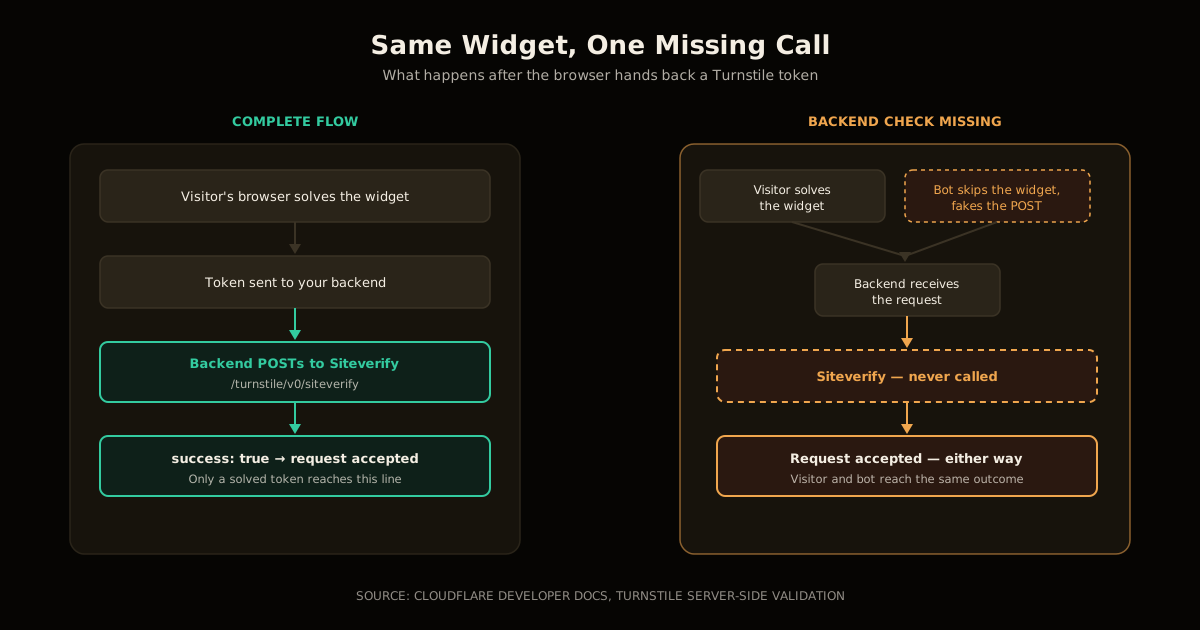
Cloudflare Turnstile ships as a two-step contract: the browser runs a challenge and hands your backend a token, and your backend is supposed to send that token to Cloudflare’s Siteverify endpoint before trusting the request. Plenty of setups do step one and never write step two — and because the widget still renders and still returns a token either way, nothing in the UI tells you the second half never happened.
What is Turnstile backend validation, and why do widgets work without it?
Turnstile backend validation is the server-side half of the Turnstile contract: your backend takes the cf-turnstile-response token the widget produced and sends it, along with your secret key, in a POST to https://challenges.cloudflare.com/turnstile/v0/siteverify. Cloudflare responds with JSON — a success boolean, plus error-codes, challenge_ts, and hostname on the fields it can report — and your code is supposed to reject the request unless success is true.
The reason this specific gap survives so long in production is that skipping it produces no error. A frontend widget with no matching backend check still loads, still runs its challenge, still returns a token to your form-submit handler — and your form still submits successfully, because nothing downstream ever inspects what that token actually says. Cloudflare’s own framing is blunt: “misconfiguring Turnstile by skipping backend validation leaves sites exposed to bots.” A script that fabricates a POST request straight to your endpoint, skipping the widget entirely, sails through exactly the same door a real visitor uses.
How Turnstile Spin finds and fixes the missing check
Turnstile Spin is the agent Cloudflare built specifically to close this gap, reachable from three places: the Cloudflare dashboard, the Wrangler CLI, or directly, as a public skill an AI coding agent can invoke from a GitHub-hosted prompt without going through the dashboard at all.
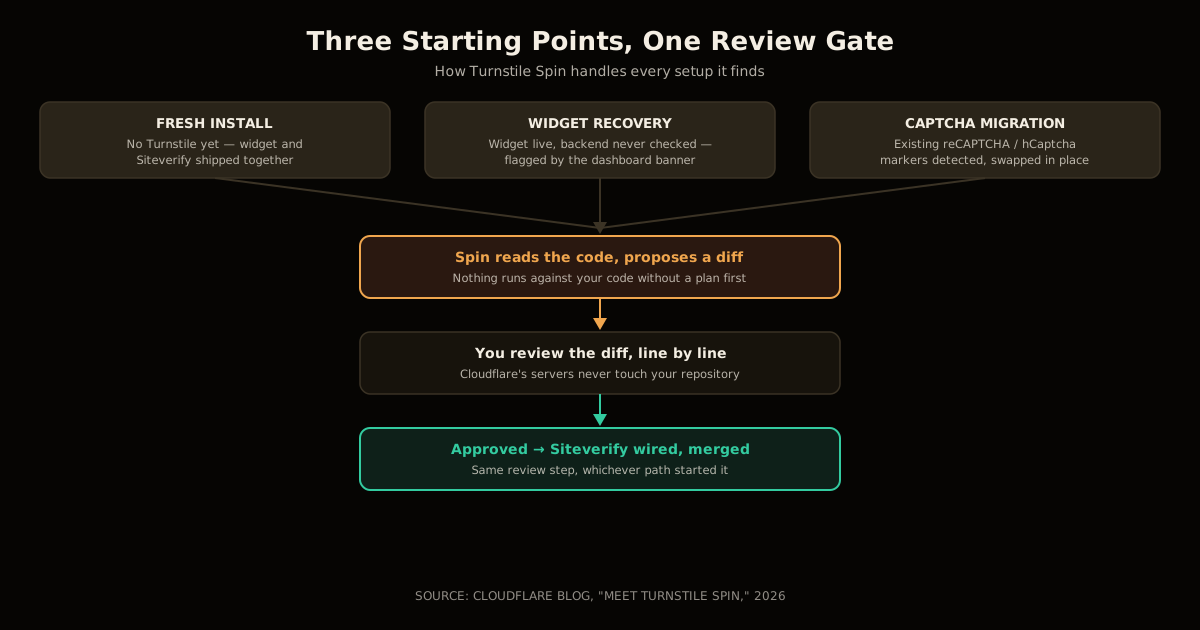
In every case the mechanism is the same — Spin reads your actual frontend and backend code, “finds the relevant frontend and backend code, proposes a plan, and waits for your approval” before changing anything. Cloudflare doesn’t receive or modify your code remotely; the agent runs against your repository and stops at a diff for you to accept.
Spin handles three distinct situations:
- Fresh install — no Turnstile integration exists yet. The agent wires the widget into the frontend and the Siteverify call into the backend together, so the two halves ship as one change instead of the widget landing first and the backend check landing “later.”
- Widget recovery — the frontend widget is already live, but Cloudflare’s own monitoring of Siteverify call volume shows the backend never checks it. Sites in this state get a “Fix with Spin” banner directly in the dashboard, and the agent adds only the missing backend half, leaving the working widget untouched.
- CAPTCHA migration — an existing CAPTCHA (reCAPTCHA, hCaptcha) is detected in the code, and Spin proposes swapping in Turnstile’s widget and Siteverify call in the same place, again pending your approval.
Cloudflare reports the pattern has real reach: 65,000+ widgets have been created through Spin since its July release, developers have copied Spin-generated setup prompts 30,000+ times, and roughly 23,000 accounts created a new widget in a recent week alone — against a platform that Cloudflare says processes on the order of 3 billion Turnstile verifications on a typical weekday. Widget-recovery detection is the part worth noting for anyone who already shipped Turnstile: Cloudflare is actively watching for exactly this gap on setups that already exist, not just steering new ones.
How to check whether your own Turnstile setup validates on the backend
You don’t need Spin to find out if you’re exposed — the check is five minutes with your own code and the dashboard:
Grep your backend for the Siteverify call. Search for
challenges.cloudflare.com/turnstile/v0/siteverifyin your server code. If it isn’t there at all, you have no backend validation, full stop.Confirm the call actually gates the request. Finding the URL isn’t enough — check that the handler branches on the response’s
successfield and rejects the request when it’sfalse. A Siteverify call whose result is logged but never checked is functionally identical to no call.Open the Turnstile tab in the Cloudflare dashboard. Cloudflare tracks Siteverify call volume per widget and surfaces a “Fix with Spin” banner directly on any widget it never sees validated server-side — this is Cloudflare telling you the gap exists without you having to read a line of your own code.
Test it adversarially. Submit your form with the Turnstile script blocked or removed in devtools. If the backend still accepts the submission, nothing is checking the token.
If the check is missing, run Spin from the dashboard banner,
wrangler, or the public agent skill, review the proposed diff line by line, and only then approve it.
Turnstile Spin vs a manual Siteverify integration
| Manual integration | Turnstile Spin | |
|---|---|---|
| Who writes the code | You, by hand, in two separate places | An agent, from a plan you approve |
| Detects an existing gap | Only if you go looking | Yes — dashboard banner on unverified widgets |
| Frontend + backend shipped together | Only if you remember to | Yes, as one proposed change |
| CAPTCHA migration | A separate rewrite | Same flow, existing markers auto-detected |
| Code leaves your repository | N/A | No — agent runs locally against your code |
| Requires your review before applying | N/A | Yes, always — plan first, then approval |
What breaks if you skip backend validation?
Every request reaches your protected endpoint, whether or not a human ever solved the challenge. A scripted client can skip the widget entirely and POST directly to your form-handling route with a fabricated or missing token, and a backend that never calls Siteverify has no way to tell that request apart from a real submission — because it isn’t checking anything that would distinguish them.
This is precisely the shape of gap that doesn’t show up in ordinary QA: the page loads, the widget solves, the form submits, and every manual test a developer runs passes cleanly, because a developer testing the page always goes through the widget. The failure only appears once someone stops using the widget on purpose.
It’s also why this is a caching-adjacent lesson, not just a Turnstile one: the same instinct that ships an AI agent’s CMS write access without wiring the cache invalidation it needs is the instinct that ships a bot-check widget without the server-side call that gives it teeth. The visible half works. The invisible half is where the guarantee actually lives.
Where this fits with agent-driven infrastructure changes
Turnstile Spin is one instance of a pattern showing up across Cloudflare’s own platform this year: an agent that proposes a scoped, reviewable change to security-relevant configuration instead of applying it unattended. It sits next to Cloudflare’s own move to resource-scoped Workers roles rather than account-wide grants, and the same discipline that keeps an agent from drowning its human reviewer in permission requests — a single, specific diff to approve, not a standing grant to hand over.
If you’re already thinking about gating access to a Worker before code runs or deploying an MCP server on Workers, the Spin pattern is worth copying even outside Turnstile: propose the smallest fix, show the diff, wait for a human to say yes. For the broader set of patterns like this, see the AI coding agents and developer experience hub.
FAQ
What is Turnstile backend validation? The server-side call to Cloudflare’s Siteverify API — a POST to https://challenges.cloudflare.com/turnstile/v0/siteverify with your secret key and the widget’s token — that your code must check before trusting a submission as human-verified.
Why does a Turnstile widget work fine even without backend validation? The widget only produces a token; it can’t know whether your server ever inspects it. A form with no backend check submits successfully every time, for a real visitor and a scripted bot alike.
What is Turnstile Spin? Cloudflare’s agent-mediated Turnstile setup tool, run from the dashboard, Wrangler, or a public agent skill. It reads your code, proposes the missing widget or Siteverify call, and waits for your approval before applying anything.
How do I check whether my own Turnstile setup validates on the backend? Search your backend for the Siteverify call and confirm it actually gates the request on the success field, or check the Turnstile tab in the dashboard for a “Fix with Spin” banner, which Cloudflare posts on widgets it never sees validated server-side.
Does Turnstile Spin replace an existing CAPTCHA outright? Yes, it can — Spin detects existing CAPTCHA markers and proposes swapping in Turnstile in the same place, still pending your approval before it applies anything.
Is Turnstile backend validation optional for low-traffic sites? No. A missing backend check passes every submission regardless of traffic volume; it only takes longer to get targeted, not longer to be exposed.
Sources
- Meet Turnstile Spin: your AI agent for setting up bot protection — Cloudflare Blog. The announcement: what Spin does, the three setup scenarios, and the usage numbers cited here.
- Server-side validation — Cloudflare Turnstile docs — the Siteverify endpoint, request parameters, and response fields.
- Turnstile overview — Cloudflare Developers — how the widget and challenge flow fit together end to end.
Frequently asked questions
Google Search · Preferred sources
Prefer this site on Google
If you already read this writing, add umesh-malik.com as a Preferred Source. Google can then highlight it with a preferred badge in Top Stories, AI Overviews, and AI Mode — for you, not as a site-wide ranking boost.
Related Articles

AI Coding Agents & DX
How to Decide When to Give an AI Agent Autonomy: 3:1 Test
How to decide when to give an AI agent autonomy: chip design keeps 3 to 5 spec engineers per builder before trusting it — the same ratio tests your task.

AI Coding Agents & DX
Build an AI Agent Knowledge Base: The Pattern That Cut Tokens 80%
How to build an AI agent knowledge base: the wiki-plus-recipes pattern that cut per-turn tokens 80% and turned days of expert review into minutes.

AI Coding Agents & DX
Self-Hosted AI Coding Agent: Sandboxed Prompt-to-Deploy for $25/mo
Build a self-hosted AI coding agent with sandboxed execution. One prompt produces a repo, tests, CI, and deployed app — $25/mo, no cloud bills.
Keep reading
Get new posts on AI, Claude Code & LLMs
New deep-dives on AI engineering, Claude Code, and developer tooling — follow along however you prefer.
About the Author

Software engineer writing about AI, Claude Code, LLMs, OpenAI, Anthropic, and developer tooling. 5+ years building production systems at Expedia Group, Tekion, and BYJU'S.